
WordPress Environment with ALB based on my custom Elastic Beanstalk Platform (eb_ubuntu_nginx_php_redis_platform)
This project is for my own custom Elastic Beanstalk platform eb_ubuntu_nginx_php_redis_platform
If you are new to Elastic Beanstalk, you can reference my course on Udemy.
Create the environment by using EB CLI
eb create -p **CUSTOM-PLATFORM-ARN** -c **subdomain_name** -ip **profile_name** --elb-type application -i **instance_type** -k **key_name** --service-role **servicerole** --vpc.id **vpc_id** --vpc.ec2subnets **subnet1,subnet2** --vpc.elbsubnets **subnet1,subnet2** --vpc.securitygroups securitygroup1,securitygroup2 --vpc.elbpublic --vpc.publicip
eb createoptions (Ref the detail official documentation)
| Name | Description |
|---|---|
| -p | You should be able to get your CUSTOM-PLATFORM-ARN after platform is created. Or you can use eb platform list command under your platform project folder to get CUSTOM-PLATFORM-ARN . |
| -c | (Optional)Subdoamin name. |
| -ip | (Optional)Based on your environment, please make sure you have proper instance role setup. |
| --elb-type | You must specify application in order to use ALB. |
| -i | (Optional)Instance type you need. |
| -k | (Optional)EC2 instance key pair. |
| --service-role | Default Elastic Beanstalk service role doesn't have ability to access ALB, you must specify your own service role properly. |
| --vpc.id | You have to specify a VPC ID in order to use ALB. |
| --vpc.ec2subnets | Specifies subnets for Amazon EC2 instances in a VPC. |
| --vpc.elbsubnets | Specifies subnets for the Elastic Load Balancing load balancer in a VPC. |
| --vpc.securitygroups | You need to set it properly if you want to connect to your DB outside this Elastic Beanstalk. |
| --vpc.elbpublic | (Optional)Check your VPC setting. |
| --vpc.publicip | (Optional)Check your VPC setting. |
There are some .ebextensions settings as below.
In this repo, I extend existing log streams and add nginx_logs, you can find in nginx_logs.config
Be sure to have proper CloudWatch Log IAM permission in your instance role.
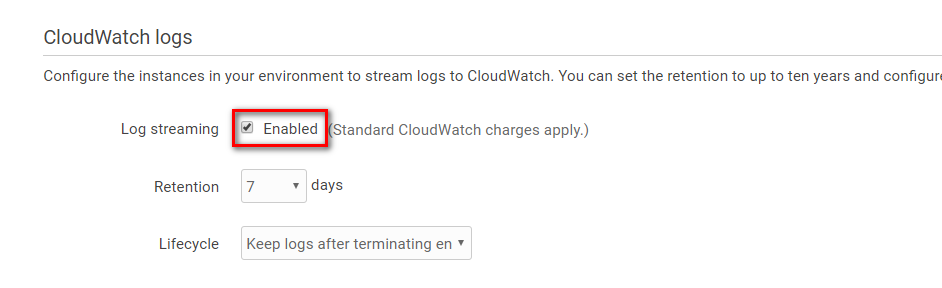
Remember to enable CloudWatch logs stream.
I add ALB settings, you can modify base on your situation
Be sure to have proper ALB permission in your service role.