










Stabilo-Optimize is a Python benchmarking tool designed specifically to evaluate and tune methods and hyperparameters of the Stabilo 🌀 library for video and track stabilization tasks. It systematically generates performance evaluations through random perturbations, eliminating the need for ground-truth homographies. This tool significantly simplifies the optimization of stabilization techniques, making it ideal for high-precision tasks in fields such as urban monitoring, traffic analysis, and drone imagery processing.

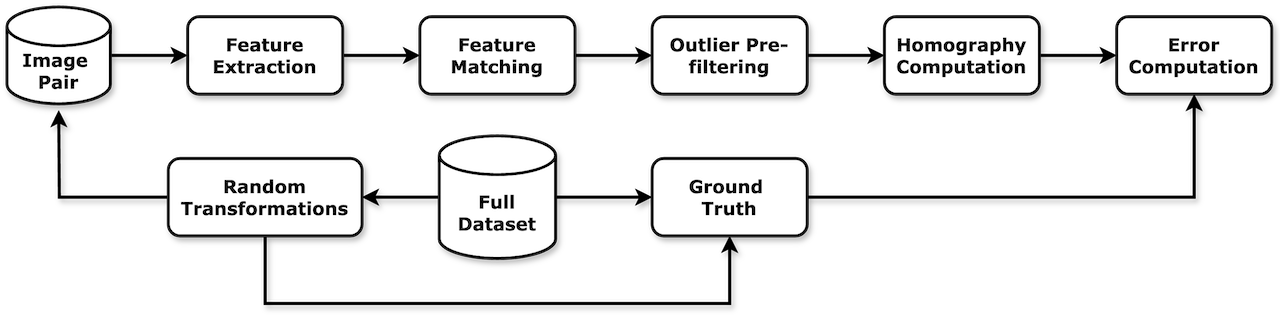
- Ground Truth-Free Benchmarking: Randomly generates photometric and homographic perturbations (brightness variations, Gaussian blur, saturation adjustments, fog effects, rotations, translations, scales, and perspective shifts).
- Hierarchical Benchmarking Strategy: Encourages users to systematically vary hyperparameters hierarchically for efficient parameter optimization.
- Flexible JSON Configuration: Customize extensive parameter settings using nested dictionaries (see comprehensive_benchmark.json or simple_benchmark.json for examples).
- Result Visualization: Generates comprehensive performance plots and benchmarking process visualizations.
Create and activate a Python virtual environment (Python 3.9–3.13), then install from PyPI:
python3.11 -m venv .venv
source .venv/bin/activate  # On Windows: .venv\Scripts\activate
pip install stabilo-optimize
Also works with uv (uv pip install stabilo-optimize) and conda.
For development, clone the repository and install in editable mode with the dev extra:
git clone https://github.com/rfonod/stabilo-optimize.git
cd stabilo-optimize && pip install -e '.[dev]'A sample benchmark (simple_benchmark.json) with provided scenes and vehicle bounding box masks is included in the experiments/sample_experiment directory. To reproduce the results, run:
stabilo-optimize benchmark experiments/sample_experiment/simple_benchmark.json -sp -sv -o-sp: Save performance plots.-sv: Save benchmark visualization video.-o: Overwrite previous results.
Add -l <path>/--log-file <path> (also available on plot) to additionally write console output to a file — parent directories are created automatically, color codes are stripped in the file, the resolved absolute path is printed to the console, and log files are gitignored (*.log) by default.
-v/--verbosity (benchmark only) controls how much detail is printed, including from Stabilo's own internal logging: 0=quiet (top-level status only, Stabilo's own messages fully suppressed), 1=minimal (+ per-run header/summary table, Stabilo errors only), 2=detailed (+ per-scene summary table, Stabilo warnings and up), 3=debug (+ per-trial output, Stabilo info and up).
Use stabilo-optimize benchmark --help to explore additional command-line options, or re-plot existing results without re-running the benchmark:
stabilo-optimize plot experiments/sample_experiment/simple_benchmark.jsonNote: This example is limited to three scenes for demonstration purposes. Users should define their own benchmarks with a more representative selection of scenes for meaningful evaluation.
To set up your own benchmark, create a new experiment directory within experiments containing:
benchmark.json: Configuration specifying methods/hyperparameters and number of random trials (N) per scene. For reliable results, setN > 100.scenes: Directory containing input images (and optional exclusion masks in YOLO format). Ensure selected scenes adequately represent your stabilization tasks. To obtain reliable benchmarking results, include a diverse set of scenes covering different lighting conditions and camera viewpoints.
Example structure:
experiments
└─custom_experiment
  ├─benchmark.json
  └─scenes
    ├ image1.jpg
    ├ image1.txt
    ├ image2.jpg
    ├ image2.txt
    ├ ...
Note: A comprehensive configuration file (comprehensive_benchmark.json) is included for illustration purposes. Due to computational costs, users should avoid directly running such an extensive parameter search. Instead, adopt a hierarchical parameter search approach by fixing some hyperparameters and varying others.
Refer to the Stabilo 🚀 library and the associated article for detailed descriptions of available methods and hyperparameters.
GPU acceleration: setting gpu: true in the config runs (parts of) Stabilo's pipeline on an NVIDIA GPU — see docs/cuda.md in the Stabilo repo for building a CUDA-enabled OpenCV and setting it up. This mainly affects Computation_time, not tuning outcomes: RANSAC-based homography/affine estimation always runs on CPU, so the HEA/MIoU accuracy metrics are essentially unaffected by this setting.
Benchmarks use metrics like Homography Estimation Accuracy (HEA) and Mean Intersection over Union (MIoU). MIoU specifically evaluates the accuracy of object-level registration and requires bounding box masks for calculation. Detailed metric definitions and analysis are provided in the manuscript.
If you use Stabilo-Optimize in your research, software, or product, please cite the following resources appropriately:
-
Preferred Citation: Please cite the associated article for any use of the Stabilo-Optimize, including research, applications, and derivative work:
@article{fonod2025advanced,
  title = {Advanced computer vision for extracting georeferenced vehicle trajectories from drone imagery},
  author = {Fonod, Robert and Cho, Haechan and Yeo, Hwasoo and Geroliminis, Nikolas},
  journal = {Transportation Research Part C: Emerging Technologies},
  volume = {178},
  pages = {105205},
  year = {2025},
  publisher = {Elsevier},
  doi = {10.1016/j.trc.2025.105205},
  url = {https://doi.org/10.1016/j.trc.2025.105205}
}
-
Repository Citation: If you reference, modify, or build upon the Stabilo-Optimize software itself, please also cite the corresponding Zenodo release:
@software{fonod2026stabilo-optimize,
  author = {Fonod, Robert},
  license = {MIT},
  month = jul,
  title = {Stabilo Optimize: A Framework for Comprehensive Evaluation and Analysis for the Stabilo Library},
  url = {https://github.com/rfonod/stabilo-optimize},
  doi = {10.5281/zenodo.13828430},
  version = {1.1.0},
  year = {2026}
}
Contributions from the community are welcome! If you encounter any issues or have suggestions for improvements, please open a GitHub Issue or submit a pull request.
This project is distributed under the MIT License. See the LICENSE file for more details.