ChatPDF is a Streamlit-based web application that lets you upload PDF documents and have a conversation with their content using AI. It uses a RAG (Retrieval Augmented Generation) pipeline to extract text from PDFs, create vector embeddings, and generate accurate answers to your questions based on the document content.
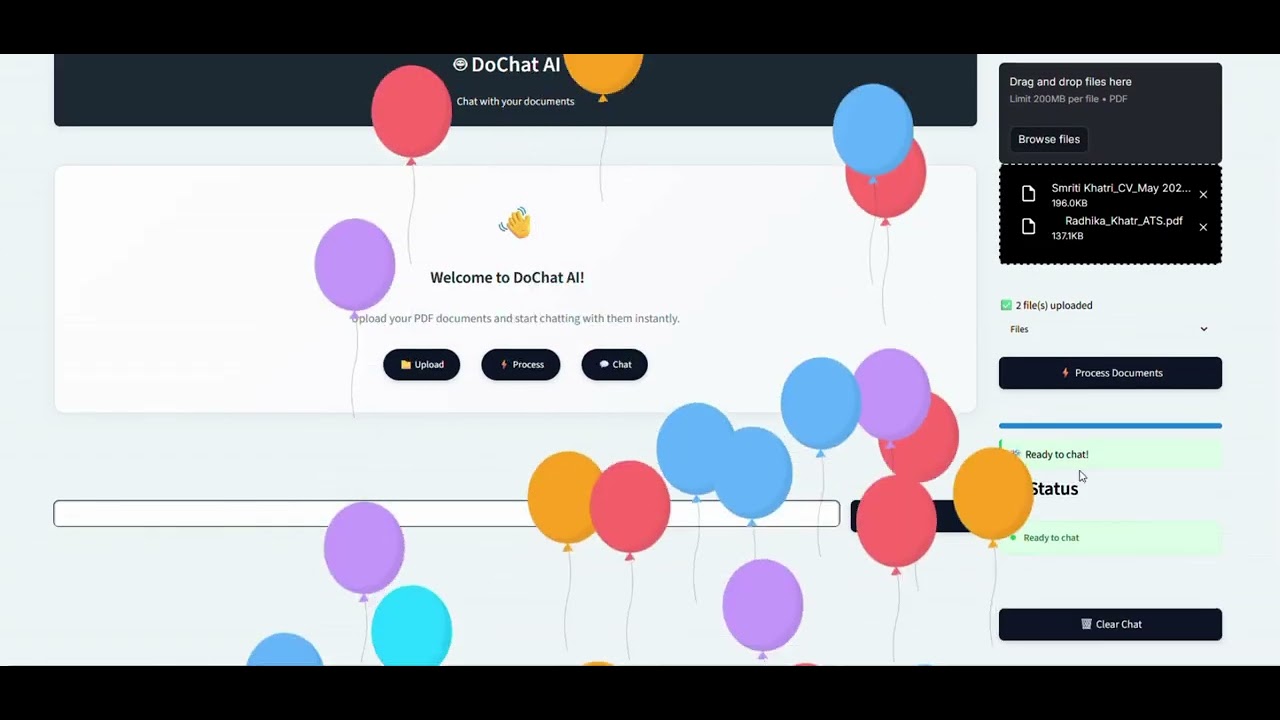
- Upload PDFs - Upload one or more PDF files through the sidebar.
- Text Extraction - The app extracts text from all pages of the uploaded PDFs using PyPDF2.
- Chunking - The extracted text is split into overlapping chunks (1000 characters with 200 character overlap) to preserve context.
- Embedding - Each chunk is converted into a vector embedding using HuggingFace's
sentence-transformers/all-MiniLM-L6-v2model. - Vector Storage - The embeddings are stored in a FAISS vector database for fast similarity search.
- Conversational QA - When you ask a question, the app retrieves the most relevant chunks and passes them to the Mistral LLM (via Ollama) to generate a context-aware answer. It also maintains chat history so follow-up questions work naturally.
| Component | Technology |
|---|---|
| Web Framework | Streamlit |
| PDF Parsing | PyPDF2 |
| LLM Orchestration | LangChain |
| Embeddings | HuggingFace Sentence Transformers (all-MiniLM-L6-v2) |
| Vector Database | FAISS (CPU) |
| Language Model | Mistral (via Ollama, runs locally) |
| Chat Memory | LangChain ConversationBufferMemory |
- Python 3.x
- Ollama installed and running on your machine
- The Mistral model pulled in Ollama (
ollama pull mistral)
# Clone the repository
git clone https://github.com/ArmaanSeth/ChatPDF.git
cd ChatPDF

# Create and activate a virtual environment (recommended)
python -m venv venv
source venv/bin/activate        # Linux/macOS
venv\Scripts\activate           # Windows

# Install dependencies
pip install -r requirements.txt-
Make sure Ollama is running with the Mistral model:
ollama run mistral
-
In a separate terminal, start the Streamlit app:
streamlit run app.py
-
The app will open in your browser at
http://localhost:8501. -
Use the sidebar to upload your PDF files and click Process Documents.
-
Once processing is complete, type your question in the input field and click Ask to get answers based on the content of your PDFs.
ChatPDF/
├── app.py              # Main application logic (PDF processing, embeddings, chat chain, UI)
├── htmlTemplates.py    # Custom CSS and HTML templates for the chat interface
├── requirements.txt    # Python dependencies
├── .gitignore          # Git ignore rules
└── README.md           # This file
- Multi-PDF Support - Upload and query across multiple documents at once.
- Local LLM - Runs entirely on your machine using Ollama. No API keys or cloud services required.
- Conversation Memory - Maintains chat history within a session, so follow-up questions understand prior context.
- Fast Retrieval - FAISS-powered similarity search for quick and relevant document lookups.
- Progress Tracking - Visual progress bar during document processing.