
[中文] · English



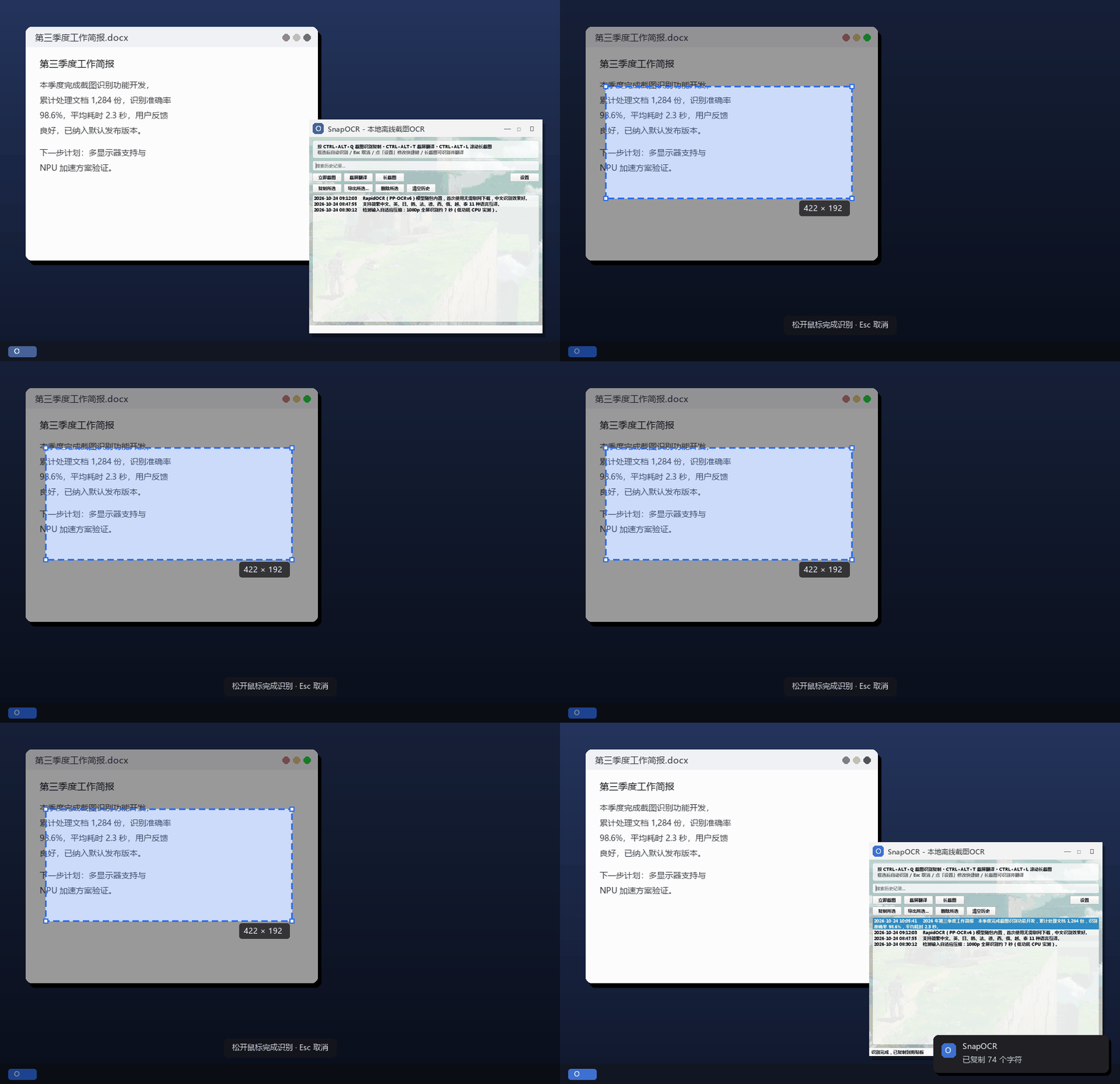
系统自带 OCR 已经能应付白底黑字的常规截图。SnapOCR 做的是那些自带工具容易失手的时刻:
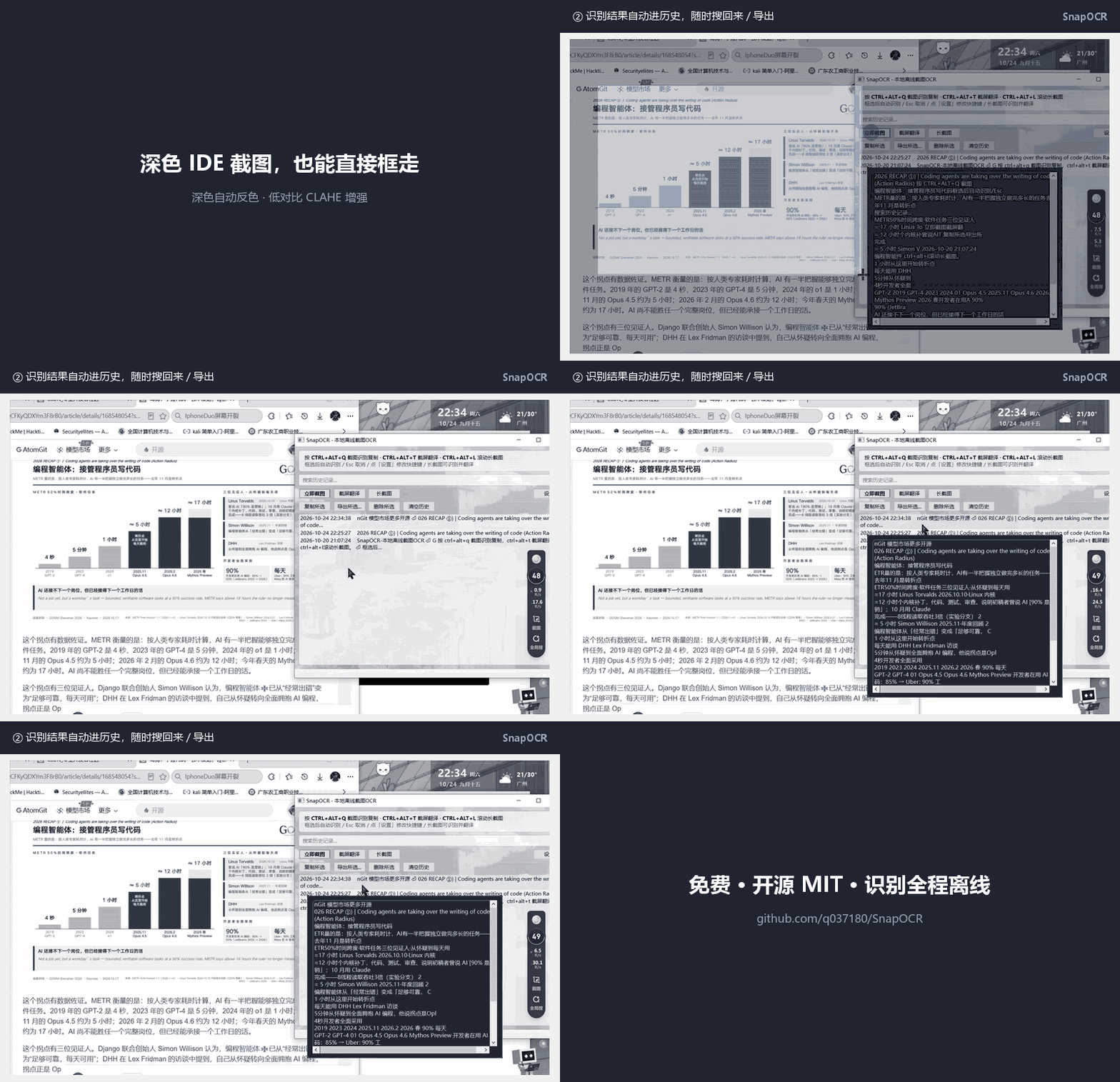
- 深色 IDE / 深色网页截图:深色背景配浅色字,检测模型容易漏检。SnapOCR 会先判断整体亮度,自动反色,再对低对比度区域做 CLAHE 增强,最后才送去识别 —— 代码、报错栈、暗色文档,框完就能复制,不用手工反色。
- 识别结果要回头找:剪贴板只记得最后一次,SnapOCR 记得每一次。所有结果自动进历史,关键词即时过滤、悬停浮窗预览、双击再次复制,还能一键导出 txt / docx / pdf / md / xlsx。
- 一整页 / 一整批:滚动长截图拼接、PDF 逐页识别、文件夹拖入批量队列,配合表格转 Excel 与截屏翻译,一次做完,不用在几个工具之间来回倒。
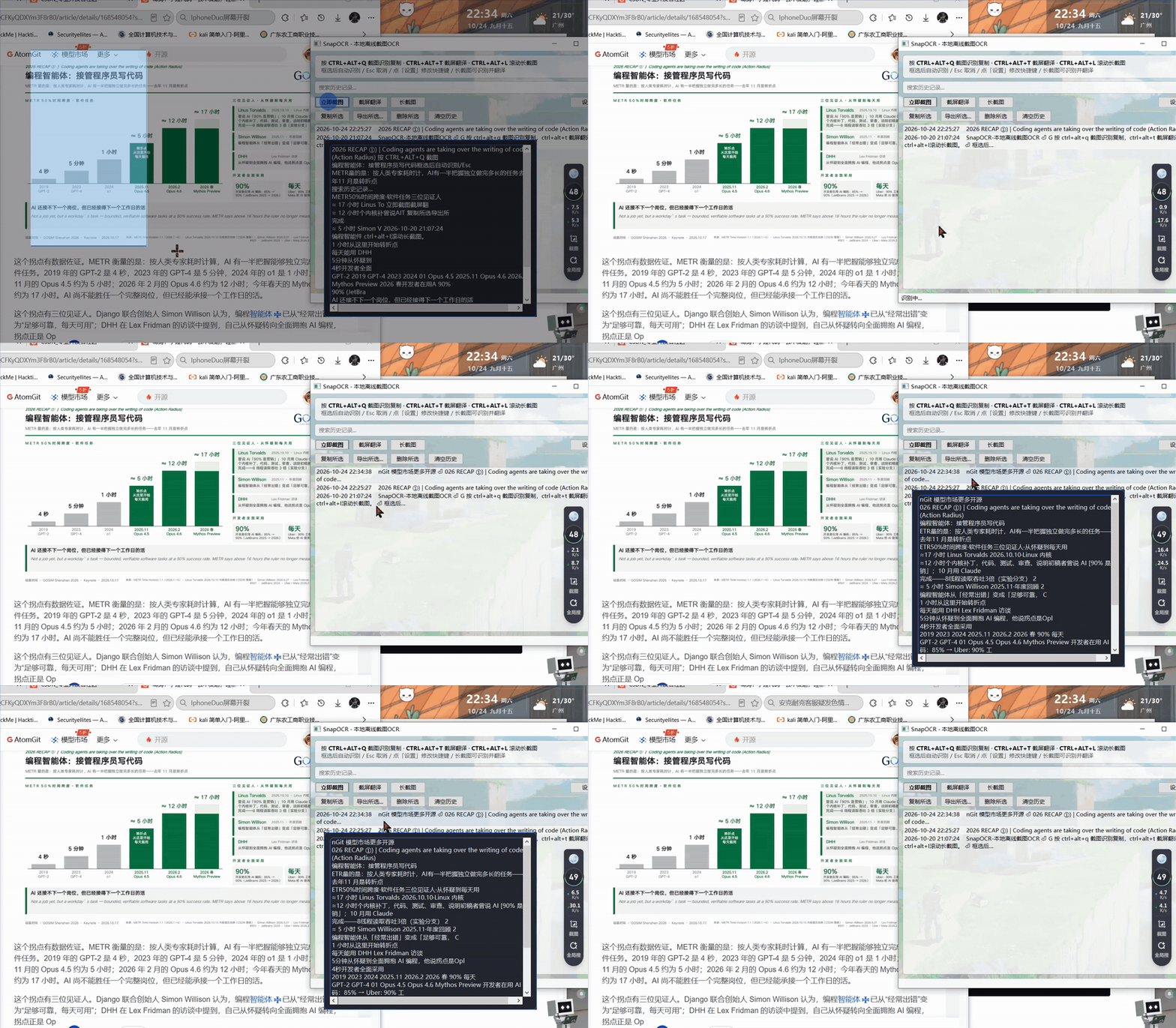
想一次看完 15 秒串联演示(截图识别 → 历史搜索 → 导出):hero-15s.gif
演示图均为完整清晰度版本(合计约 6.9 MB),托管在项目落地页同域的图床上。若长时间空白不显示,可直接在仓库
assets/目录查看同名文件,或打开 落地页。
- 什么时候该用 SnapOCR
- 截图识别 — 热键框选、图像增强、段落合并、二维码
- 批量识别 — 拖入文件夹排队识别,结果可搜索
- PDF 整档识别 — 逐页渲染识别、进度可取消
- 表格识别 — 识别为行列矩阵,导出 Excel
- 截图贴图 — 钉在桌面置顶,缩放调透明度
- 截屏翻译 — 框选即译,11 种语言互译
- 长截图 — 自动滚动拼接整页
- 导出与历史 — txt / docx / pdf / md / xlsx,搜索回溯
- 全局设置 — 快捷键、语言、功能开关
- 安装
- 跨平台兼容性
- 项目结构
- 开发计划
按全局热键 Ctrl+Alt+Q(可改键)框选屏幕任意区域,松开即识别并复制到剪贴板:
- 深色截图增强:深色主题截图自动反色,低对比度文本再用 CLAHE 提对比,深色 IDE / 暗色网页的识别率显著提升
- 多语言:内置简体中文模型,离线即用;繁中 / 英 / 日 / 韩首次切换时会联网下载对应识别模型,下载后本地缓存、之后离线
- 段落合并:多行文本自动合并为自然段;中文智能排版去除字间多余空格
- 二维码:框选区域没有文字时自动兜底解码二维码
- 智能排版:按行还原排版,多栏文本不乱序
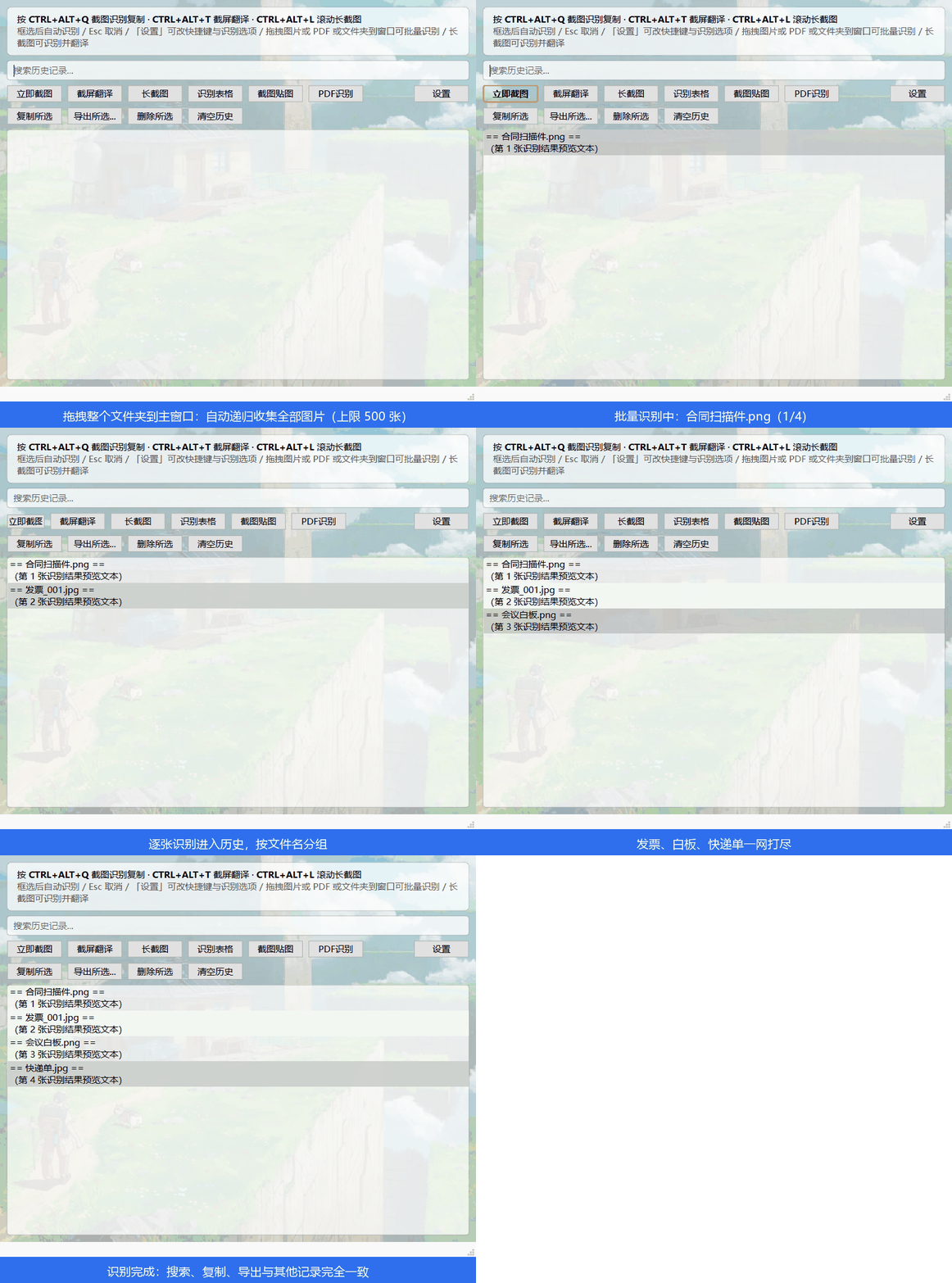
把图片或整个文件夹拖进主窗口,自动加入批量队列(递归收集、去重、上限 500 张),点「开始识别」逐张处理,结果按文件名分组进入历史记录,之后可以按关键词搜回来。
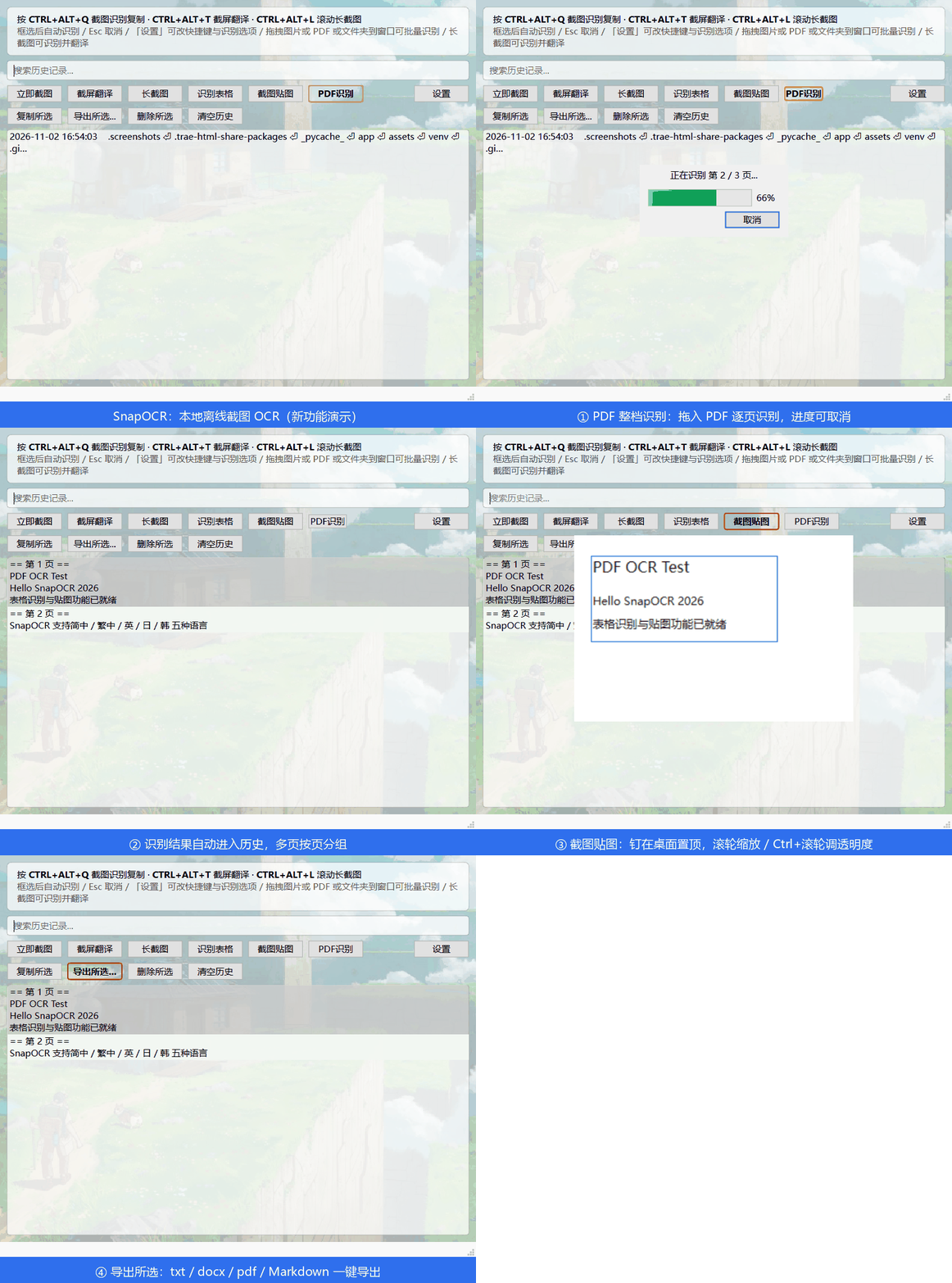
点「PDF识别」或直接把 PDF 拖进窗口,逐页渲染识别(≈144dpi),多页结果按「== 第 N 页 ==」分组,带进度条、可随时取消。
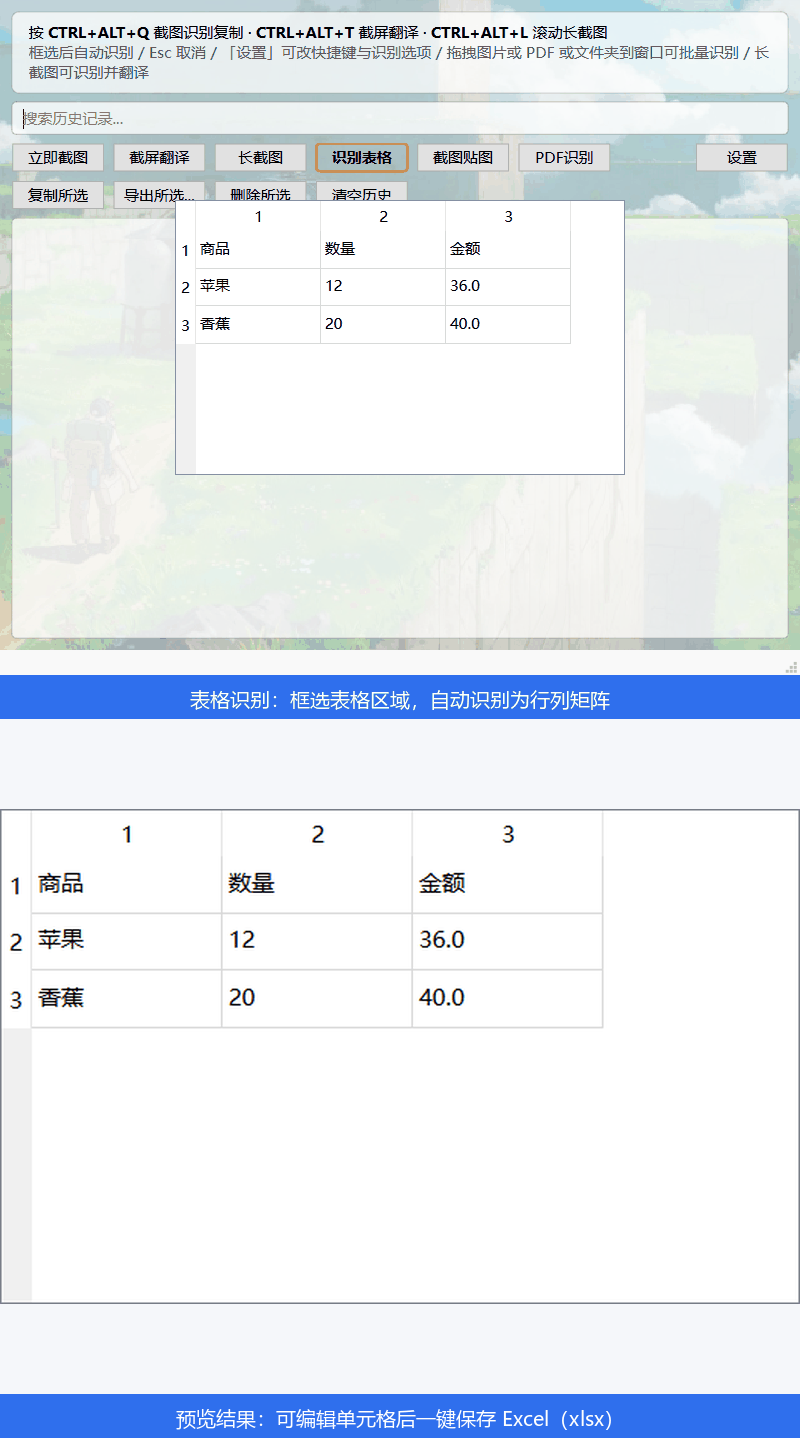
框选表格区域 → 自动识别为行列矩阵 → 预览可编辑 → 一键保存 Excel(xlsx)。
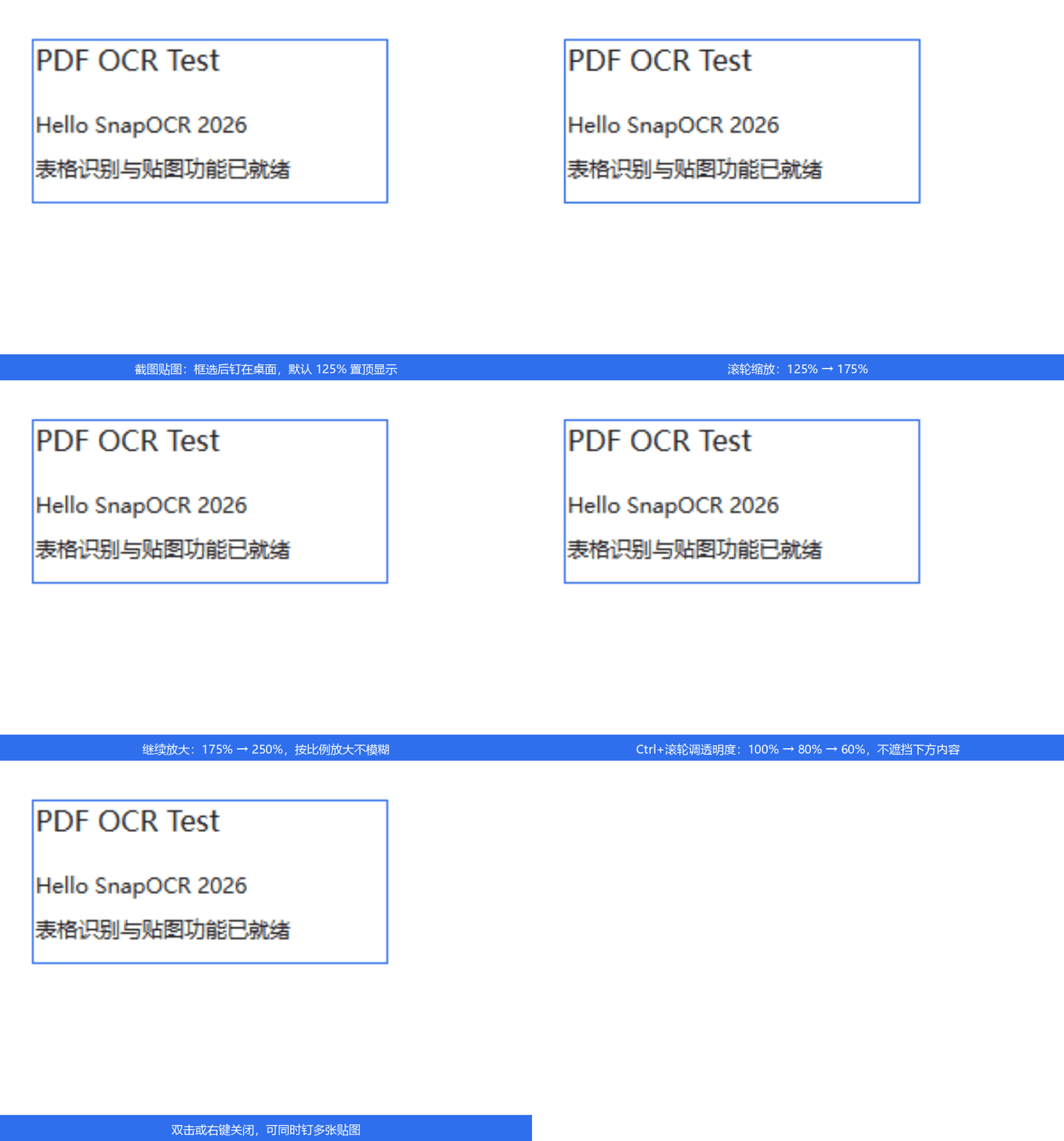
框选后图片钉在桌面置顶显示,可同时钉多张:拖动移动、滚轮缩放、Ctrl+滚轮 调透明度、双击或右键关闭。
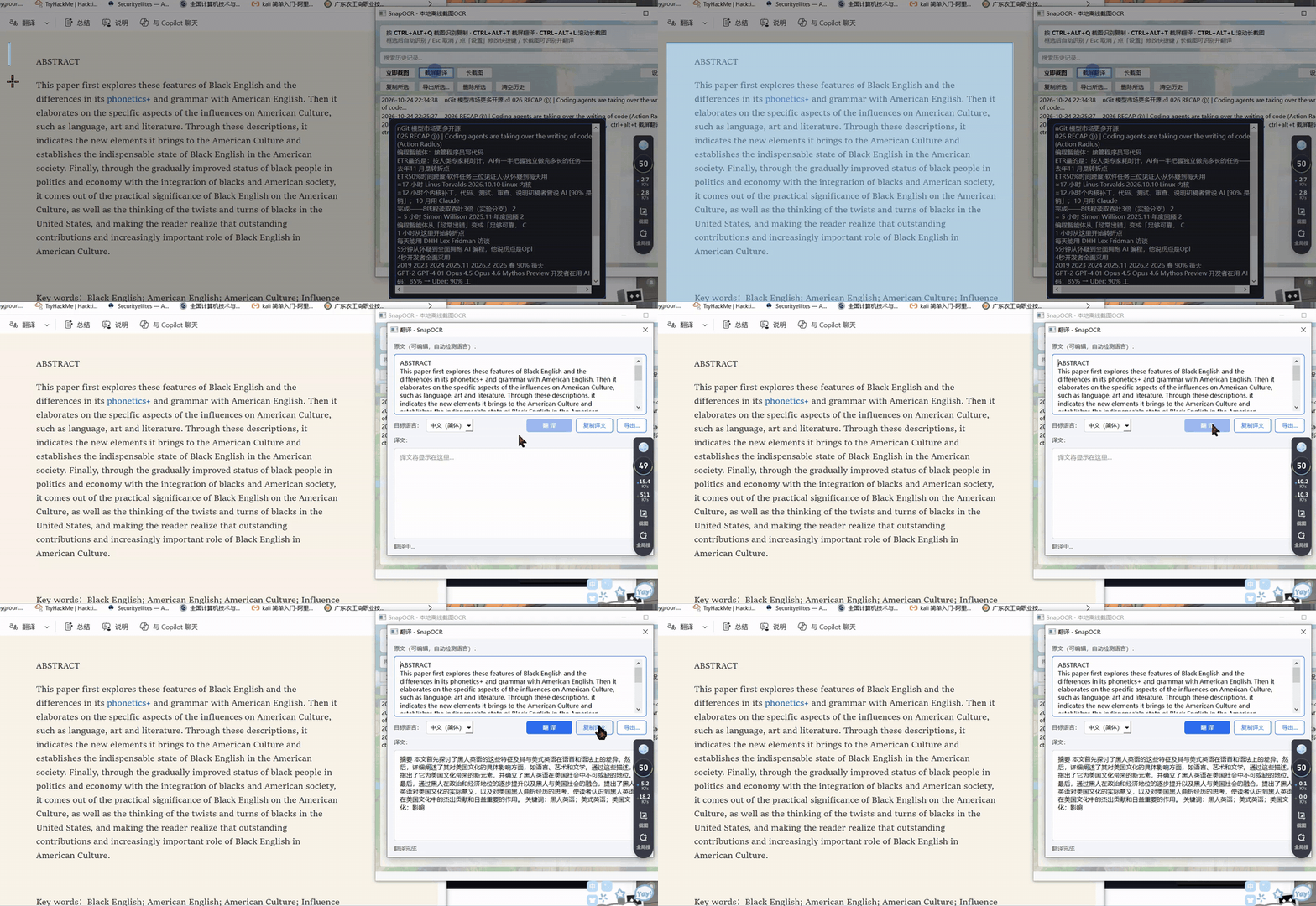
热键 Ctrl+Alt+T 框选英文段落 → 识别 → 自动弹出翻译窗口得到中文译文。原文可编辑后重译,支持简繁中文、英、日、韩、法、德、西、俄、越、泰 11 种语言互译(必应翻译为主,MyMemory 兜底,免费无需 API Key)。
热键 Ctrl+Alt+L 框选区域后自动注入滚轮下滚、逐帧拼接,滚到页面底部自动结束。整页可保存 PNG / 复制图片,或直接「识别并复制」「识别并翻译」。
已知限制:固定页眉会重复出现;动画/视频区域可能拼接不齐;自动滚动依赖 Win32(Linux/macOS 下给出提示,算法本身跨平台)。
- 内置历史记录,关键词搜索即时过滤;单击条目浮窗预览,双击再次复制
- 「导出所选...」一键导出 txt / docx / pdf / md;表格结果可保存 xlsx
- 大批量导出在后台线程进行,界面不冻结;内容超过 20 万字会先提示预计耗时,导出中可取消
- 历史写入采用「临时文件 + 原子替换」:断电或磁盘写满不会把已有记录截断成半个文件
主窗口「设置」或托盘菜单打开,侧边栏三页:
| 页 | 内容 |
|---|---|
| 快捷键 | 主截图 / 截屏翻译 / 长截图热键录制,即时生效 |
| 识别 | 语言、角度分类、图像增强、段落合并、GPU 加速 |
| 功能 | 二维码、表格识别、PDF识别、截图贴图、水印关键词过滤 |
配置持久化于 %APPDATA%\SnapOCR\settings.json。
程序是单实例的:再次双击(或从另一个快捷方式启动)不会开出第二个窗口,而是把已经在运行的那个窗口唤到前台——避免两份历史互相覆盖、一次热键弹出两个截图遮罩。需要刻意多开排查问题时可以加 --multi 参数。
配置文件被手工改坏(history.json / settings.json 结构不对)也不会导致「双击没反应」:程序会跳过损坏的历史记录并在状态栏提示,非法的快捷键值自动回落到默认的 Ctrl+Alt+Q。
目前只有 Windows 10/11 x64 提供可直接运行的二进制。 Linux / macOS 需要从源码运行,且部分功能受限,详见跨平台兼容性。
下载 v1.0.3(两个链接是同一个文件,SHA-256 一致,慢或断流时用镜像):
| 产物 | 官方直链 | 国内镜像 |
|---|---|---|
| 7z 绿色包 · 推荐(120 MB) | 下载 | ghproxy 镜像 |
| zip 绿色包(163 MB,内容与 7z 完全相同) | 下载 | ghproxy 镜像 |
| 单文件 exe(163 MB,见下方已知问题) | 下载 | ghproxy 镜像 |
7z:
29fec864e619aeff605c1dd11c3ed7b4693d7c72153f116dffc06c476be55177zip:d6fdf2b05660a6a796183552cfd2166c4e1ed2c8a3344d455ee633d197a75591exe:68dbec68c8bb8934e045e2ab324d609938acf999ee0e54df4d8bda2c683a5abf
到 Releases 下载 SnapOCR-v1.0.3-win64.7z,解压得到 SnapOCR/ 文件夹,进入后双击 SnapOCR.exe 即用。无需安装、不写注册表、删除文件夹即卸载,内置简体中文模型,默认识别全程离线。切换繁中 / 英 / 日 / 韩时首次会联网下载对应识别模型(缓存到 %APPDATA%\SnapOCR\models\,之后离线可用)。
绿色包是 onedir 结构(主程序 + 依赖目录),启动明显更快:单文件 exe 每次运行都要把 160 MB 自解压到临时目录,绿色包解压一次之后就不再做这一步。实测同一台机器:绿色包启动约 2.5 秒,单文件 exe 11–16 秒。用同页的 .sha256 文件可校验完整性:
Get-FileHash .\SnapOCR-v1.0.3-win64.7z -Algorithm SHA256同一份内容还提供
SnapOCR-v1.0.3-win64.zip(163 MB):解压后与 7z 包逐字节相同,只是容器格式不同。它是给包管理器用的 —— winget 支持 zip 但不支持 7z,winget的 SnapOCR 清单就指向这个文件。你手工安装的话用 7z 就行,体积小 43 MB;机器上没装 7-Zip 时,zip 用资源管理器右键「全部解压缩」即可。
下载 SnapOCR.exe,双击即用——无需安装 Python,内置简体中文模型,默认识别完全离线;切换其他语言首次需联网下载对应模型。
已知问题:单文件版有约 13% 的概率启动失败。 它是 PyInstaller onefile 打包,每次运行都要把 378 MB、313 个文件解压到临时目录,这一步偶尔会失败——表现为双击后没有任何窗口,退出码 127(
ERROR_PROC_NOT_FOUND,解压后找不到 DLL)。本机(Windows 11 x64)实测:单文件版 52 次启动失败 7 次(13.5%);把临时目录换到另一块盘仍是 20 次里失败 3 次,所以与磁盘和临时目录无关,是 onefile 形态本身的问题。同一份 onedir 产物 20 次启动 0 次失败。
结论:日常使用请用上面的 7z / zip 绿色包,单文件版只适合临时取用、或用在不方便解压的场合。失败时重开一次基本就能起来,但仍然建议换绿色包。这个问题会在后续版本里处理。
关于 SmartScreen 提示:本程序暂未做代码签名,首次运行时 Windows 可能弹出「Windows 已保护你的电脑」(绿色包同样如此)。这是未签名开源程序的正常提示,点「更多信息」→「仍要运行」即可。建议先核对 Release 页的 SHA-256 校验值再运行。如果介意,请从源码自行构建。
下载很慢 / 报网络错误? 这不是文件损坏,是 GitHub 的下载域名(
release-assets.githubusercontent.com)在部分网络下会被限速或断流,表现为下到一半停住、提示网络错误、或代理软件报超时。两种办法:
- 用支持断点续传的下载器(IDM、迅雷、
curl -C -),断了重连续传,不必从头开始;- 走镜像前缀(第三方转发,不修改文件内容;下载后仍请核对上面的 SHA-256):
https://ghproxy.net/https://github.com/q037180/SnapOCR/releases/download/v1.0.3/SnapOCR-v1.0.3-win64.7z
pip install -r requirements.txt
python entry.py- 环境要求:Python 3.10+(已在 3.12 验证);Windows 10/11 完整支持,Linux / macOS 部分功能可用
- 默认简体中文模型开箱即用、无需联网;切换到繁中 / 英 / 日 / 韩时首次会联网下载对应识别模型,下载后缓存在
%APPDATA%\SnapOCR\models\,之后离线可用 - 也可以双击根目录的
启动.bat,它会自动检查并安装缺失依赖后启动 - 打包与出图还需要额外依赖(pyinstaller / py7zr / Pillow):
pip install -r requirements-dev.txt - 想自己打包单文件版:
pyinstaller SnapOCR.spec --noconfirm - 想自己打包绿色版:
pyinstaller SnapOCR-portable.spec --noconfirm --workpath build/portable --distpath dist,再运行python tools/make_portable_7z.py(版本号自动取自app/config.py的APP_VERSION) - 改了演示图:直接重跑对应的
tools/make_*.py,它们写的就是落地页图床目录docs/assets/ - 提交前自检:
python -m unittest discover -s tests -v(校验版本号、下载链接、图片引用、图床一致性)
性能参考:基于 RapidOCR(PP-OCRv6 模型),1080p 全屏识别约 7–10 秒(视 CPU 与文字密度),框选小区域秒出。
先说清楚现状:Releases 里只有 Windows 二进制。 源码在 Linux / macOS 上可运行,但全局热键与长截图需要额外权限或依赖 Win32,实际体验以 Windows 为准。
| 功能 | Windows | Linux | macOS |
|---|---|---|---|
| 截图识别 / 翻译 / 历史 / 批量识别 | ✅ | ✅ 源码运行 | ✅ 源码运行 |
| PDF 整档识别 / 表格 / 贴图 / 导出 | ✅ | ✅ 源码运行 | ✅ 源码运行 |
| 全局热键 | ✅ | ||
| 长截图自动滚动 | ✅ | ❌ 启动时提示(依赖 Win32 滚轮注入) | ❌ 同左 |
| GPU 加速 | CUDA / DirectML | CUDA(onnxruntime-gpu) | CPU(可装 onnxruntime-coreml) |
| 官方二进制 | ✅ | ❌ | ❌ |
在目标平台上运行自检脚本即可确认:
python tests/platform_check.py热键或长截图不可用时程序不会崩溃:GUI 按钮、托盘菜单均照常工作。
SnapOCR/
├─ entry.py               # 程序入口(支持 --smoke 冒烟自检)
├─ app/
│  ├─ main.py             # 应用组装与生命周期
│  ├─ config.py           # 常量与 settings.json 持久化
│  ├─ core/
│  │  ├─ engine.py        # RapidOCR 封装:多语言 / 增强 / 段落 / 表格 / 二维码
│  │  ├─ pdf_ocr.py       # PDF 整档识别线程
│  │  ├─ stitcher.py      # 长截图滚轮采集与拼接算法
│  │  ├─ translator.py    # 免费翻译接口(必应 + MyMemory)
│  │  └─ exporter.py      # txt / docx / pdf / md / xlsx 导出
│  └─ ui/
│     ├─ main_window.py   # 主窗口:标签页 / 批量队列 / 托盘 / 热键
│     ├─ capture_overlay.py  # 截图遮罩与框选
│     ├─ longshot.py      # 长截图控制条与预览窗
│     ├─ pin_window.py    # 置顶贴图窗口
│     ├─ preview_popup.py # 历史条目浮窗预览
│     ├─ settings_dialog.py  # 侧边栏设置页
│     └─ translate_dialog.py # 翻译窗口
├─ assets/                   # 图标源文件(icon.svg)与打包用 icon.ico
├─ docs/                     # GitHub Pages 落地页;docs/assets/ 是演示图的唯一副本
├─ packaging/                # winget / scoop 包管理器清单
├─ tests/platform_check.py   # 平台自检脚本
├─ tools/make_demo_gif.py       # 功能演示 GIF
├─ tools/make_compare_image.py  # 深色截图增强对比图
├─ tools/make_hero_gif.py       # 15 秒串联演示
├─ tools/make_portable_7z.py    # 绿色包打包 + SHA256
├─ SnapOCR.spec              # 单文件 exe 打包配置
├─ SnapOCR-portable.spec     # onedir 绿色版打包配置
└─ requirements.txt
已完成:
- 多语言识别(内置简体中文模型,其余 4 种语言首次切换时按需下载)
- 图像增强 / 段落合并 / 水印过滤
- 表格识别导出 Excel
- PDF 整档识别(进度可取消)
- 截图贴图
- 批量识别页与可搜索历史
- Markdown 导出
- 截屏翻译 / 长截图 / 二维码
- Linux / macOS 源码级兼容
远期计划:
- 多显示器支持
- NPU / OpenVINO 加速
- 公式识别
- macOS / Linux 官方二进制与代码签名
OCR 识别在本机完成,不上传任何截图或识别文本。有两类情况会联网:① 首次切换到繁中 / 英 / 日 / 韩时,从模型源下载对应识别模型到本地(只下载、不上传任何数据);② 使用截屏翻译时,识别出的文本会发送到必应翻译 / MyMemory 公共接口,可在设置里关闭。除此之外不联网。
SnapOCR is a free, MIT-licensed desktop app for Windows that turns any on-screen region into copyable text with a single hotkey. Recognition runs fully offline using bundled RapidOCR / PP-OCRv6 models — your screenshots never leave the machine.
Looking for Chinese documentation? See the 中文说明 above. This section is a standalone English readme.
Built-in OCR (Windows Snipping Tool, PowerToys Text Extractor, macOS Live Text) handles white pages with black text well. SnapOCR targets the cases they tend to miss:
- Dark IDEs and dark-mode pages. Most detection models assume black text on a light background. SnapOCR measures overall brightness, automatically inverts dark captures, and applies CLAHE contrast enhancement on low-contrast regions before recognition. Code snippets, stack traces and dark documentation become copyable without manual preprocessing.
- Results you can find again. The clipboard remembers one item; SnapOCR remembers all of them. Every recognition lands in a searchable history with hover preview, double-click to re-copy, and export to txt / docx / pdf / md / xlsx.
- Whole pages, not just one box. Scrolling long-shot stitching, page-by-page PDF OCR, drag-a-folder batch queues, table → Excel and screen translation are all included.
- Hotkeys:
Ctrl+Alt+Qcapture ·Ctrl+Alt+Ttranslate ·Ctrl+Alt+Llong shot (all rebindable) - Bundled Simplified Chinese model works fully offline; Traditional Chinese / English / Japanese / Korean models are downloaded once on first switch, then cached locally
- Dark-capture inversion, CLAHE enhancement, small-region upscaling, paragraph merging, CJK spacing cleanup, watermark keyword filtering
- QR code fallback when a selected region contains no text
- Batch queue (folder drag-in, dedupe, up to 500 images), whole-PDF OCR with cancellable progress
- Table → editable grid →
.xlsx; pinned always-on-top captures; 11-language screen translation - Export:
.txt/.docx/.pdf/.md/.xlsx - Performance reference: ~7–10 s for a full 1080p screen on CPU (depends on CPU and text density); small regions are near-instant
- Go to Releases.
- Download
SnapOCR-v1.0.3-win64.7z(recommended) and unzip anywhere; or download the single-fileSnapOCR.exe. - Open the unzipped
SnapOCR/folder and runSnapOCR.exe. No Python, no installer, no admin rights, and no model download for the default Simplified Chinese model. Switching to another language downloads that recognition model once (into%APPDATA%\SnapOCR\models\). To uninstall, delete the folder.
The 7z build uses a normal onedir layout (main exe + dependency folder). Unlike the single-file exe, which self-extracts 160 MB into a temp directory on every launch, it starts directly after one unzip. Measured on the same machine: about 2.5 s for the portable build versus 11–16 s for the single-file exe.
Verify the archive with the .sha256 file on the release page:
Get-FileHash .\SnapOCR-v1.0.3-win64.7z -Algorithm SHA256SmartScreen notice: the binary is not code-signed yet. Windows may show "Windows protected your PC" on first run. Choose More info → Run anyway, ideally after checking the SHA-256. This is expected for an unsigned independent open-source build; building from source is always an option.
Slow download / network errors? That is not a corrupted file. GitHub serves release downloads from
release-assets.githubusercontent.com, which is throttled or dropped on some networks (downloads stall halfway, or the proxy times out). Resume-capable downloaders (curl -C -, IDM) work; alternatively use a mirror prefix (third-party pass-through, file contents unchanged — still verify the SHA-256 above):https://ghproxy.net/https://github.com/q037180/SnapOCR/releases/download/v1.0.3/SnapOCR-v1.0.3-win64.7z
pip install -r requirements.txt
python entry.py
# optional: check platform-specific limitations
python tests/platform_check.py
# optional: build a single-file exe
pyinstaller SnapOCR.spec --noconfirm
Requires Python 3.10+ (verified on 3.12). The default Simplified Chinese model is bundled, so no network access is needed at first run. Switching to another language downloads that recognition model once; subsequent runs are offline.
Only Windows has an official binary. Linux and macOS work from source, with these caveats:
| Feature | Windows | Linux | macOS |
|---|---|---|---|
| OCR / translation / history / batch / PDF / table / pin / export | Yes | From source | From source |
| Global hotkeys | Yes | Needs sudo; falls back to tray/buttons |
Needs Accessibility permission |
| Scrolling long shot | Yes | No (Win32 wheel injection) | No |
| Official binary | Yes | No | No |
Missing hotkeys or long-shot support never crashes the app — the GUI buttons and tray menu keep working.
OCR runs locally: no screenshot or recognized text is uploaded, no telemetry, no account. Two things do use the network: a one-time recognition-model download when you first switch to Traditional Chinese / English / Japanese / Korean (download only, nothing uploaded), and screen translation, which sends the recognized text to Bing Translator / MyMemory public endpoints and can be disabled in settings.
- Fixed page headers may repeat in stitched long shots; animated/video areas can misalign.
- A 160 MB single-file exe unpacks on every launch — the onedir 7z build starts directly and is the recommended download.
- No automatic updater yet; check Releases for new versions.
- Only the Simplified Chinese recognition model is bundled; the other four languages need a one-time download on first use.
- Mixed-DPI multi-monitor setups may show a slightly scaled capture overlay (selection still maps to the correct pixels).
Bug reports, feature requests and OCR accuracy samples are welcome in Issues. If a screenshot is misrecognized, attaching the original crop (with sensitive data removed) plus the expected text is the most useful report you can file.
MIT — free for personal and commercial use.