

Hover any element and find out whether it is actually on your design system.
Which token. Which type role. Which cascade layer won.

MIT · no runtime dependencies of its own · React only for the overlay
A design system can be present, correct, and have no effect.
Unlayered CSS outranks layered CSS whatever the specificity. So one legacy
stylesheet imported without layer() sits above every utility your system
emits — and adding a design-system class to an element does nothing. No error.
No warning. No visual change.
On the codebase this was built against, that was 1,590 typography rules outranking the entire design system, leaving 694 of 2,200 elements on one screen unreachable by it. It had been that way for months.
No inspector reports which layer won. This one does.
npm i -D layerlensimport { LayerLens } from 'layerlens/react'
<>
<App />
{import.meta.env.DEV && <LayerLens />}
</>That's it. Zero configuration on a Tailwind v4 project.
Two entries. layerlens is the engine — no React anywhere in its import
graph, so a Playwright script or a CI check can use it with React not
installed at all. layerlens/react is the overlay, and re-exports the engine, so
a React app still writes one import.
| For | How | |
|---|---|---|
| Overlay | people | a draggable crosshair button |
window.__layerLens |
agents | plain JSON, no protocol |
new Lens() |
CI | fail a build when the count goes up |
All three call the same function, so the panel a designer reads and the numbers an agent acts on can never disagree.
A 44px button you can drag anywhere; its position is remembered.
| Mode | How | Clicks |
|---|---|---|
| Peek | hold ⌥ / Alt | pass straight through |
| Locked | click the button | copy the reading |
A copied reading is four lines, not the raw object — the size it is actually read at. Hold ⌘ / Ctrl while clicking for the full JSON instead.
Measuring between two elements — hold ⇧ while inspecting. Whatever was under the cursor becomes the reference, and moving to anything else draws the gap on the page and shows it in the panel:
The CSS panel gets out of the way while you hold ⇧ — it is the one thing covering the gap you are looking at, and none of its rows answer the question being asked. Nothing replaces it unless there is something the rulers cannot say: a two-axis summary, or an overlap, which has no ruler at all. A single distance is never printed twice.
Let go of ⇧ and everything comes back. Nothing to pin, nothing to clear.
Measured edge to edge, per axis rather than as one number — two elements can sit 40px apart horizontally and overlap vertically, and a single figure there would be a guess about which was meant.
"Aisha Rahman"  ·  div.convo-row > div > div > span
Type    14px / 600 / normal       ✗ nearest text-paragraph-md
Colour  #101828                   ✓ --foreground
Origin  inline style · UNLAYERED
Peek is the one to use alongside an annotation tool — look at an element, let go, click it. Esc unlocks.
__layerLens.readSelector('.contact-name')   // one element
__layerLens.readPoint(x, y)                 // pairs with an annotation's coords
__layerLens.audit()                         // every off-system value, grouped
__layerLens.audit({ root: 'table', properties: ['type'] })
__layerLens.roles()                         // what it thinks your ladder is
__layerLens.enrich(annotation)              // an annotation + what it measures
__layerLens.describe(reading)               // that reading as one readable line
format(reading) gives the four-line block instead of a single line.
Anything that can run a line of JavaScript in the page can use it — Playwright, Puppeteer, a devtools console, an MCP browser tool, a bookmarklet.
const { offSystem } = new Lens().audit({ properties: ['type'] })
if (offSystem > budget) process.exit(1)
A full-page audit runs in about 17ms.
Constructed in a page, not in Node. Importing
layerlensin Node is fine and needs no React — butnew Lens()reads the document's custom properties as it is built, so construct it inside the page: Playwright or Puppeteer'spage.evaluate, a devtools console, or your bundled app. Calling it in plain Node throws with that instruction rather than a straygetComputedStyle is not defined.
Everything is optional.
<LayerLens
  rolePattern={/^type-/}              // default /^text-[a-z][\w-]*$/
  tokenPrefixes={['--ds-']}           // default: every :root custom property
  properties={['color', 'gap']}       // default: type, colour, spacing, shape
  ignore={['.third-party-widget']}
  overlaySelectors={['#my-devtools']} // other floating UI to leave alone
  accent="#7C5CFF"
  exposeGlobal={false}                // default true
/>
Not using CSS classes for your type ladder? Declare it directly:
roles={{ 'body-m': { fontSize: '14px', fontWeight: '500', lineHeight: '20px' } }}Tokens are read off :root — every declared custom property, resolved and
indexed the other way round, so rgb(16, 24, 40) can answer with
--text-primary. Aliases collapse; preference goes to the name that reads like
the property it serves, then to the shorter one.
Type roles are read from the emitted CSS, not from theme variables.
Tailwind v4's @theme inline inlines a role's value into the utility and never
emits the variable — reading :root on the project this was built for found
3 roles out of 9, each missing its weight. The utility rules are always there,
because they are what the browser applies.
The winning rule is computed the cascade's own way: !important, then layer
rank, then specificity, then document order — with layer rank inverted for
important declarations, which is the part people misremember.
layerlens needs nothing else installed. But it plays well with agentation, Vercel Comments and friends, which tell an agent where someone pointed without saying what that element measures.
They don't fight. While locked, layerlens intercepts clicks — so it skips
known floating toolbars by default, and overlaySelectors adds your own.
They cooperate through the page, not through each other. Hand an
annotation to enrich and get it back with the measurement attached:
import { enrich, describe } from 'layerlens'

enrich(annotation)
// { comment: "this looks tight",
//   elementPath: "#page > .row > #btn",
//   layerLens: { type: {...}, readings: [...], offSystem: [...] } }

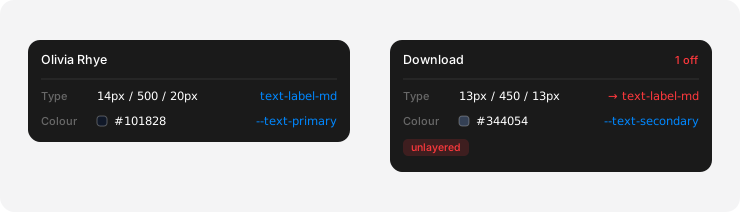
describe(enrich(annotation).layerLens)
// "14px / 500 / 20px · text-label-md · layer utilities"
// "13px / 450 / 13px · no role, nearest text-label-md · UNLAYERED"
enrich accepts elementPath, selector, element or x/y, so it works
with agentation, Vercel Comments and anything else that reports where a click
landed. layerlens imports nothing from any of them. Both are on the global too —
__layerLens.enrich(...), __layerLens.describe(...).
If agentation happens to be on the page, layerlens borrows its accent colour; if not, it uses its own blue.
- Reads what is in the document. A rule in an unloaded or cross-origin stylesheet is invisible.
@scopeproximity and transitions are not modelled in the cascade sort.- Token matching is by resolved value. Two tokens sharing a value are genuinely
ambiguous — narrow with
tokenPrefixes. - The overlay is React and lives at
layerlens/react. The engine is plain DOM and imports nothing, so it is safe to import during SSR or in Node — constructing aLensis what needs a document.
npm i
npm run typecheck
npm run build     # tsup → ESM + CJS + .d.ts + sourcemaps
prepublishOnly runs both, so a package whose types don't compile can't ship.
Consuming it from a monorepo during development is easier through a source
alias than a file: dependency — you get hot reload and skip the rebuild:
// vite.config.ts
resolve: { alias: { 'layerlens': '/abs/path/to/layerlens/src/index.ts' } },
server:  { fs: { allow: ['.', '/abs/path/to/layerlens'] } },
That second line matters. Vite refuses to serve files outside its root, and without it the alias resolves, the request 404s, and the only symptom is a component that never mounts.
MIT