Repository navigation
Issue: Day-long events get displayed with wrong time (and wrong date on day-spans) #2290
Description

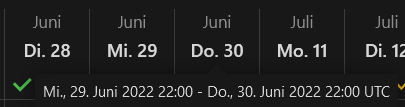
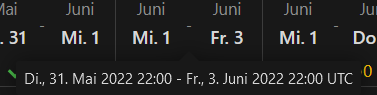
Hi there, I'm not sure where the problem lies exactly; we're running a hosted nextcloud on a shared server. The problem ist: whenever we want to poll whole days (e.g. we want to know whether all participants are free on a given date, without specifiying time), it jumps to the day before, 22:00 and ends the event the desired day, 22:00. This is confusing, because on mouseover, two dates will be displayed.
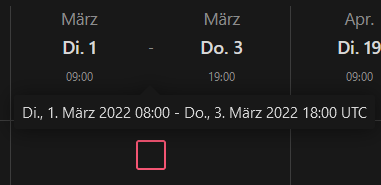
It gets even worse when trying to figure out a span of more than one day (e.g. 3 days). Days will be displayed correctly, if a time is selected as well (0:00 to 24:00 doesn't work though). I've attached screenshots.
Is that a localization problem (got to be, since in third screenshots displays not only wrong time, but a different time that's even more wrong on mouseover - I've put in 09:00 to 17:00) and also a bug?
Long story short: please fix the behaviour to display days correctly without having to choose a time as well.
Activity
[-]Issue: Day-long events get displayed with wrong time[/-][+]Issue: Day-long events get displayed with wrong time (and wrong date on day-spans)[/+]dartcafe commentedon Feb 25, 2022
The timespan in the tooltip displays the time in UTC or GMT indicated with the word UTC. This is by intention.
kgollmer commentedon Feb 28, 2022
Ok. So how do I get it to only display the date I selected, without switching to the day before or using a two-day timespan in the tooltip due to it being UTC+1 in Germany?
dartcafe commentedon Feb 28, 2022
I don't get the point, there is no switching. The selected date is displayed in the header cells for the user's time zone. So just ignore the tooltip. It is an additional information, i.e. if mates from different time zones are looking at the same poll.
finmackandal commentedon Mar 24, 2022
I'm having a similar issue.
I setup a poll without specifying the time, because as the OP, I only wanted to know date availability.
Users that lives in another TZ see the dates shifted because the app uses 00:00 by default apparently.
Suggestion: if no time is specified in the poll, don't include a default time (00:00 is useless for planning a meeting).
dartcafe commentedon Mar 24, 2022
Thanks for feedback, but please open another issue, because it is another request.
github-actions commentedon May 30, 2024
This thread has been automatically locked since there has not been any recent activity after it was closed. Please open a new issue for related bugs.