





What problem does it solve? Modern projects depend on hundreds of third-party packages, and any of them may contain known security holes or licenses you cannot use. This extension lists everything your project depends on and tells you which packages are risky and how to fix them, without leaving VS Code.
Generate software dependency inventories (SBOM), audit known vulnerabilities, perform license compliance checks, triage actively exploited threats (CISA KEV), fix issues with 1-click Quick Fix, and share results as HTML, JSON or Word (DOCX) documents directly from VS Code.
Install from Marketplace · Open VSX Registry · 日本語 · Report an issue
These screenshots show this repository at v9.0.0, analyzed from package-lock.json with the built-in manifest generator and checked with npm audit, using the extension's actual SBOM Explorer (captured October 20, 2026). This inspection found 306 components: 8 direct and 298 indirect dependencies, with 0 known vulnerabilities at the time of the scan.
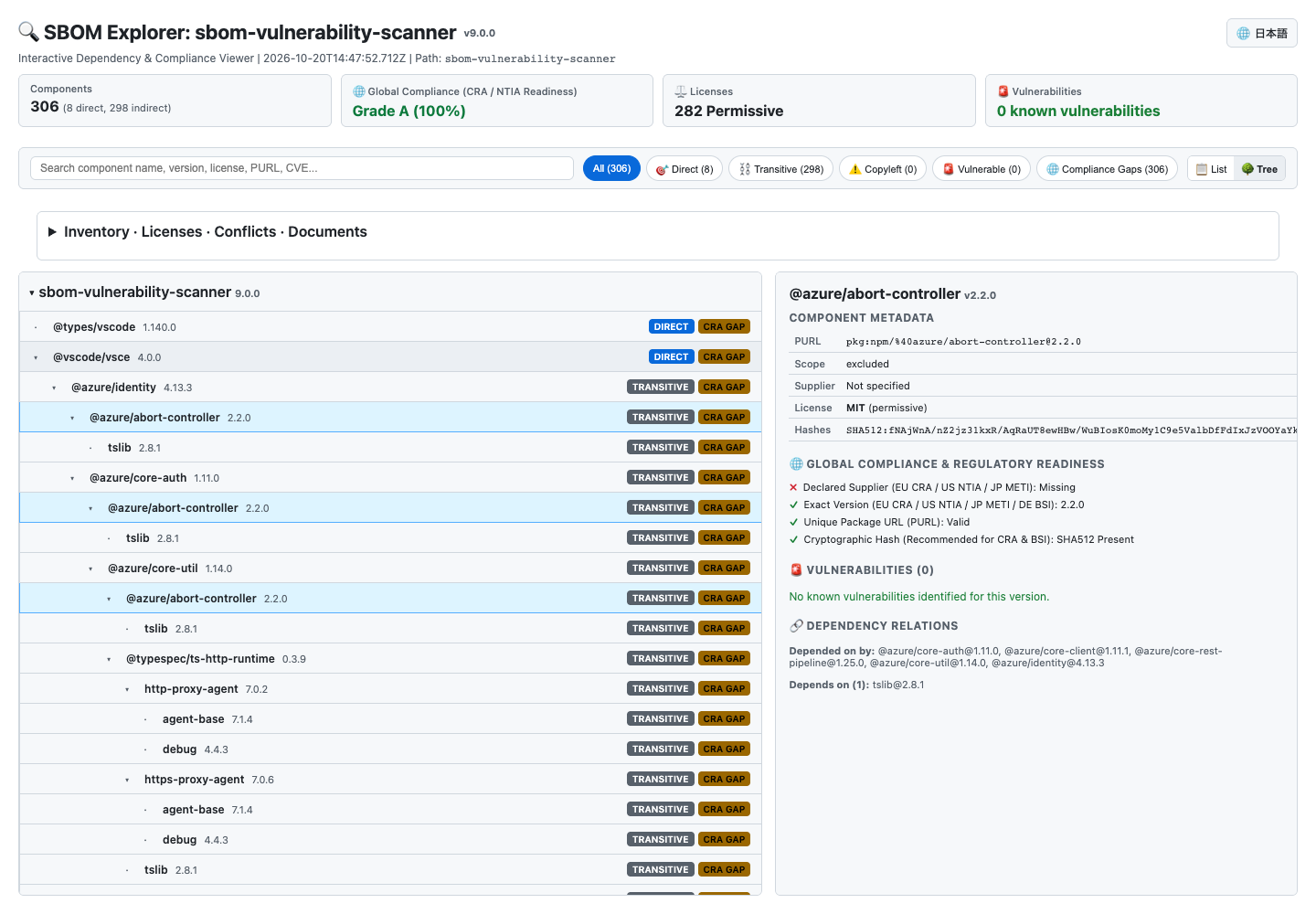
- Follow the dependency tree on the left. Expand or collapse branches with the arrows. Direct and transitive badges explain how packages relate to the project. The hierarchy represents SBOM dependencies, rather than filesystem directories.
- Select a package to inspect it on the right. Review its version, PURL, license, hashes, missing metadata, vulnerabilities, and parent/child relationships. A compliance gap badge indicates missing SBOM fields such as supplier information.
- Search and filter above the tree. Search by name, license, or CVE, or filter for vulnerable packages, copyleft licenses, and compliance gaps. Matching packages keep their ancestor branches so you can trace where they came from.
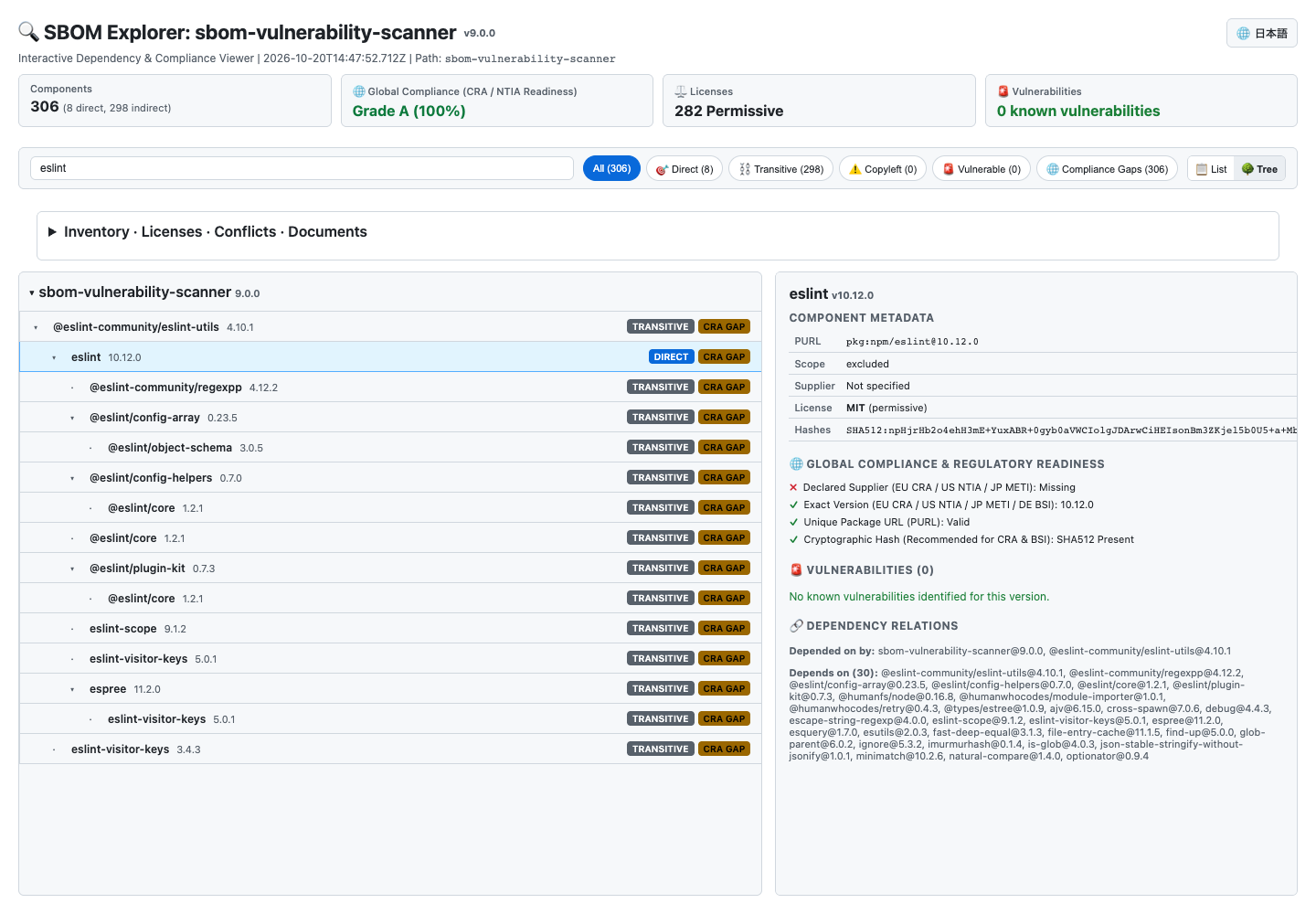
This example filters for eslint while keeping the hierarchy beside the package details. To use this view, open your project in VS Code, generate its SBOM, and open SBOM Explorer.
- Install the extension in VS Code 1.90 or newer and open your project folder. Scanning requires a trusted, local workspace.
- Open SBOM Scanner in the Activity Bar and check the current project.
- For an npm project, choose manifest and npm-audit in Settings. Install Node.js/npm and use an existing
package-lock.json. This route needs no Syft or Trivy. - For other ecosystems, select Set Up Syft and Trivy, then choose automatic installation if available.
- Select Generate HTML, JSON and Word Reports. Inspect the scan status and coverage before interpreting the findings. Open the output folder to find the Word document.
The workflow described here is available in the 1.1.0 build. Marketplace users on earlier versions can generate and scan, then export DOCX separately where supported.
Inspect and explore your complete software bill of materials through an interactive, graphical tree & list visualizer:
- Real-Time Incremental Search: Filter components instantly across names, versions, licenses, PURLs, and CVE identifiers.
- Dependency Tree & List: Switch between a flat list and expandable package dependency branches with direct/transitive badges.
- 1-Click Quick Filter Pills: Filter with a single click by
All,🎯 Direct Only,⛓️ Transitive Only,⚠️ Copyleft / GPL,🚨 Vulnerable, or🇪🇺 CRA Gaps. - Component Inspector: Click any package to view deep metadata: exact PURL, declared supplier, cryptographic hashes, license compliance status, linked CVE vulnerabilities with suggested fix versions, and upstream/downstream dependency relationships.
- Zero External Dependencies: Operates 100% locally with zero CDN or external network requests—completely offline-ready and secure.
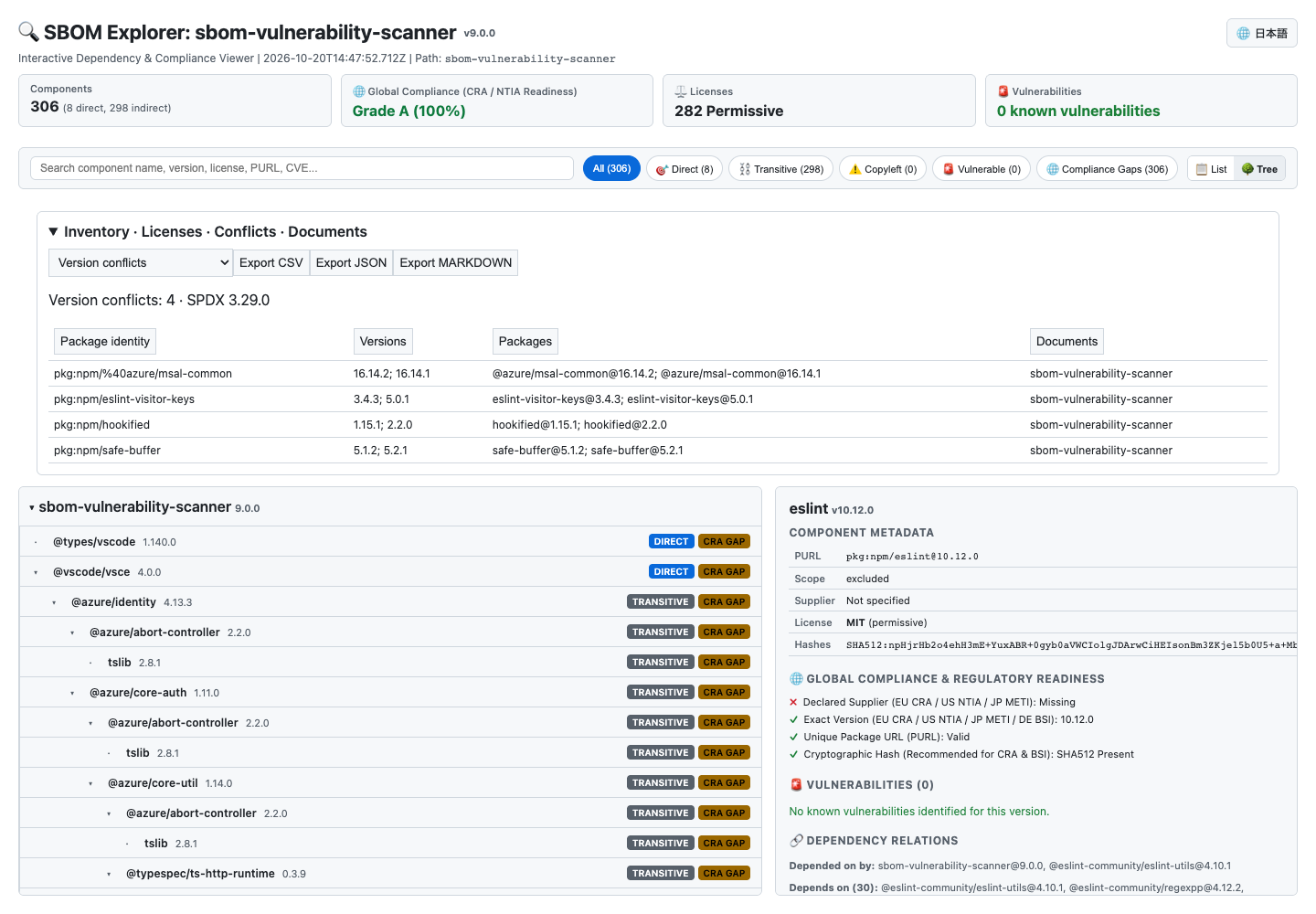
Expand Inventory · Licenses · Conflicts · Documents in Explorer and choose a dataset. Click column headings to sort ascending or descending. Inventory, license and conflict views share the search and filters above the tree.
- Inventory lists component name, version, PURL, license, source document, scope and supplier.
- Licenses checks identifiers against the bundled SPDX License List 3.29.0, distinguishing listed, deprecated, custom LicenseRef, unlisted and exception identifiers. It includes declared/concluded counts, packages and documents. This checks identifiers; it does not determine license obligations or validate an entire expression.
- Version conflicts groups multiple versions of the same PURL identity with their occurrences. Packages without a PURL are grouped by name; unknown versions alone do not establish a conflict.
- CSV / JSON / Markdown export opens a native save dialog in VS Code or downloads a file when viewing the HTML in a browser. Export follows the current search, filters and sort order. CSV output protects cells that could otherwise be treated as spreadsheet formulas.
Use Open SBOM Documents (JSON) in the command palette to select SPDX 2.x JSON or CycloneDX 1.x JSON files together. Component identifiers are isolated by source document, with a combined inventory and dependency tree retaining document names. External SPDX dependency references use the recorded checksum first, or the document namespace when no checksum is present. CycloneDX BOM-Links in dependency references resolve by serial number, document version and component ID.
Missing, ambiguous or checksum-mismatched references are listed as unresolved. Documents are not fetched automatically from the network. Limits are 64 documents, 50 MB per document and 100 MB combined; import can be cancelled from its progress notification. Importing documents does not run a vulnerability scan and explicitly displays “Vulnerability scan not run.”
Document field coverage shows present/total counts for names, versions, suppliers, PURL/CPE identifiers, licenses, hashes, timestamps, authors, document identifiers and relationships. Specification notes (hashes) checks hexadecimal content and length for supported hashes. Both views export as CSV, JSON or Markdown. These are generic information checks, rather than dedicated profiles validating every clause of the standards below.
When a previous SBOM exists in the same output location, the current SBOM is compared with it for added, removed and changed components, including version, license, supplier and hash changes. Identical versions with different hashes are highlighted too. Differences are saved as sbom-diff-*.json and sbom-diff-*.md, and Markdown can be copied from Explorer.
Built-in profiles named CRA, NTIA, FDA, METI and BSI count the presence of component names, versions, identifiers, suppliers, licenses, dependency scope, document timestamps and generator identity. HTML/Word reports show coverage scores and grades A–D. Checks include heuristics such as inferring a supplier from a PURL; they do not verify every clause of a particular standard edition or certify regulatory conformity. The Explorer detail pane also shows hash presence.
| Feature or standard | Current scope |
|---|---|
| Inventory | Column sorting, search, filters, combined inventory across selected JSON documents and CSV/JSON/Markdown export |
| License inventory | SPDX membership/deprecation facts, declared/concluded counts, package/document occurrences and CSV/JSON/Markdown export |
| Version conflicts and release differences | Multiple-version detection within/across selected documents and previous-run differences. No UI to choose two arbitrary document collections for comparison |
| Document loading and map | Multiple SPDX 2.x / CycloneDX 1.x JSON imports and dependency-reference resolution. No XML/YAML/tag-value, SPDX 3 JSON-LD, document map or custom editor |
| Custom quality profiles | No import of user-defined field rules/coverage thresholds or Markdown quality-report export |
| VEX (OpenVEX & CycloneDX VEX) | Standard OpenVEX and CycloneDX 1.5 VEX generation, input loading (.sbom-vex.json), justification tracking and artifact export |
| Specification findings and field help | Length/hexadecimal checks for supported hashes. No comprehensive vocabulary/expression-grammar validation or per-field specification tooltips |
| NTIA minimum elements (2021) | Basic counts of related fields; not a complete per-document quality profile validating every requirement |
| CISA 2026 minimum elements | No dedicated profile. CISA KEV vulnerability matching is a separate feature |
| BSI TR-03183-2 | Generic field-presence checks only; no edition/clause-specific coverage validation or section 6.1 license checks |
| OpenChain Automotive SBOM v1.1 | No dedicated mandatory-field profile |
| FDA 524B guidance (February 2026) | Generic fields under an FDA-named profile; no dedicated profile including level of support and end-of-support dates |
| G7 SBOM for AI minimum elements | No model/dataset-scoped quality metrics |
| CycloneDX CBOM and cryptographic inventory | No dedicated model or quality checks for algorithms, keys, certificates and protocols. Package integrity hashes are a separate feature |
| EU PQC roadmap, DORA certificate register, PCI DSS 12.3.3 and BSI TR-02102-1 (2026-01) | No dedicated cryptographic-inventory validation or parameter-table checks |
Interact seamlessly with SBOM generation, vulnerability triage, and compliance auditing from GitHub Copilot Chat:
@sbom /scan: Trigger SBOM generation and vulnerability scans with instant conversational summaries and quick report open buttons.@sbom /triage: Request intelligent vulnerability prioritization combining FIRST.org EPSS real-world exploitation probabilities and CISA KEV actively exploited catalogs.@sbom /policy: Check project compliance against custom rules in.sbom-policy.json.@sbom /vex: Draft standard OpenVEX statements to formally mark non-affecting vulnerabilities.- Autonomous Language Model Tools: Exposes
sbom_scan_workspace,sbom_evaluate_policy, andsbom_get_vulnerabilitiesso Copilot and language models can query inventory directly.
Integrate with any AI assistant supporting Anthropic's Model Context Protocol (Claude Desktop, Claude Code, Cursor, Codex, and Antigravity):
- Run directly via stdio:
{ "mcpServers": { "sbom-scanner": { "command": "npx", "args": ["sbom-scanner-mcp"] } } } - Exposes tools:
scan_workspace,evaluate_policy,query_epss,record_vex, andget_sbom.
Formally document and communicate non-exploitable vulnerabilities without editing source code:
- Document false positives or non-reachable execution paths in
.sbom-vex.json. - Automatically outputs both standard OpenVEX (
openvex.json) and CycloneDX 1.5 VEX (cyclonedx-vex.json). - Suppressed CVEs are clearly tagged as
Not Affectedin SBOM Explorer and security reports with full justifications.
- Connects directly with the FIRST.org Exploit Prediction Scoring System (EPSS) to predict 30-day real-world exploitation likelihood.
- Dynamically assigns Smart Triage Priorities (
IMMEDIATE,HIGH,MEDIUM,LOW,INFO) based on CVSS severity, EPSS scores, and CISA KEV exploit status.
Enforce compliance gates and guardrails on your software supply chain:
- Configure license restrictions (
denyLicenses,allowLicenses), max allowable severity (maxSeverity), CISA KEV bans (failOnKev), EPSS score limits (maxEpss), and minimum CRA readiness scores (minCraScore). - Evaluated automatically in SBOM Explorer and exportable as
policy-report.json.
After running a vulnerability scan, issues found in dependencies are highlighted directly inside your package.json with squiggly warnings:
- Instant visibility: Hover over flagged dependencies to inspect severity, CVE identifiers, descriptions, and available fixes.
- 1-Click Quick Fix: Click the lightbulb (💡) or press
Cmd+./Ctrl+.on any vulnerable line to automatically upgrade the dependency expression to the safe fixed version.
Vulnerabilities listed in the CISA Known Exploited Vulnerabilities (KEV) catalog are flagged with prominent [🚨 Actively Exploited (CISA KEV)] notices:
- Triage made easy: Immediately distinguish actively weaponized CVEs (such as Log4Shell, Spring4Shell, and XZ Utils) from theoretical risks.
- High-visibility warnings: Highlighted in editor diagnostics and accompanied by an urgent security banner in both HTML and Word reports.
Every generated SBOM includes automatic software license classification across your dependency tree:
- Categories: Permissive (MIT, Apache-2.0, BSD), Weak Copyleft (LGPL, MPL), and Strong Copyleft (GPL, AGPL).
- Compliance alerts: Visual warning banners alert teams to reciprocal/copyleft obligations (e.g. GPL source disclosure requirements) before release.
Manage false positives, accepted risks, and grace periods without modifying upstream reports:
- Create a
.sbom-ignore.jsonin your workspace root:{ "suppressions": [ { "cveId": "CVE-2023-12345", "reason": "Vulnerable feature is not exposed in production build", "expires": "2026-12-31" } ] } - Auditable transparency: Suppressed items are excluded from active counts but recorded under the Suppressed Findings audit table in HTML and Word exports with full rationale.
When multiple npm projects are detected, All detected projects generates an overall HTML/JSON/Word summary and a separate set of detailed reports for each project. A single-project selection limits both SBOM generation and vulnerability scanning to that project.
The output folder contains monorepo-report-*.html and monorepo-report-*.json, plus the overall security-report-*.docx. Individual reports are under monorepo-<timestamp>/projects/. Expand a project in the HTML summary to review findings and inventory, or use Open Output Folder for the separate reports. Export DOCX exports the latest overall summary after a batch run.
Projects are analyzed sequentially. Failed/skipped projects and restricted fallback coverage remain visible in the summary; cancellation stops the batch. Counts sum project occurrences, so shared dependencies can be counted more than once. Directory scanners can also include nested projects.
For npm workspaces sharing a root lockfile, use Auto or manifest for SBOM generation and Auto or npm-audit for scanning. The built-in generator follows each project's reachable dependencies, and npm audit uses the selected workspace in the shared lockfile. Explicit Syft/Trivy selections report unsupported shared-lock scopes as failures rather than implying complete coverage. pnpm/Yarn workspace declarations and non-npm projects are not automatically discovered; open those project folders separately with suitable tools.
Setup checks the available tools and installs only missing Syft/Trivy after you choose the automatic option. Progress can be cancelled, and the extension checks tool availability again before reporting completion.
| Environment | Automatic installation prerequisite |
|---|---|
| macOS / Linux | Homebrew already installed and available to VS Code |
| Windows | WinGet already installed and available to VS Code |
| Other environments / unavailable manager | Use the provided terminal choices or official installation guides |
Package managers, Node.js and npm are not installed automatically. If installation needs interactive privileges or agreement acceptance, use the guided terminal method. Restart VS Code when a newly installed tool is not visible in PATH. Tools are installed in the environment hosting the extension; remote SSH/containers require their own tooling.
Official instructions: Syft and Trivy.
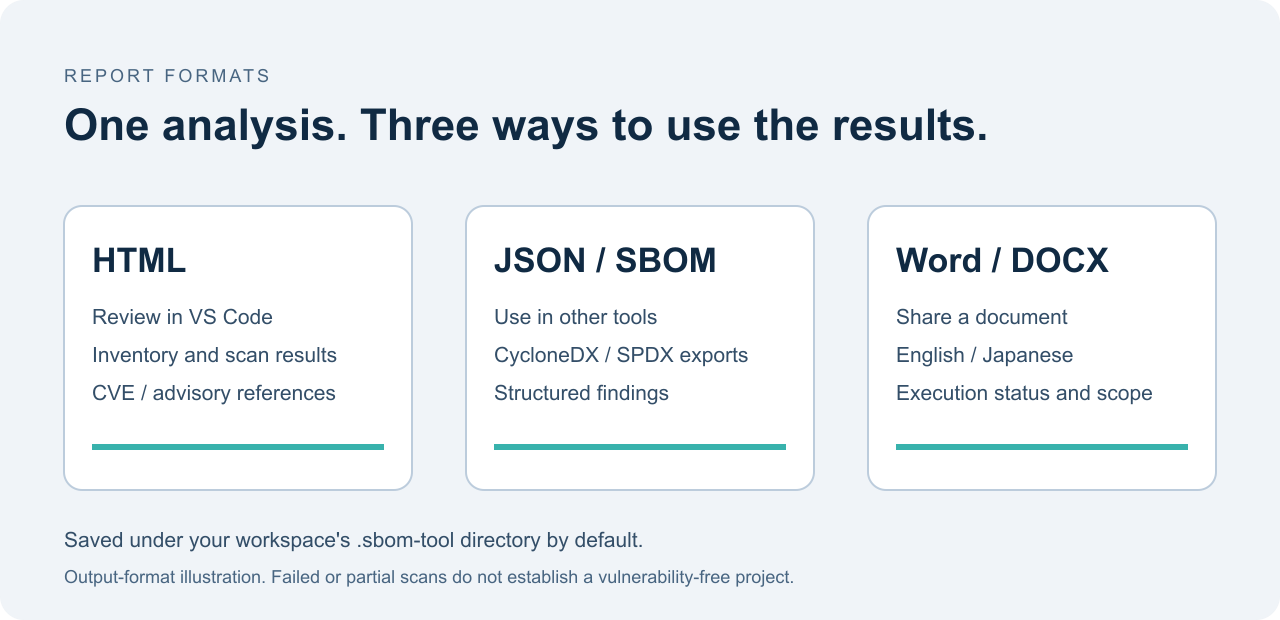
Generate HTML, JSON and Word Reports performs SBOM generation and vulnerability scanning, saves their matching snapshot, and exports a DOCX document. Export Latest Results as DOCX can re-export a saved analysis without running the scanners again. Word reports include the target, time, tools, status, counts, findings and dependency inventory, with English or Japanese labels. DOCX includes a cover page, severity-sorted findings tables, red critical/high cells and page numbers. Set optional sbomTool.reportCustomer and sbomTool.reportAuthor in VS Code Settings to add recipient and author names to the cover.
The dashboard displays the installed version and reports folder. Tool preparation appears only while Syft/Trivy are missing; Maintenance and recovery at the bottom offers reinstallation.
Default output location: SBOM-Reports/ inside the project. An explicit sbomTool.outputDirectory setting takes precedence. Previous .sbom-tool/ results are kept in place; change the setting to that folder to reopen them.
| File | Purpose |
|---|---|
sbom-report-*.html |
Browse the dependency inventory |
vulnerability-report-*.html / *.json |
Read findings or process them with another tool |
sbom-cyclonedx-*.json / sbom-spdx-* |
SBOM export; SPDX encoding depends on the generator |
security-report-*.docx |
Word report for sharing and review |
analysis-*.json |
Matching run snapshot used for later DOCX export |
sbom-raw-*.json |
Extension-normalized data, not a standard SBOM |
project-check-*.md |
Project/tool availability check |
The images above illustrate the workflow and output formats. Actual report content depends on the project and tool results. A failed or skipped scan can still produce a report describing its failure; it is not a clean bill of health. Review documents before sharing, as they contain dependency names and target paths. Exclude SBOM-Reports/ from your project’s Git repository.
- SBOM auto: tries Syft, then Trivy, then the built-in npm manifest reader.
- Scanner auto: tries Trivy, then npm audit. Falling back to npm reduces coverage to the selected npm project.
- Manifest: reads npm
package.jsonand lockfiles v1–v3. Without a lockfile, versions are estimates. - npm audit: requires Node.js/npm, a lockfile and registry access. For monorepos, select all detected projects or a single project. Discovery covers the root,
apps/*,packages/*, and declared npm workspaces using literal paths,*and**(up to eight directory levels). - Syft / Trivy: ecosystem coverage depends on the installed CLI version. SBOM generation and scanning independently inspect the source directory; this extension does not scan the generated SBOM file directly.
npm audit sends dependency information to the configured registry. Trivy uses network access for database updates. The extension does not automatically update dependencies or create a lockfile. CLI execution has a ten-minute timeout; analysis offers cancellation and prevents duplicate runs on the same folder.
| Setting | Default | Options |
|---|---|---|
sbomTool.sbomGenerator |
auto |
auto, syft, trivy, manifest |
sbomTool.vulnerabilityScanner |
auto |
auto, trivy, npm-audit |
sbomTool.defaultSbomFormat |
cyclonedx-json |
cyclonedx-json, spdx |
sbomTool.outputDirectory |
SBOM-Reports |
Workspace-relative or absolute path |
sbomTool.uiLanguage |
auto |
auto, en, ja |
sbomTool.resultOpenMode |
vscode |
vscode, external |
sbomTool.reportCustomer |
Empty | Optional Word cover recipient |
sbomTool.reportAuthor |
Empty | Optional Word cover author/company |
Use the dashboard or search SBOM Vulnerability Scanner in the Command Palette to generate reports, run individual operations, export DOCX, open saved results, clean old results, view execution logs or open the bundled user guide. Settings and individual actions are in expandable dashboard sections.
- No report button? Open SBOM Scanner. The older
masahirocom.sbom-toolextension has its own SBOM Tool view. The new view/commands have separate identifiers to avoid collisions; existingsbomTool.*settings remain supported. - Updated VSIX but old UI? Use Extensions → menu → Install from VSIX, select the latest file, then reload the window.
- ENOLOCK / scan failed? Create the lockfile using your project’s normal dependency setup, check connectivity and select the correct npm target. A zero count with
failedorskippeddoes not mean no vulnerabilities. - DOCX unavailable? Run analysis with this build first. Independent older result files are not mixed into a new report. DOCX structure/content have automated tests, and Japanese and English samples were visually checked with the bundled LibreOffice renderer. Pagination can differ between Word applications and installed fonts.
- Tool not found? Check PATH in the extension host, restart VS Code or use manifest/npm-audit for an npm project.
See the bundled Japanese user guide and troubleshooting guide. This is a development build, not a guarantee of complete vulnerability detection or licence compliance.
Enhance both your source code health and supply chain security:
- Codes Doctor: AI-assisted static analysis and automatic refactoring tool. While SBOM Vulnerability Scanner audits third-party libraries, license compliance, and security vulnerabilities, Codes Doctor analyzes the source code you write to identify defects, code smells, and performance bottlenecks with 1-click automated fixes.
- Get it: install from the VS Code Marketplace or Open VSX, or build from source below.
- Report bugs or request features: open a GitHub issue. Include your OS, VS Code version, extension version and the steps to reproduce.
- Contribute code: fork the repository and open a pull request against
develop. Read CONTRIBUTING.md for the coding standards and checks a contribution must pass.
npm ci
npm run package:release
The versioned VSIX and releases/sbom-vulnerability-scanner-latest.vsix are generated locally. Source: masahiroid/sbom-vulnerability-scanner. License: Apache-2.0.