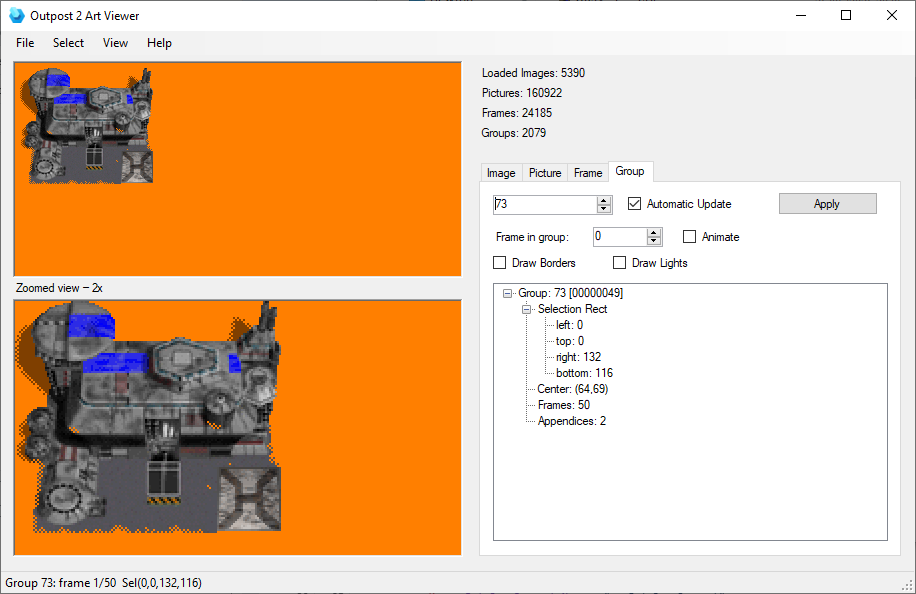
A modern re-creation of the original op2art Viewer 3.0 (2005, by Cynex) for
Outpost 2: Divided Destiny. It reads the game's art files (OP2_ART.BMP +
op2_art.prt) and lets you browse and export every image, picture, frame, and
animation group.
Written in VB.NET targeting .NET Framework 4.8 (Windows Forms).
- Browse the full art hierarchy via four tabs:
- Image – the lowest level: raw pixel data + palette + size.
- Picture – an image plus its position within a frame.
- Frame – multiple pictures composited together (correct draw order + transparency).
- Group – an animation: a sequence of frames, with a selection rectangle and centre.
- Dual render – the left side shows the selected art at 1:1, with a second 2× zoomed view below it (crisp nearest-neighbour, scrolls when larger than the panel).
- Group animation – plays automatically on the Group tab (toggle Animate), or step frames manually with Frame in group.
- Group overlays (faithful to the original):
- Draw Borders – the selection rectangle as white corner-brackets.
- Draw Lights – overlays the game's fixed "lights" group (index 47).
- Extended Info tree – shows the structured fields for the selected object (rect, palette, type, offsets, frame/picture counts, appendices…).
- Batch Save – export ranges of Images / Frames / Groups to BMP at 32 / 24 / 16 / "8 or 1"-bit colour depth. Images export losslessly in their native indexed format (8bpp with the sprite's palette, or 1bpp for shadows).
- View → Background Color – switch the canvas (both renders) between Gray,
the original op2art Orange (
0xFF7F00), Brown, or Green. - Settings persistence – paths, last selection, view toggles, window position
and batch-save options are saved to
op2art.ininext to the executable (same section layout as the original). - Group names – if
op2art_names.inisits next to the exe, the Group tab's status line shows which unit/building each group is (e.g. group 904 → "Cargo Truck Eden Gene Bank – dir 0"). It's a[GroupNames]section of<group>=<label>lines, generated from the Outpost2.exe decompile (the op2remakebuilding_anim_catalog.tsv+unit_anim_catalog.tsv). Optional — absent file just means no names shown.
- Windows with .NET Framework 4.8.
- An Outpost 2 installation (1.4.1 / OPU). The viewer expects:
OP2_ART.BMPin the Outpost 2 folder.op2_art.prtinOPU\base\sprites\under that folder.
This is a legacy (non-SDK) Windows Forms project. Build it with Visual Studio's
MSBuild, not dotnet build — the .NET SDK's resource compiler rejects the
legacy WinForms icon resource.
& "C:\Program Files\Microsoft Visual Studio\18\Community\MSBuild\Current\Bin\MSBuild.exe" OP2Art.slnOr open OP2Art.sln in Visual Studio and build normally. The executable is
written to ..\build\OP2ArtReader.exe (Debug) / bin\Release\ (Release).
- Launch
OP2ArtReader.exe. - On first run, browse to your Outpost 2 game folder (the one containing
outpost2.exe). The choice is remembered inop2art.ini. - Use the Select menu / tabs to pick an object, or File → Batch Save to export.
| File | Purpose |
|---|---|
CPrtFile.vb |
Loads op2_art.prt + OP2_ART.BMP; renders images, frames, groups. |
CPalette.vb |
Reads the PRT palette chunks. |
CIni.vb |
Minimal INI reader/writer (used for op2art.ini and op2art_names.ini). |
fMain.vb |
Main window: tabs, menus, rendering, animation, group names. |
fBatchSave.vb |
Batch export dialog (fBatchSave.Designer.vb for layout). |
fAbout.vb |
About box (fAbout.Designer.vb for layout). |
WinGDI.vb |
GDI interop for image blitting. |
All art is built from two files:
OP2_ART.BMP– raw 8bpp/1bpp pixel data only (no size or palette info).op2_art.prt– palettes, image headers (size/type/palette), and the picture/frame/group animation tables.
Levels: Image → Picture (image + offset) → Frame (composited pictures) → Group (animated frames + selection box). Palette index 0 is transparent. Image types 4 and 5 are 1bpp shadow masks that darken the background rather than being coloured sprites.
📄 Full format reference: docs/op2_art_format.md —
file structures, rendering semantics, shadow packing, and group border/lights behaviour.
- Original op2art Viewer 3.0 © 2005 by Cynex.
- Format documentation from the Outpost 2 community (forum.outpost2.net).
- This re-creation builds on the OP2Graphics / op2art recreation efforts.