






Delegate browser tasks. Keep your browser yours.
Kitsune is an MCP server and browser extension that connects Claude Code, Codex, Pi and other MCP clients to the Firefox, Zen or LibreWolf browser you already use. It's built for personal browser tasks—researching products, comparing pages, and drafting forms—rather than cross-browser testing. Your agent opens its own background tabs while you keep working in yours.
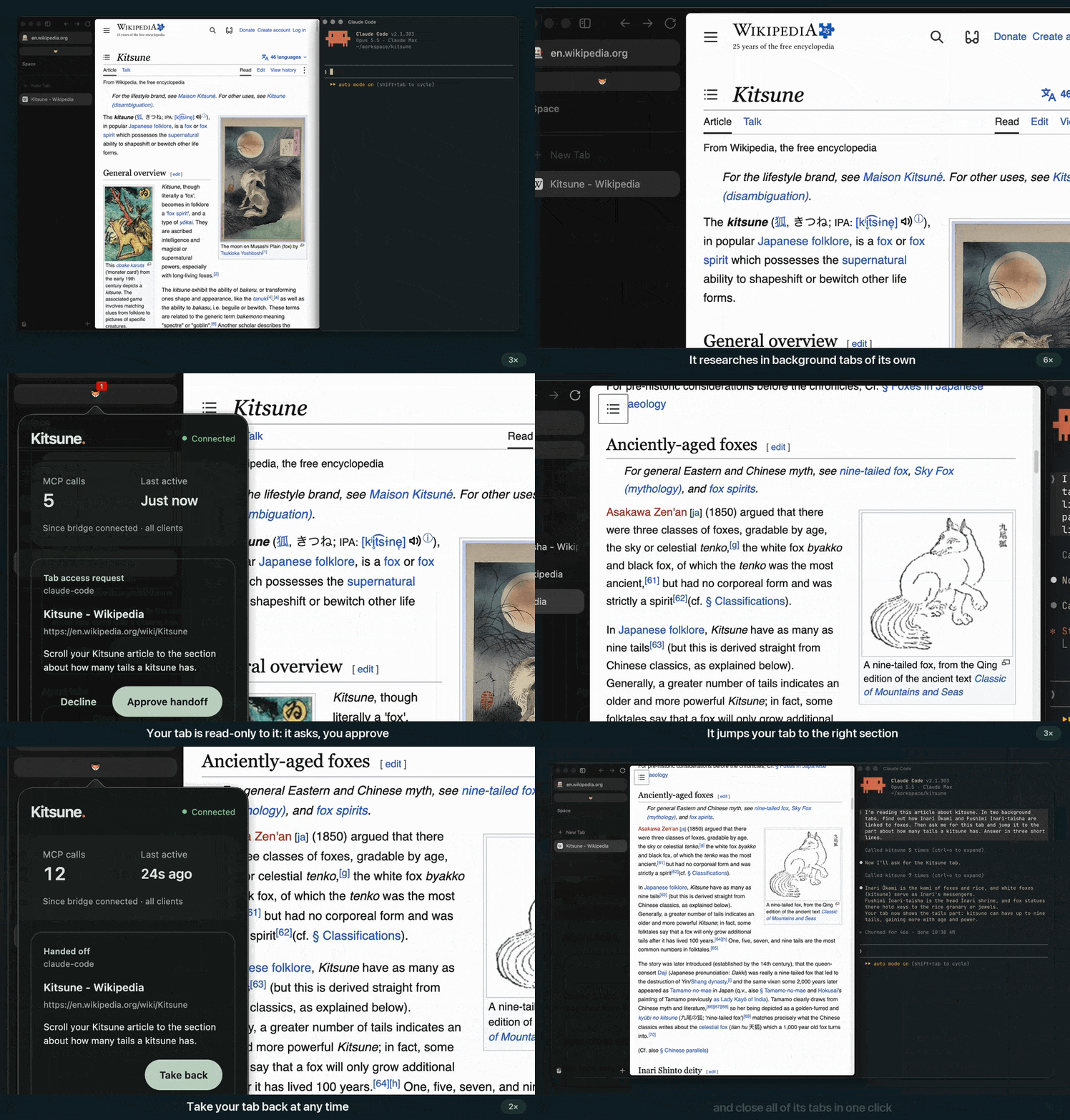
Your agent asks for a tab. You approve, then take it back. Watch the 45-second demo →
I built Kitsune after getting tired of switching back to my tab whenever my Playwright setup took focus, and opening Chrome for my agent when I already used a Firefox-based browser. I wanted browser automation that worked alongside me, not in my way.
- Keep working while the agent works. Agent-created tabs open in the background. Selecting a tab for the agent doesn't switch the tab you see.
- Your tabs stay yours. By default, the agent can read your tabs but cannot type, navigate, scroll or close them. It must request a handoff before changing one; you approve and can take it back.
- Stay in Firefox, Zen or LibreWolf. Reuse your existing sessions without opening a separate Chrome browser or installing WebDriver.
- A small tool surface. Six tools: Python for browser actions, plus direct controls for user help and recovery.
Kitsune is designed to reduce interruptions, not eliminate them: site-opened popups and OS-level trusted input can still move focus. See the shared-browser limits.
On 26 realistic web tasks Kitsune passed as many as Playwright MCP under Claude Code and Codex, and used the least input of four browser tools. Aside, EgoLite, Playwright MCP and Kitsune on 26 WebArena-Pro tasks: 208 attempts, graded by the sites' backend state and the agent's answer. How much less input depends on the agent: on the tasks every tool passed, Kitsune used 39% of Playwright MCP's input under Claude Code and 87% under Codex, with about half its tool calls under both.
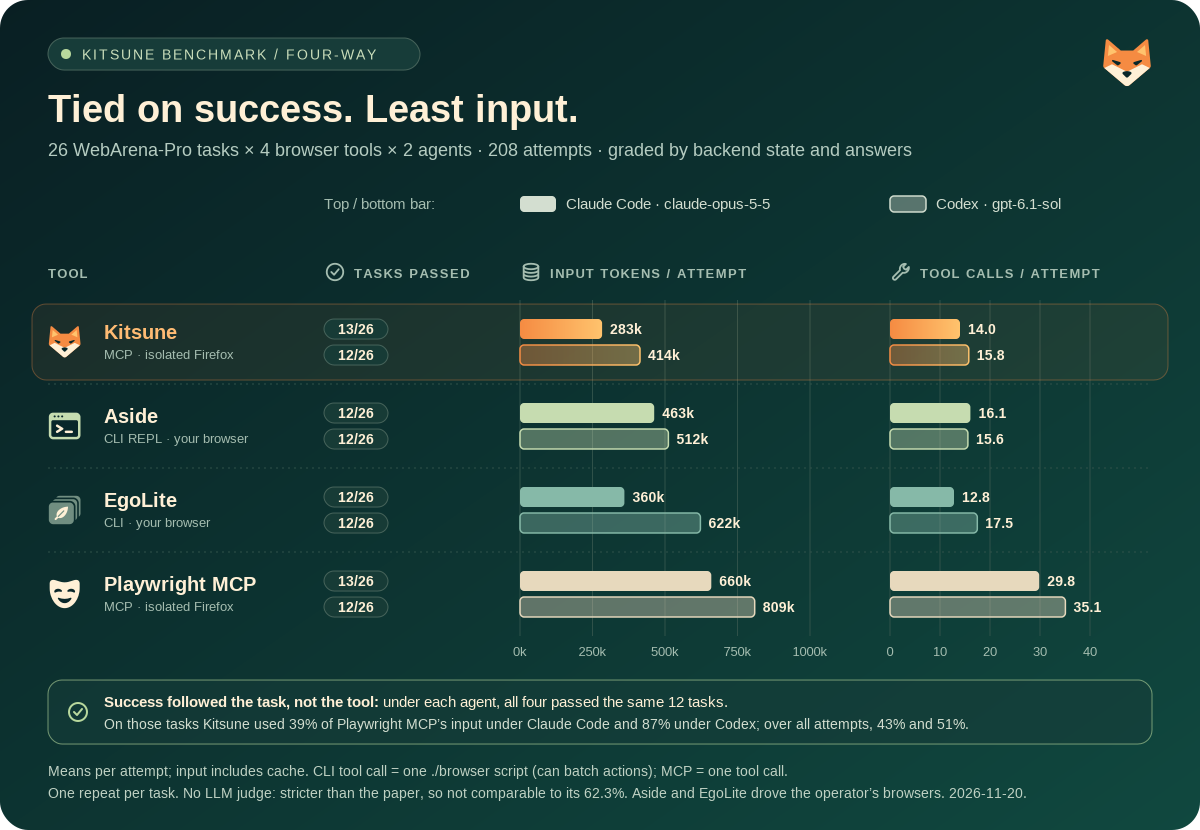
claude-opus-5-5 and gpt-6.1-sol, one attempt per task (19 test, 7 dev). Input includes cache, not billed cost. Grading has no LLM judge, so it is stricter than the WebArena-Pro paper's and not comparable to its scores. Aside and EgoLite used the operator's browsers; Playwright MCP and Kitsune ran an isolated Firefox. EgoLite (under Claude Code) and Aside (under Codex) made slightly fewer tool calls than Kitsune. Results, methodology and limitations →
-
Install uv.
-
Install the browser extension in Firefox, Zen or LibreWolf.
-
Add Kitsune to your agent. For Claude Code:
claude mcp add --scope user kitsune -- uvx --from kitsune-browser-mcp kitsune
Codex, Pi, OpenCode, Claude Desktop and Cursor are in Installation.
-
Keep the browser open and ask in plain language:
Research these three products in background tabs and compare them with links. Leave my current tab alone.
Fill in a draft of this form. Don't submit it.
Trust note: Python runs locally, not in a sandbox; set KITSUNE_SCRIPTING=0 to disable it.
Approvals do not prevent prompt injection. Use a separate profile for sensitive accounts and
read the security guide.
The website, junyeong-nero.github.io/kitsune, has an interactive demo of background tabs and handoff. The full documentation is at junyeong-nero.github.io/kitsune/docs:
- Installation: every MCP client, version pinning, upgrades
- Your tabs and approvals: what limits the agent: protected tabs, per-tool approvals, ask-before-act
- Tools: the default and legacy tool lists
- Python API: drive the browser from your own scripts with
pip install kitsune-browser - Troubleshooting · FAQ · Benchmarks · API reference