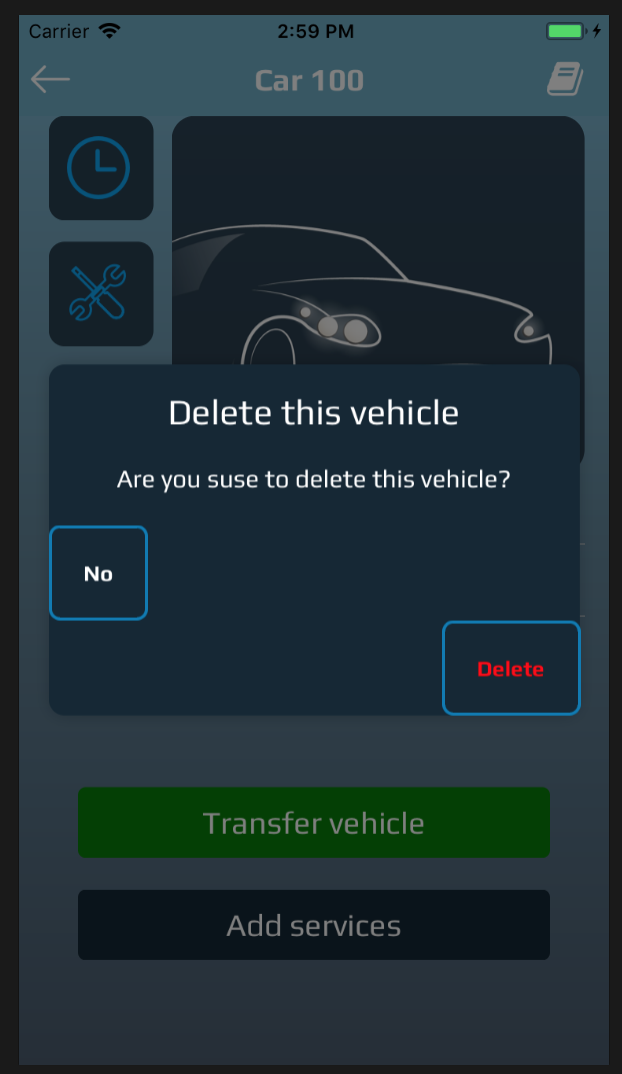
Could anyone help me with this problem. Here is my code.
DialogManager.show({ title: "Delete this vehicle", titleTextStyle: { fontFamily: "Play", color: "white", fontSize: moderateScale(22) }, titleAlign: "top", animationDuration: 200, dialogStyle: customModalSetting, ScaleAnimation: new ScaleAnimation(), children: ( <DialogContent> <View> <Text style={{ fontFamily: "Play", color: "white" }} adjustsFontSizeToFit > Are you suse to delete this vehicle? </Text> </View> </DialogContent> ), actions: [ <DialogButton textStyle={{ fontFamily: "Play", color: "white", fontSize: 14 }} buttonStyle={{ borderColor: "rgb(0,122,180)", borderRadius: 7, borderWidth: 2 }} key="1" text="No" align="left" onPress={() => DialogManager.dismiss()} />, <DialogButton textStyle={{ fontFamily: "Play", color: "red", fontSize: 14 }} buttonStyle={{ borderColor: "rgb(0,122,180)", borderRadius: 7, borderWidth: 2 }} key="2" text="Delete" align="right" onPress={() => dispatch(deleteVehicleRequest(form, navigation))} /> ] });
Could anyone help me with this problem. Here is my code.
DialogManager.show({ title: "Delete this vehicle", titleTextStyle: { fontFamily: "Play", color: "white", fontSize: moderateScale(22) }, titleAlign: "top", animationDuration: 200, dialogStyle: customModalSetting, ScaleAnimation: new ScaleAnimation(), children: ( <DialogContent> <View> <Text style={{ fontFamily: "Play", color: "white" }} adjustsFontSizeToFit > Are you suse to delete this vehicle? </Text> </View> </DialogContent> ), actions: [ <DialogButton textStyle={{ fontFamily: "Play", color: "white", fontSize: 14 }} buttonStyle={{ borderColor: "rgb(0,122,180)", borderRadius: 7, borderWidth: 2 }} key="1" text="No" align="left" onPress={() => DialogManager.dismiss()} />, <DialogButton textStyle={{ fontFamily: "Play", color: "red", fontSize: 14 }} buttonStyle={{ borderColor: "rgb(0,122,180)", borderRadius: 7, borderWidth: 2 }} key="2" text="Delete" align="right" onPress={() => dispatch(deleteVehicleRequest(form, navigation))} /> ] });