


A two part mod:
- Prepend cities with a symbol relative to their type for better management,
- Visualizing unicode characters via a Tutorials menu section that can be used for modding or unit/city naming.
In-game, this is what you'd see in the spy screen for example - notice capitals and CS's are clearly marked:
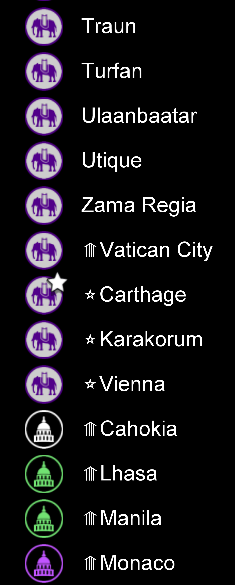
Unicode is notoriously variable on rendering symbols, per screen, per platform, etc.
⚠ For example, the map editor cannot render certain symbols, while the tutorials screen can. Android and Windows do not have a unified font base.
PR#15166 addressed one such issue lately. Alternative solutions to font rendering issues might be addressed by a mod like SomeTroglodyte/Sort-Icons.
💡 New: There are now Resources named with symbols from the Arrows block (U+2190) and a test render map. Glyph resources enable render testing in Editor and World screens.
- Start a new game, G&K base
- Select FancytextUnicode as an add-on mod
- Start the game
Now if you press F1 or tap to Civilopedia, under the Tutorials section, you will see a new FancyText Unicode section. The subsections demonstrate various symbols.
⚠ Symbols that render in tutorials may not render in another screen.
Using symbols in unit or city names adds a fun and readable attribute! ♬
All capitol cities ⭐ and city-states ⟰ in this mod have a symbol prefix.
Aliased cities look like:
Babylon = ⭐Babylon
Athens = ⭐Athens
Beijing = ⭐Beijing
...
Brussels = ⟰Brussels
Bucharest = ⟰Bucharest
Florence = ⟰Florence
...
⚔ Improve sorting city/unit names and labels in various screens and menus!
⚔ Better unit identification at-a-glance!
By adding a symbol prefix to a name:
❈ The spy_screen cities will auto-sort based on Capitols and CS's
❈ The city_screen [city name] reveals if this city is a CS or Capitol
❈ The unit_screen can auto-sort by special cities
By adding prefix symbol badges to high ranking units, this helps manage unit strategy faster.
Different unit types or groups can be assigned their own ranks (manually of course, just another way to crawl).
An even more clever use is for naming mod assets in very unique ways.
Rather than a long description, a unicode symbol says it all, i.e.:
⮝ ╦.png
..says this asset has reduced a descriptive name from 5 words to 2 symbols, describing an upper aligned top-to-bottom T-intersection.
Add unit prefixes like in these examples:
☮ Great Prophet
⚛ GDR Boss
⚍ Lt Cmdr
⛉⛉⛉ Sky Admiral (3rd rank)
⚑⭐ Washington (the additional flag tells me this is my capital city, vs other captured capitals)
☹ Copying characters? There does not appear to be a way to highlight-select text in-game, other than from city or unit renaming.
☹ You cannot copy characters from this help screen! See below.
☹ 😝 ☹ 😛 ← the Emoji Faces (Smileys) pictograph set doesn't work. Other basic emojis do ☠ ☺
To use these symbols for your cities or units:
▸ tap the link under the sections' preview block which opens Firefox etc,
▸ copy the symbol from your browser,
▸ paste into an Unciv textbox from in-game.
The FancyText sections here are known good rendering Unicode blocks. Pictograph symbols generally don't work. More sections to be added.