
A Retrieval-Augmented Generation (RAG) application built with .NET 8, Microsoft Semantic Kernel, Azure OpenAI, Qdrant, Docker, and PdfPig.
The application lets users ask questions in multiple languages and receive responses grounded in a private collection of PDF documents.
Originally created for Microsoft's .NET Hack Together, the project demonstrates how RAG can be implemented entirely within the .NET ecosystem.
This project started from a real problem. A relative of mine was applying to a new humanitarian program created by the Government of Canada, and there was a lot of conflicting information about the eligibility requirements and application process.
I built this assistant to provide a more reliable way to find answers using only the program's official documentation. It uses Retrieval-Augmented Generation to ground responses in a curated collection of government PDFs rather than relying on general model knowledge — so the assistant can only answer from the source material, and says nothing when the documents don't cover the question.
The application follows a standard RAG pipeline:
- PDF documents are parsed using PdfPig.
- Extracted text is divided into smaller chunks.
- Embeddings are generated and stored in Qdrant.
- A user's question is converted into a semantic search query.
- Relevant document context is retrieved from the vector database.
- Semantic Kernel combines the retrieved context with the user's question.
- Azure OpenAI generates a response grounded in the retrieved documents.
- C# / .NET 8
- Microsoft Semantic Kernel
- Azure OpenAI
- Qdrant Vector Database
- Docker
- PdfPig
- Retrieval-grounded responses based on supplied PDF documents
- Multilingual questions and answers
- Semantic search using document embeddings
- Persistent vector storage with Qdrant
- PDF text extraction using PdfPig
- Conversational interface using Semantic Kernel
- Docker-based Qdrant deployment
- Designed to reduce unnecessary LLM context and token usage
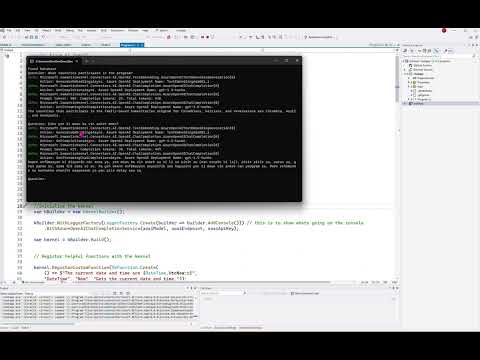
Click the image to watch the video demonstration.

Multilingual interaction with application logging enabled.

The assistant answering questions in multiple languages.
The application accepts a natural-language question, retrieves relevant information from the indexed documents, and provides that context to the language model before generating the response.
The hackathon required building entirely within the .NET ecosystem, which shaped most of these choices. Working inside that constraint is a large part of what made the project interesting — RAG tooling at the time was overwhelmingly Python-first.
Orchestration had to happen in C#, and Semantic Kernel was the most complete option for doing that natively in .NET. It manages the interaction between the application, the language model, retrieved context, and registered functions.
Same constraint applied to document parsing: extraction had to stay in .NET rather than shelling out to a Python library. PdfPig provides the text that is later chunked and embedded.
Qdrant provides vector similarity search for document chunks, allowing retrieval based on semantic similarity rather than keyword matching. As a standalone service it sits outside the .NET constraint, and running it in a container kept the vector store swappable and the local setup reproducible.
Qdrant runs locally in Docker, making the vector database easy to configure and keeping the development environment portable.
On startup, the application checks whether the required Qdrant collection already exists. If it does not:
- PDF files are loaded from the configured data directory.
- Text is extracted from each document.
- The text is divided into smaller chunks.
- Embeddings are generated for those chunks.
- The chunks and their embeddings are stored in Qdrant.
When a user asks a question:
- The application searches Qdrant for semantically relevant document chunks.
- The retrieved context is added to the prompt.
- Semantic Kernel sends the question and supporting context to the language model.
- The generated response is returned to the user.
Indexing runs only once per collection, so subsequent starts skip straight to answering.
- .NET 8 SDK
- An Azure OpenAI deployment and API key
- Qdrant — either running locally in Docker (step 2 below) or reachable at a configured endpoint
- Docker, if you are running Qdrant locally
1. Clone the repository
git clone https://github.com/edilma/RAG-App-HackTogether.git
cd RAG-App-HackTogether
2. Start Qdrant
If you are running it locally:
docker run -p 6333:6333 qdrant/qdrantIf Qdrant is already running elsewhere, point the application at that endpoint instead.
3. Set your Azure OpenAI API key
# macOS / Linux
export AZURE_OPENAI_API_KEY="your-key-here"
# Windows (PowerShell)
$env:AZURE_OPENAI_API_KEY = "your-key-here"4. Add your documents
Place the PDF files you want the assistant to answer from in the data/ directory.
5. Run the application
dotnet runOn first run the application indexes the documents into Qdrant. Once indexing completes, you can start asking questions in any language.
.
├── AiCore.cs           # Semantic Kernel setup, embeddings, and chat orchestration
├── chatapp.csproj      # .NET 8 project file
├── data/               # PDF documents indexed into the vector store
├── images/             # Screenshots and demo assets
└── Properties/
- The assistant answers only from the documents provided. Questions outside that material return no answer by design — the goal was reliability over coverage.
- Chunking is fixed-size rather than structure-aware, which works for the government PDFs used here but would need revisiting for documents with complex tables or layouts.
- There is no automated evaluation harness. Answer quality was assessed manually against the source documents.
See LICENSE for details.