
A VFX plate-preparation workflow built on FFmpeg — inspect footage, set IN/OUT, and export EXR sequences + proxies in one step.
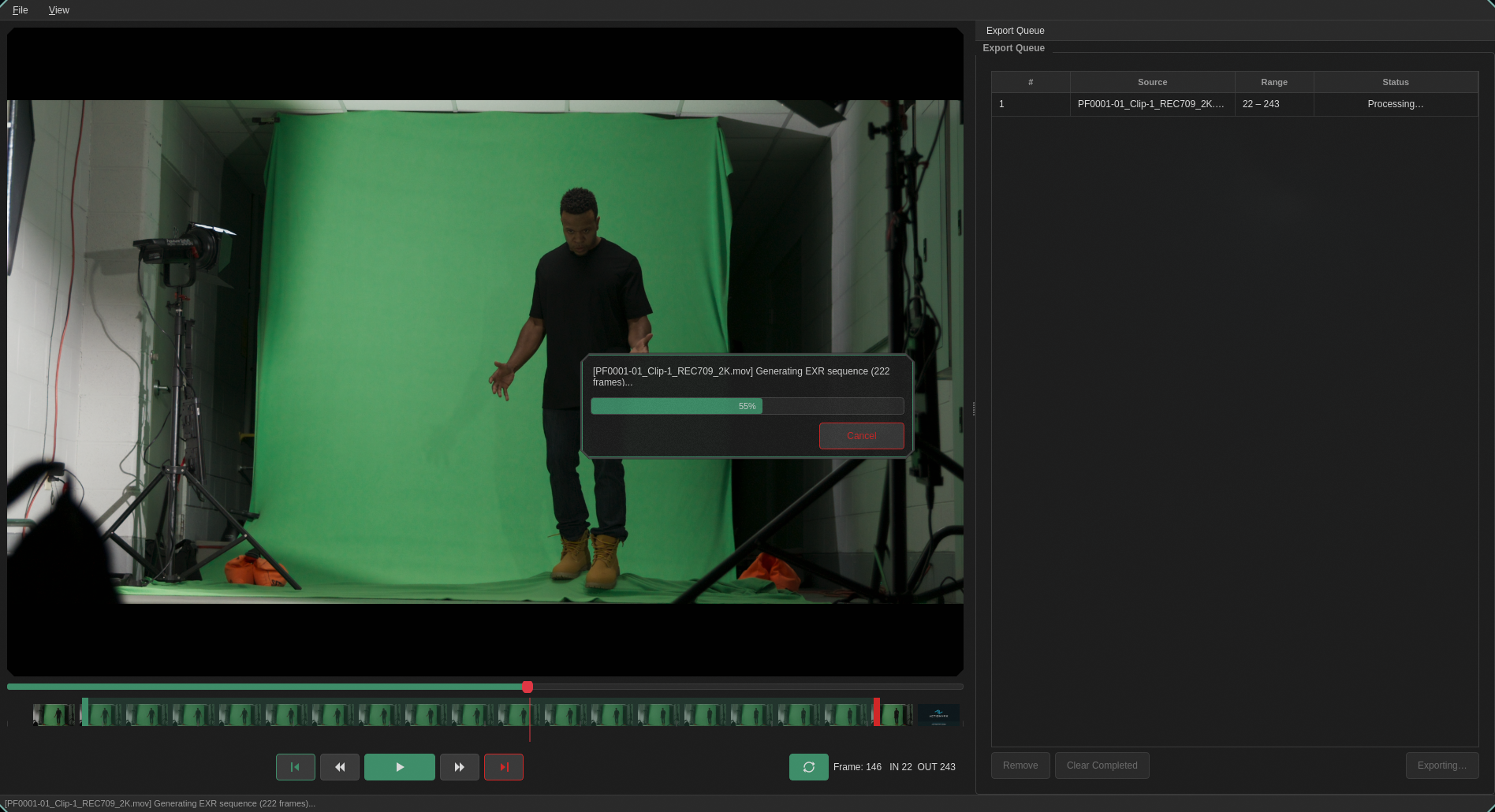 Plate's GUI — load a clip, scrub through frames, set IN/OUT on the timeline, and export.
Plate orchestrates FFprobe, FFmpeg, and (optionally) PySide6 into a single plate-prep pipeline. Open a clip, choose your frame range, and get back:
- A proxy — lightweight H.264 for review
- An EXR sequence — ready for compositing
- A manifest.json — machine-readable metadata
All in one shot-named folder.
# Prerequisites: FFmpeg on your PATH, Python 3.10+
pip install plateprep

# CLI — single clip
plate footage.mov --in 1204 --out 1389 --start-frame 1001 --output ./shots

# GUI
pip install "plateprep[gui]"
plate-guishots/
└── footage/
├── proxy.mp4
├── exr/
│ ├── footage.001204.exr
│ ├── footage.001205.exr
│ └── ...
└── manifest.json
- Visual frame-range selection — GUI timeline with draggable IN/OUT handles
- EXR export — 32-bit float, configurable compression (none/rle/zip1/zip16)
- Proxy generation — H.264, configurable max width, burn-in (frame number, timecode, source name)
- Color management — LUT (.cube) or OCIO colorspace transform baked into EXRs and proxies
- ComfyUI export — display-referred 16-bit PNG sequence (OCIO display/view baked in, scaled to a max width) ready for ComfyUI
- Shot scaffolding —
--shot img01_envlays outref/ comfy/ paint/ nuke/ renders/ breakdown/ plates/task folders with versioned artifact names (img01_env_v001, auto-incremented per export);--new-shotscaffolds an empty shot - Batch processing — process multiple clips from a JSON file
- Export presets — "ACES 2K", "Rec709 HD", "Archival 4K" with user-defined presets
- Nuke script export — auto-generate a
.nkscript pointing at your EXR sequence - Shot queue — queue multiple exports from the GUI, run them in the background
 The timeline ruler with IN/OUT handles and frame-accurate scrubbing.
plate SOURCE --in IN --out OUT [options]
plate --batch BATCH_FILE [options]| Option | Default | Description |
|---|---|---|
--in |
required | IN frame (inclusive) |
--out |
required | OUT frame (inclusive) |
--start-frame |
0 |
First frame number in the source |
--output |
./output |
Root output directory |
--proxy-width |
1920 |
Max proxy width (never scales up) |
--exr-pixfmt |
gbrpf32le |
EXR pixel format |
--exr-codec |
zip1 |
EXR compression (none/rle/zip1/zip16) |
--frame-padding |
6 |
Zero-padding for EXR frame numbers |
--skip-exr |
off | Skip EXR generation |
--skip-proxy |
off | Skip proxy generation |
--nuke-script |
off | Generate a Nuke script |
--preset |
— | Export preset name |
--burn-in |
— | Overlays on proxy: frame_number, timecode, source_name |
--lut |
— | Path to .cube LUT |
--ocio-config |
— | OCIO config path |
--ocio-src |
— | Source colorspace |
--ocio-dst |
— | Destination colorspace |
--shot |
— | Shot name (e.g. img01_env); switches to the shot layout with versioned names |
--shot-version |
auto | Force a version number (requires --shot) |
--new-shot |
— | Scaffold an empty shot folder structure and exit |
--comfy |
off | Also export display-referred 16-bit PNGs to comfy/ |
--comfy-width |
1024 |
Max width for ComfyUI PNGs (never scales up) |
--ocio-display |
— | OCIO display for the ComfyUI export |
--ocio-view |
— | OCIO view for the ComfyUI export |
--comfy bakes --ocio-display/--ocio-view (with --ocio-config +
--ocio-src) into the PNGs; without display/view it reuses the main
color transform. Given without --ocio-dst, the OCIO options apply to
the ComfyUI PNGs only and the EXRs/proxy are left untouched:
plate clip.mov --in 1001 --out 1100 --comfy \
  --ocio-config config.ocio --ocio-src "ACEScct" \
--ocio-display "sRGB - Display" --ocio-view "ACES 1.0 - SDR Video"# Scaffold an empty shot
plate --new-shot img01_env --output ./shots
# Export into it — picks the next free version automatically
plate clip.mov --in 1001 --out 1100 --shot img01_env --output ./shots --comfy --nuke-scriptshots/
└── img01_env/
├── ref/ paint/ renders/ breakdown/
├── plates/img01_env_v001/img01_env_v001.001001.exr …
├── comfy/img01_env_v001/img01_env_v001.001001.png …
├── nuke/img01_env_v001.nk
├── proxy_v001.mp4
└── manifest.json
Re-running the same command writes _v002, and --shot-version 1
overwrites v001. The folder set is configurable via
[project] folders = [...] in ~/.plate/config.toml. Batch entries
accept per-entry "shot" / "shot_version" keys.
[
  {"source": "clip_a.mov", "in": 1001, "out": 1100},
  {"source": "clip_b.mov", "in": 1204, "out": 1389, "proxy_width": 1280}
]
plate --batch jobs.json --output ./shotsEvery export produces a manifest.json with shot metadata — designed to
plug into downstream automation or AI-assisted ingest pipelines.
{
  "shot": "footage",
  "source": "footage.mov",
  "in": 1204,
  "out": 1389,
  "exported_frames": 186,
  "proxy": "shots/footage/proxy.mp4",
  "exr_dir": "shots/footage/exr",
  "fps": 23.976,
  "width": 4096,
  "height": 2160,
  "colorspace": "bt709",
  "has_audio": true
}from plate.pipeline import PlatePipeline
pipeline = PlatePipeline(
source="footage.mov",
in_frame=1204,
out_frame=1389,
start_frame=1001,
output_root="./shots",
)
result = pipeline.run()
print(result.manifest_path)- Python 3.10+
- FFmpeg (provides both
ffmpegandffprobe) on yourPATH - PySide6 — only for the GUI (
pip install plateprep[gui]) - OpenColorIO — only for OCIO transforms (
pip install plateprep[ocio])
MIT