There are several generators in this project: AutoInterface, AutoException, AutoSettingsGenerator, and OpenApiGenerator.
The purpose of this generator is to save you from some boilerplate code. In many cases, we add an interface to a class to make it testable. However, every interface added like this pollutes a solution and adds some maintenance cost. The better approach is to automatically extract an interface with the source generator; the interface will always be up-to-date with the actual implementation.
In case you are using Visual Studio 2019 syntax highlighting can be broken. In order to fix this, please follow the following: http://stevetalkscode.co.uk/debug-source-generators-with-vs2019-1610
- Add nuget package
dotnet add package Dojo.AutoGenerators- Modify .csproj file like this:
<PackageReference Include="Dojo.AutoGenerators" Version="1.1.5" />
  <IncludeAssets>all</IncludeAssets>
  <PrivateAssets>analyzers</PrivateAssets>
</PackageReference>- Make your class partial.
- Add AutoInterface attribute. It will automatically generate an interface and include all public methods.
- Default lifetime is
Scoped. - You can set explicit lifetime using
AutoInterfaceLifetime.SingletonorAutoInterfaceLifetime.Transient.
- Default lifetime is
- Delete manually created interface.
- Register generated interfaces in DI:
public void ConfigureServices(IServiceCollection services)
{
  services.AddAutoInterfaces();
  ...
}
This code:
// Foo.cs
[AutoInterface(Lifetime = AutoInterfaceLifetime.Transient)]
public partial class Foo
{
    public ReturnType Method1()
    {
      // ...
    }
}
Generated DI extension method:
services.AddAutoInterfaces();Will generate code quivalent to:
// IFoo.cs
public class IFoo
{
  ReturnType Method1();
}

// Foo.cs
public class Foo : IFoo
{
    public ReturnType Method1()
    {
      // ...
    }
}
You can also see generated code.
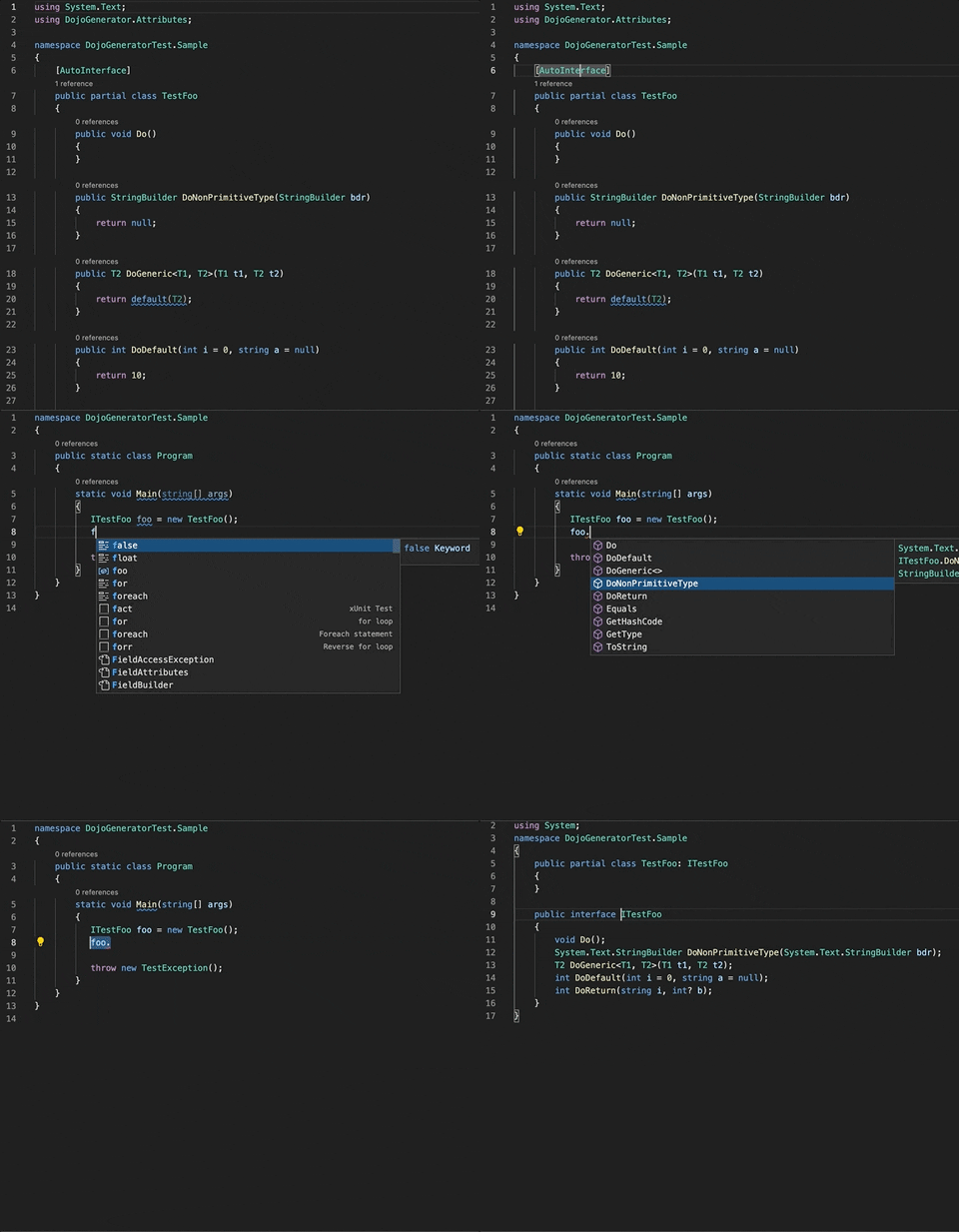
Most of our exceptions are basic boilerplate and contain only standard constructors. Instead, you can use AutoException attribute:
using Dojo.Generators;

namespace DojoGeneratorTest.Sample
{
    [AutoException]
    public partial class TestException
    {
    }
}
Which will generate code equivalent to this one:
using System;
using System.Runtime.Serialization;

namespace DojoGeneratorTest.Sample
{
    public partial class TestException : Exception
    {
        public TestException()
        {
        }

        public TestException(string message) : base(message)
        {
        }

        public TestException(string message, Exception innerException) : base(message, innerException)
        {
        }

        protected TestException(SerializationInfo info, StreamingContext context) : base(info, context)
        {
        }
    }
}The purpose of this generator is to generate settings POCOs from appsetting.json file. Additionally, extension code
for IServiceCollection class is generated, that can be used for easy settings injection. All first level settings classes are auto-injected
after calling the AddAppSettings auto-generated code.
- Add nuget package
dotnet add package Dojo.AutoGenerators- Inject and bind settings using autogenerated code:
public void ConfigureServices(IServiceCollection services)
{
    services.AddAppSettings(_configuration);
    ...
}Dojo.OpenApiGenerator reads OpenAPI 3.0.x schemas at compile time and generates abstract ASP.NET Core controller base classes, model POCOs, and API versioning infrastructure.
- Add nuget package:
dotnet add package Dojo.OpenApiGenerator- Configure the package reference in your
.csprojso it is analyzer-only:
<PackageReference Include="Dojo.OpenApiGenerator" Version="x.x.x">
  <IncludeAssets>all</IncludeAssets>
  <PrivateAssets>all</PrivateAssets>
</PackageReference>- Add OpenAPI schema files (
.json,.yaml,.yml) underOpenApiSchemas/at project root. - Inherit from generated
{Title}ControllerBaseclasses and implement abstract actions. - Register generated infrastructure:
services.AddApiConfigurator();For full documentation, see Dojo.OpenApiGenerator README.
To output source-generated files into a dedicated folder, add the following in your .csproj:
<PropertyGroup>
		<!-- Output source generated files to a specific directory -->
    <EmitCompilerGeneratedFiles>true</EmitCompilerGeneratedFiles>
    <CompilerGeneratedFilesOutputPath>Generated</CompilerGeneratedFilesOutputPath>
</PropertyGroup>
  <ItemGroup>
		<!-- Exclude generated files from compilation -->
    <Compile Remove="Generated\**\*.cs" />
</ItemGroup>Package publishing is triggered by Git tags.
Release steps:
- Make sure the target commit is merged and CI is green.
- Fetch tags and check the latest published tag:
git checkout main
git pull origin main
git fetch --tags
git tag --sort=-v:refname | head -n 1- Create and push the next SemVer tag in format
vX.Y.Z:
git tag v1.2.6
git push origin v1.2.6- Cloud Build picks up the tag and runs the publish pipeline.
- The pipeline validates the tag, writes the package version to
nuget-version, packs, and pushes to Nexus.
For full release details (variables, suffix behavior, and checklist), see CONTRIBUTING.md.