Repository navigation
Simulator Explanation
This is the file that is responsible for setting up the menus for users to choose the scenario and scheduling algorithm they want to run. It then is responsible for asking the user to select a seed value. Once these 3 selections are done it will use a branch of if statements to select the correct scenario and scheduling algorithm to run. It will then create either a queue for the FIFO algorithm or a priority queue for the SJF algorithm. Once that is done, a for loop is used to generate 40 random processes using the chosen seed. This seed generates random service times between 1 million and 1 billion. It also generates random service times between 1 and 8. Additionally, each process is assigned a process ID between 1 and 40. These processes are pushed into either the priority queue or the regular queue using structs in order to store multiple variables in a single queue entry. Once the process generation is done createProcess.cpp will call the method in the FIFO or SJF file responsible for executing the processes. By calling this method, the contents of the queue are passed as a parameter, as well as the speed and memory capacity constraints.
These two .cpp files are very similar in functionality, with the only major difference being that FIFO.cpp uses queues to schedule its processes on the processors while SJF.cpp uses a priority queue to schedule its processes. A priority queue is used for SJF in order to order the processes from smallest to largest service times.
Both files begin with a while loop checking of any of our three queues are empty. If they are not empty the program will proceed. They then check if all of the processors are full and running a process. If all processors are full then the processes on them continue running until one of them finishes. Once one of these processes finishes it will signal that is done and open that processor up for use. All other processes will halt execution and the program will go on to putting a new process on that open processor. This is done by checking which processor is flagged as open. Especially for scenario 2, once a processor is found to be open it will check if its memory constraints are able to put the process on the processor of if the process is too large. If the process is too large it will either be put on the 4GB queue or the 8GB queue to be run on the processor that fits its memory constraint. If the process is found to be the correct size all of its data will be put into variables that are put into a function call to load the process on that processor. It will also send a signal that the process is now full. For scenario 2 processors 3 & 4 draw processes from two queues. If there is a process waiting in either its 4GB queue for processor 3 or 8GB queue for processor 4, it will first draw processes from that processor before attempting to draw a process from the process queue.
Once all the queues are empty there is still a possibility that there are processes remaining that haven't finished executing yet. So at the bottom of each file we have a while loop, checking the remaining service time of each process on the processor and those processes will run until completion when at that point they will flag that they are completed.
Once all processes are completed, all the processes have been scheduled and completed and the program will output the results of that algorithm.
An example of the situation described above for how processes are determined if they can run of a given processor is shown here.
else if(processorFull1 == false){
    node temp = processes.front();
    int processMemorySize = temp.memorySize;
    if(processMemorySize <= memory1){
        long processServiceTime = temp.serviceTime;
        int ID = temp.processID;
        IDNumber.push(ID);
        outputServiceTime.push(processServiceTime);
        outMem.push(processMemorySize);
        waitTime.push(totalTurnaround);
        long totalTime = totalTurnaround + processServiceTime;
        outTotalTime.push(totalTime);
        processes.pop();
        processorFull1 = true;
        if(temp.serviceTime != 0){
            temp1 = processor1(0, processServiceTime, ID, processServiceTime);
        }
    }
    else{
        if(processMemorySize > 2 && processMemorySize < 5){
            fourGB.push(temp);
            processes.pop();
        }
        else{
            eightGB.push(temp);
            processes.pop();
        }
    }
}
The processor checks if it is full, if it isn't it will get the memory size of the process in the front of the queue. It will then check if the process meets the memory constrains of the processor. If it doesn't it will assign it to either the fourGB queue or eightGB queue depending on its memory constrains. If the process does meet the processors memory constraints it will get the process service time and ID. It will also insert some information about the process to be used later when we output the results. It then pops the process from the processes queue, signal that the processor is full and then assign that process to the processor, using the correct parameters. Speed is set to 0 initially so the process won't run until execution of all processes continues in the initial if statement checking if all processors are full.
This is where all the structs used in this project are defined. Structs are a way of storing multiple variables in a single block of memory. We use structs in order to store in 3 different situations throughout our project
The first struct we use is called data, which looks like this:
struct data{
    data(long sp, long r, int p) : speed(sp), remainingServiceTime(r), processID(p){}
    long speed;
    long remainingServiceTime;
    long processID;
};
We use this struct to store the speed that the process is executing on its assigned processor, how much service time the process has left after it has gone through its cycles to allow another process to run on another processor, and the process ID of the process. The values in this struct are received by our processor classes and is returned back to the scheduling class to be called again until the process finishes.
The second struct we use is called node, which looks like this:
struct node{
    node(long s, int m, int i) : serviceTime(s), memorySize(m), processID(i){}
    long serviceTime;
    int memorySize;
    int processID;
};
This struct is used to store in the queue that we use for the FIFO scheduling algorithm. It stores the service time that was generated, the amount of memory the process requires, and the process ID of the process. We store the nodes in the queue created when the process is created. We can access each value in the struct by either looking at the one stored at the front of the queue or other we can look at other structs values by popping the first node off of the queue, making another node the first in the queue.
Lastly, the third struct we use is called priorityNode, which like this:
struct priorityNode{
    priorityNode(long s, int m, int i) : serviceTime(s), memorySize(m), processID(i){}
    long serviceTime;
    int memorySize;
    int processID;

    bool operator<(const priorityNode& compare) const{
        return serviceTime > compare.serviceTime;
    }
};
This struct is used to be in stored in the priority queue that we use for the SJF scheduling algorithm. It stores the randomly generated service times and memory sizes of the processes as well as the process ID's. There is also a bool operator pat of the struct that is used to compare the service times in order to order the priority queue from smallest to largest service time.
All of our processors functioned exactly the same.
data processor#(long speed, long sTime, int processID, long serviceTime){
    if(sTime > speed * 1000000000){
        sTime = sTime - (speed * 1000000000);
        return data(speed, sTime, processID,  serviceTime);
    }
    else{
        return data(speed, 0, processID, serviceTime);
    }
}
The processor would receive the speed it was supposed to function at, how much service time it had remaining, the ID of the process it was running and the original service time that the process began with. It would then check if the remaining cycles on the process was greater then the amount of the cycles per second the processor runs at. If the remaining cycles was greater it would subtract the amount of the cycles per second the processor ran at and then returned that value so it could be run again. If the remaining cycles was less than the cycles per second the processor runs at then the process would be over after its execution so it would return 0 cycles remaining to where it was called.
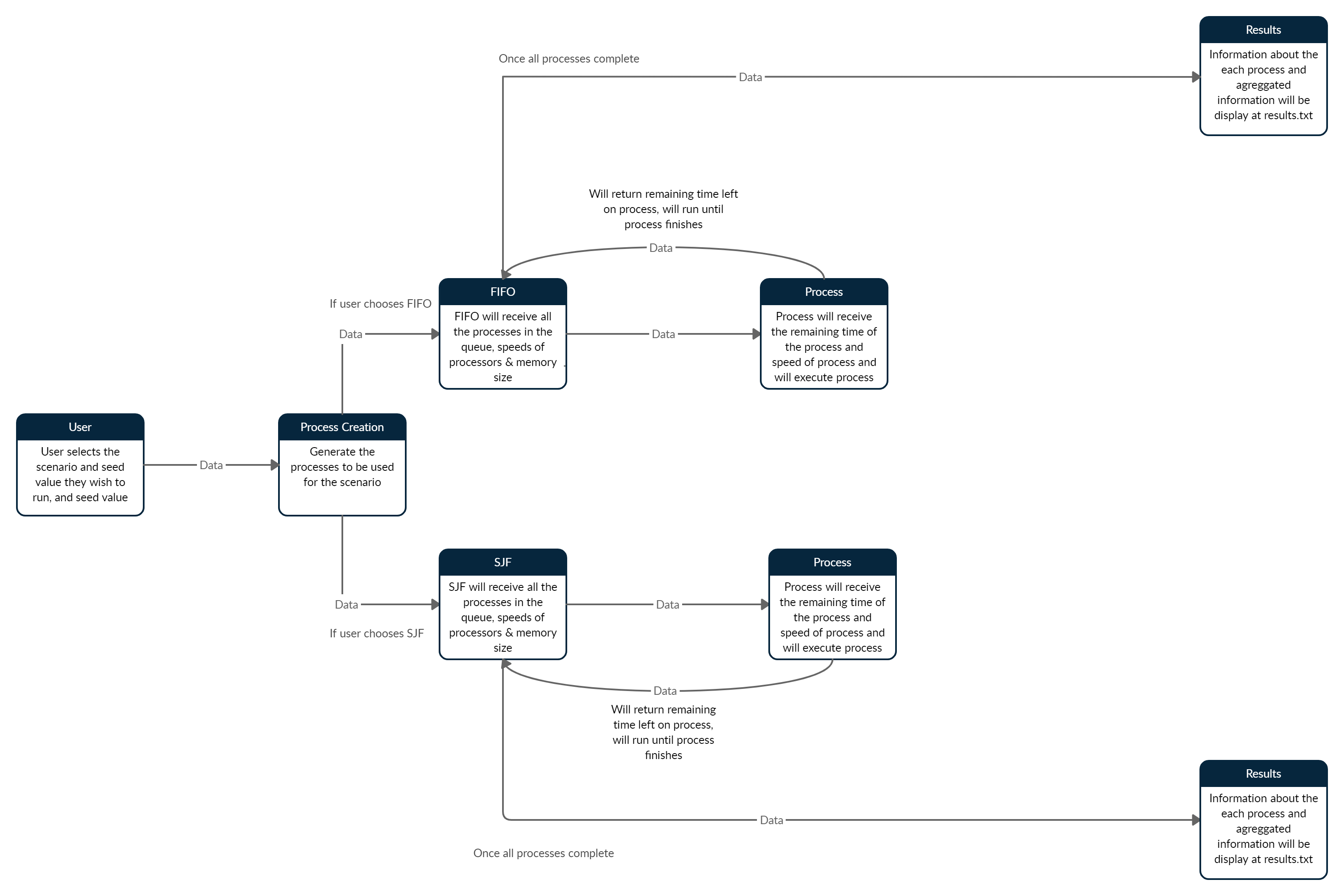 This is an overall Data Flow diagram of how our program works. The data starts by the user entering their desired values for seed, scenario & algorithm. This then goes to the process creation where the processes are created using the random seed. For a chosen algorithm that data is sent to the correct file with the correct memory and speed information for the chosen scenario. FIFO/SJF schedule the correct processes onto a processor which constantly returns the amount of service time left after its execution, continuing to run until the process is finished. Then a new process is put on that processor. Once all the processes are finished all the information collected will be output to the results.txt file.