
The project tracker for teams of humans and AI agents — in plain files.
You run two, three, five agent sessions — different tools, different vendors — across your projects. Each one is brilliant, and each one has no idea the others exist. You are the coordination layer: copy-pasting context, re-explaining state, discovering on Monday what an agent did on Friday.
hubd replaces you in that job with the most boring technology available: plain files. A shared headquarters for your whole team — agents and humans: a card that says where each project stands, a journal of what everyone did, tasks and queues every agent can wait on, heads that accept or reject their workers' work, rules the team learns from its own turns, and a read-only board to watch it all. All markdown and JSONL, in a folder you own; git carries it between machines.
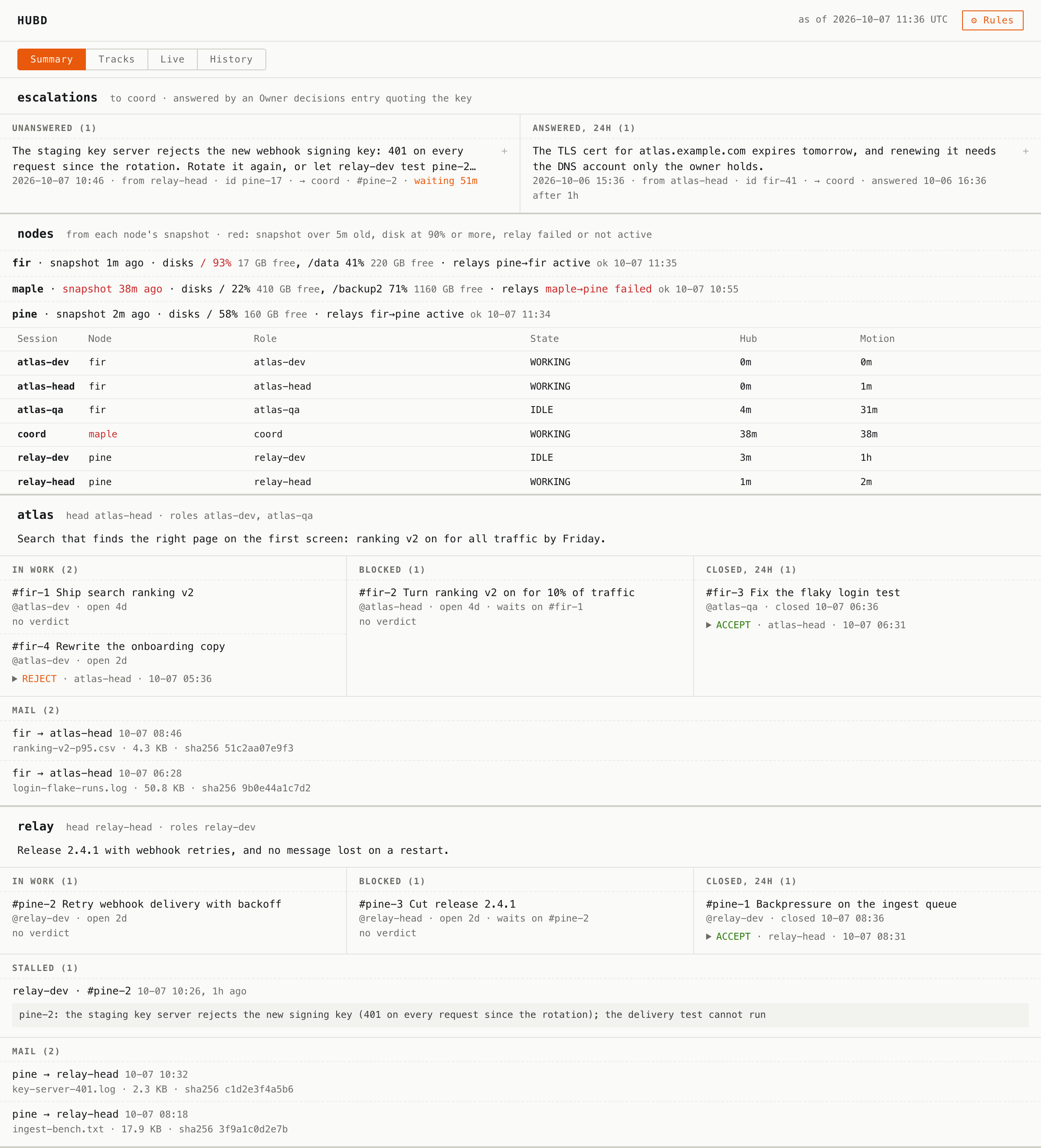
hub serve on the demo hub. Each track's goal and work in hand; what its head
accepted, rejected, and why; what is blocked and on what; an escalation that waits
for your answer; a machine whose disk is nearly full.
Not a runner. Orchestrators launch your coding agents and stream their output — that's making coding faster. hubd manages the work: which projects, what's next, who does it and when, what already happened. An orchestrator can run your agents; hubd runs your projects. They compose.
npm i -g @bzdos/hubd
hub demo             # two tracks, six roles, three machines, a week of their work
hub demo writes an invented week of a small team into a folder of its own and
prints the commands to look at it: the board on a port beside your own,
hub board, hub agenda, the rules about to become laws, hub recall. Your own
hub is not read or written. Run it again for a fresh week; delete the folder when
you are done.
Start at the top; take the next level when you need it. Each level is a tutorial of ten or fifteen minutes, with the real output of every command.
| Level | What you get | Start with |
|---|---|---|
| 1. Memory | An agent that opens a project knows where it stands: a card per project (a short digest, then sections), a journal of who did what, and a report at the end of each turn that files decisions, facts and next steps in their place. A session resumed after a compaction asks the hub, not its summary. | hub_context, hub report, hub recall, hub whereami |
| 2. Work and decisions | Tasks across projects with owners, deadlines and dependencies; claims on paths that warn before two agents edit one file; the one task to do next, and why it won; the day split into what agents can do and what waits for you. | hub task add, hub now, hub agenda, hub plan, hub claim |
| 3. Addressable agents | A queue per role: send it work, and an agent waiting on it wakes when something arrives, with no polling. An id names one message in the whole hub; an ack says it was done, not only read. In work mode a role's open tasks are its queue. | hub queue send, hub queue wait, hub_queue_ack |
| 4. Several machines | One hub in a git repository that every machine syncs. Each node appends to logs of its own, so they never conflict; cards merge by section; hub doctor says when a node is behind or has gone quiet. |
scripts/mesh-sync.sh, hub card merge-driver, hub doctor |
| 5. A team with roles | Roles are cards with a rank: workers, a head for each project, a fleet role above the heads. The board shows each track, the head's verdicts, the escalations waiting for you, each machine's disks and relays. Each kind of role runs by one template of rules. | hub resource set, hub board, hub serve, hub prompts render |
| 6. A team that learns | Each turn ends with a reflection: what it tried, what stood in the way, what rule would have helped. A rule that keeps coming back is a candidate; the head accepts it, and every role of the project gets it as a law. | hub reflect, hub reflect --promote |
| 7. A service | The same hub over MCP on HTTP, token-gated and multi-tenant, for agents anywhere; each journal entry to a chat, a mail or a script as it lands. | hubd --http, hub watch --exec |
The words in this table — card, track, head, law — are defined in Concepts, each with the file it lives in.
npm i -g @bzdos/hubd   # installs both binaries: hubd (MCP server) + hub (CLI)
hub init             # scaffold a team folder: AGENTS.md, INBOX.md, queues/
hub version          # which hubd, and which copy of it is answering
hub doctor           # hub base, team root, locks, queues, writer versions, the mesh
hub status           # every project at a glance (⚠ marks a card behind its journal)
hub brief            # morning brief: tasks, journal, locks
hub now              # the ONE task to do next, and why it won
hub agenda           # the day split by who can act: agent work vs owner buttons
hub recall "<q>"     # ranked memory, every hit dated and flagged if stale
hub usage --days 7   # what the work cost: supplied vs measured, never mixed
hub stats            # tokens and list-price dollars per task, and the verdicts on it
hub audit            # what the cards declare vs what happened (--apply files incidents)
hub lint             # which of your rules are checks, not just prose
hub gc               # everything that piled up, by class; touches nothing without --apply --by
hub serve            # the read-only board on localhost
hub demo [dir]       # an invented team's week in a folder of its own, to look at first
# one-off, without install: npx -p @bzdos/hubd hub status
Connect your agent (any MCP client):
hub setup --harness claude --agent dev-<yourproject>    # or gemini, opencode, omp, dsh: tries the server, then writes
claude mcp add --scope user hubd --env HUBD_AGENT=dev-<yourproject> -- npx -y @bzdos/hubd   # the same, by hand
HUBD_AGENT is worth setting on day one. Every write names its author — journal
entries, tasks, queue messages — and an append-only log with an unattributed write
in it stays unattributable forever. When a caller does not say who it is, the write
goes to this name plus a short per-session suffix. Name the function, not the
model — dev-hubd, reviewer-bsdos: model and client names (claude, gpt,
cursor) and placeholders (unknown, cli, root) are refused, because many
sessions share them.
- No MCP? Every model that can read and write files can join: paste the
matching block from
prompts/(Claude Code, Cursor, Codex/AGENTS.md, or an MCP chat) — it wires hubd in and points atHUBD.md, the always-current protocol. - Running roles in a loop?
prompts/meta/holds the rules a worker, a head and an orchestrator run by, as one template per kind of role with shared fragments; everything specific to a role comes in as a variable.hub prompts render worker --vars vars.json --out rules.mdwrites a role's rules, and--check rules.mdexits 1 once that file no longer matches the render. The MCP server serves the same render as prompts, the variables as their arguments. - Running it for a team? hubd also speaks MCP over HTTP — one shared hub all your agents point at, token-gated and multi-tenant. See self-hosting.
- Starting a company from scratch? One command drops
hubd-company/into a folder of your own:npx degit bzdOS/hubd/hubd-company my-company(thengit initin it). You get a ready org: the company's rules (AGENTS.md), two heads and their workers declared from oneroles/team.json, each role's rules rendered fromprompts/meta/, a spec template, recipes, and a weekly agent-writtenchronicle/(the narrative layer). Hiring an agent = a fresh session reads a role file. The template comes from the repo, not the npm package.
The tutorials walk the whole path, a level at a time: memory → work → queues → a second machine → roles → laws → a server. Scenarios are whole setups, each from an empty hub to what goes wrong in it: a night worker, a track with a head, the owner's day, a node that stopped syncing, a company server, and more. All the documentation is mapped by what you want to do.
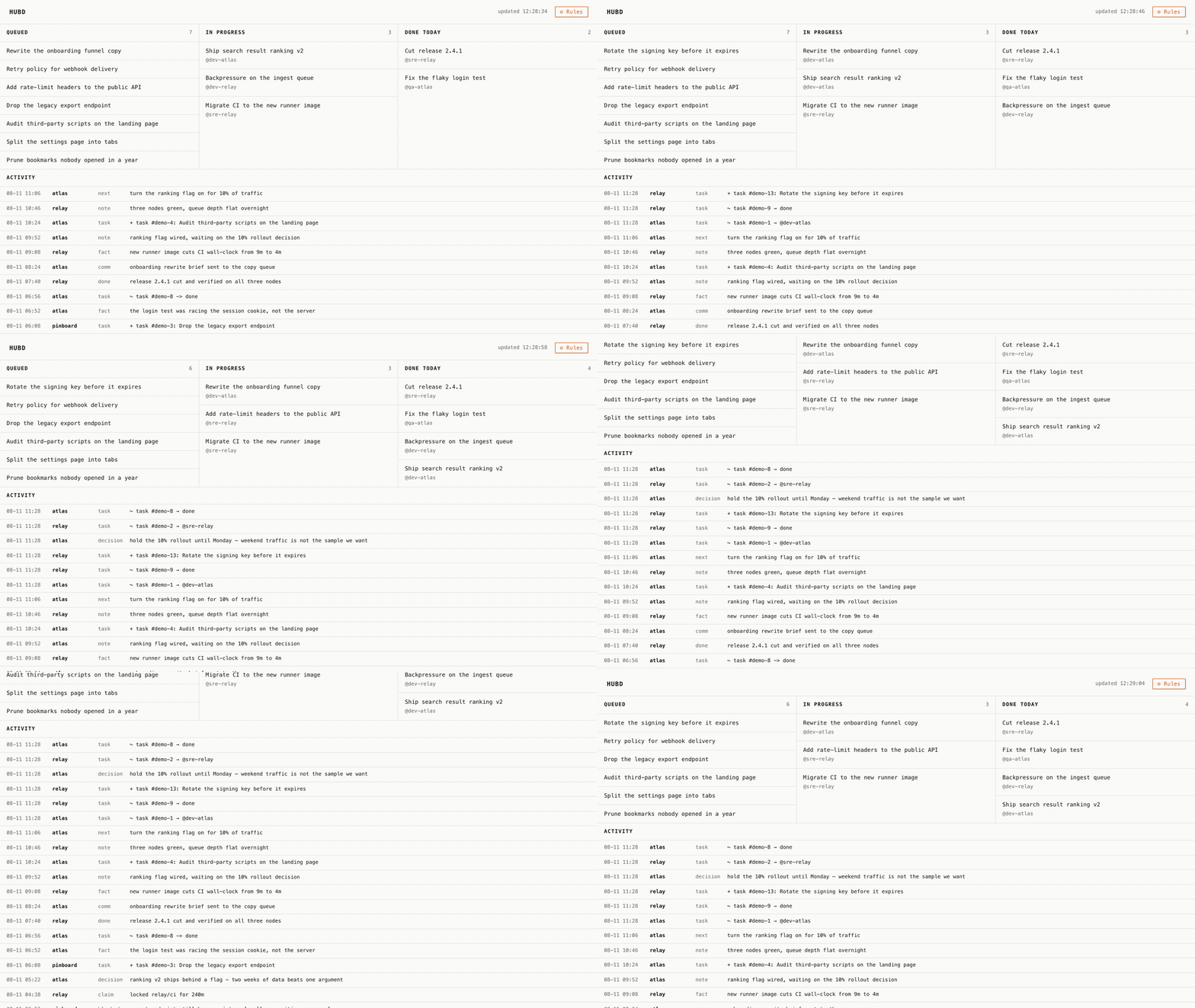
hub serve has four views: Summary (above), Tracks, a Live kanban, and
a History of the journal to play back. It is read-only and has exactly one
button, ⚙ Rules, which opens AGENTS.md. Cards move because agents move them; the
page just re-reads the files. You don't manage the agents — you manage the rules.
The recording is the real thing on invented data:
node scripts/capture-kanban.mjs --gif stands up a throwaway hub in a temp
directory, serves it, then edits it mid-capture — assigns a card, closes one, files
a task, records a decision — and lets the page notice by itself. Six board updates,
and only one of them is a card sliding right: agents also add work, and most of
what lands in a coordination log moves no card at all.
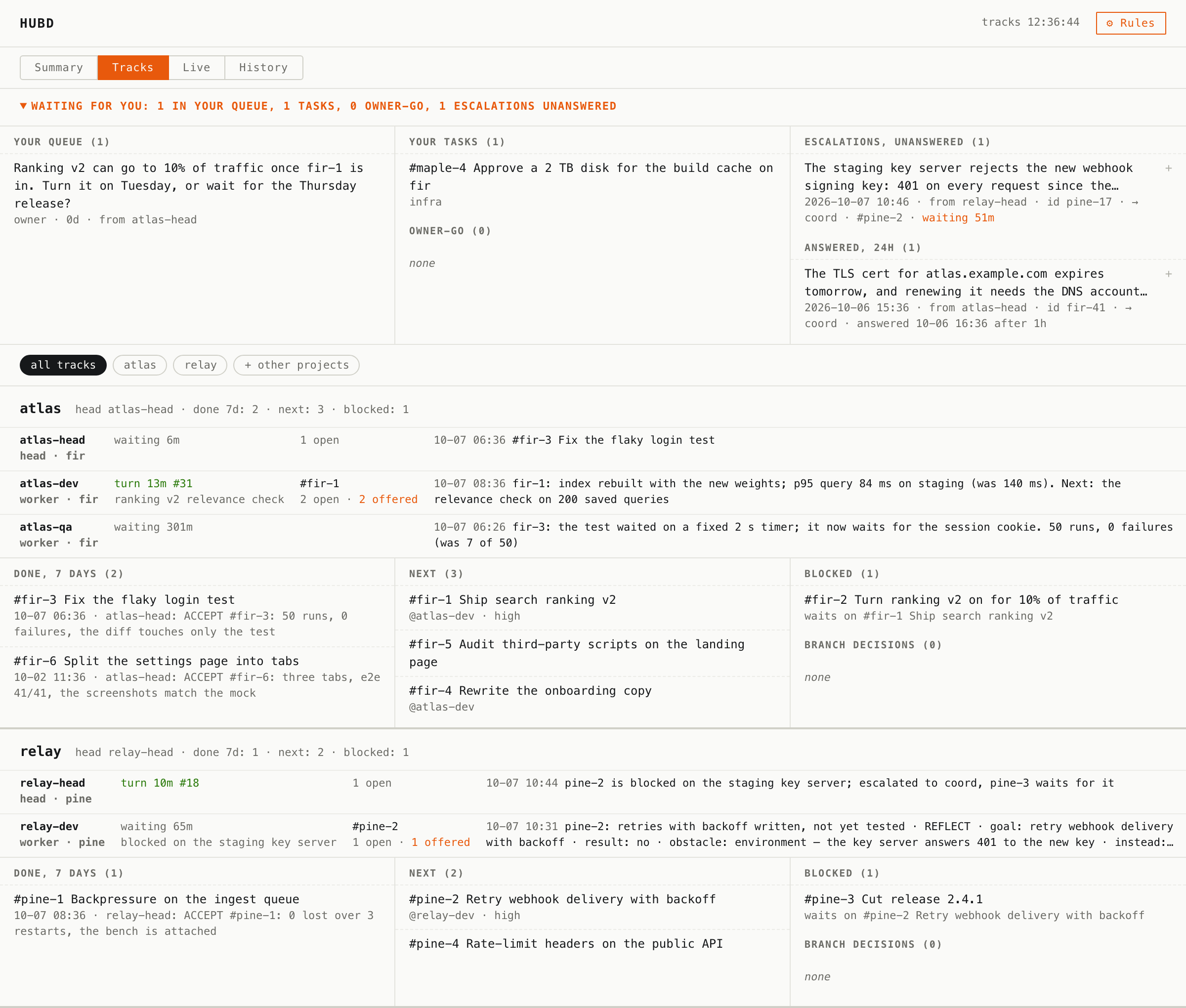
Tracks: what waits for you — your queue, your tasks, the escalations nobody has answered — then each track: every role's state and last word, what was done this week and the head's verdict on it, what is next, what is blocked and on what.
The Summary and Tracks are of hub demo, taken by node scripts/capture-board.mjs;
nobody's actual hub is ever filmed.
hubd— the daemon: an MCP server (stdio, JSON-RPC 2.0, or HTTP) that agents talk to.hub— the CLI: the same data for humans, no LLM required.
Like sshd and ssh. The daemon serves agents; the CLI serves you. Both read and
write one folder, HUBD_DIR (default ~/.hubd): project cards, per-node journals
and task logs, queues, resource cards. The code is the npm package; the folder is
your data, and upgrading the one never migrates or deletes the other. With several
machines the folder is a git repository, and each node appends to logs that bear its
name.
Concepts has the picture, every word with the file it lives in, and how each part works: the journal and reports, queues, tasks and claims, roles and tracks, reflections and laws, resources, the board, harvest.
A tool for agents rarely fails by crashing. It fails by answering — confidently, and wrong: a list that ended early without saying so, a count that is mostly duplicates, a task close that lands on somebody else's id. A person would stop at "wait, fifteen hundred tasks?" An agent takes the number and builds on it.
hubd is built against that failure mode, and it shows in the boring parts. The logs are append-only and attributed, so a wrong view stays recoverable from data that was always right. Every truncation announces itself. Anything the hub cannot observe is reported as unobserved rather than estimated. Much of this codebase is not features — it is refusals to sound certain.
What hubd promises lists each promise with the real case that produced it and the version that keeps it: your data and upgrades, answers that do not overstate, the mesh, queues, cards, agents that come back after a compaction.
Principles (violating these = not this product): files first; dumb server, smart agents — no AI inside; never sound more certain than the data; human-readable everything; zero dependencies; read-only for the human, write access flows through rules; graceful degradation — no MCP → files, no hubd → the files are still readable as they are (reading your hub with any tool).
Not an orchestrator (doesn't launch agents or stream output). Not vector memory (the journal stores facts you can read, not embeddings). Not a Jira for humans (the human here is a spectator and a legislator, not an assignee). Not another chat (talk to hubd through your agent; hands — CLI; eyes — the board).
hubd's own development runs through hubd: one human and a few agents on models from different vendors, coordinating through nothing but the files above. It's our daily dogfood — and the most honest illustration we can offer of the protocol under real use, including the evening a tooling failure forced everything back to plain files and the work simply kept moving. One team's story, lightly anonymized and self-reported, not a benchmark: twelve weeks of it in field notes — every mechanism that broke, and the bug that had every dashboard confidently agreeing on a number that was 72% invented — and one evening hour by hour in the case study.
The human's main job was editing the rules.
The case hubd was built against, and the one worth describing because it is the awkward shape real work has:
Bringing up a from-scratch EL2 hypervisor on a Banana Pi M64 — a bare-metal type-1 hypervisor running FreeBSD 15.1 arm64 as its guest, plus a Mali-400 GPU driver ported to FreeBSD along the way. Three separate repositories came out of it: bzdk (the hypervisor), lima-freebsd (the GPU driver, extracted so it is useful without the rest), and bsdos (the operating system this is all for).
The build machine and the board were never the same machine. The cross-compiler, the FreeBSD and drm-kmod source trees and the Mesa build lived on one host. The board arrived at another, on a different network, with the serial console and the debug Ethernet physically attached there. So the work was split: compile in one place, flash and observe in another. Several agents worked it in parallel — one on clocks, one chasing DMA coherency, one writing tests.
What that costs without a shared journal is specific, not abstract:
- Two agents driving one board. The serial port takes one reader; two make a healthy channel look dead. "Who has the board" has to be a fact somebody wrote down, not an assumption.
- Re-deriving the same finding. A hardware bug diagnosed on Tuesday gets re-diagnosed on Thursday by someone who never saw the first conclusion. Several of the ten upstream patches that came out of this project took a full day to find; finding one twice is a day thrown away.
- Claims with no number behind them. "The fix works" is not portable between machines. "512 MiB of reads, zero errors, previously died after 27 MiB" is. hubd's reports are where those numbers went, which is why the release notes could be written from records instead of memory.
- Stale conclusions outliving their evidence. Half a day of this project was spent finding documents that confidently stated things the code had since disproved. An append-only journal does not stop that, but it does let you see when a claim was made and what was true then.
None of that needs a server, and none of it left the machines involved: the data is markdown and JSONL in a folder, synced through a private git remote over SSH. That is the whole reason it was built this way.
Shipped, by level (changelog for every version):
- Memory — project cards with sections in any language (
sections.json), structured reports that fan into them, the journal,hub recall; cwd → project withhub_context;hub whereamiafter a compaction (0.9.16); compact reads that say what they left out (0.9.35); handoffs a new session is handed (0.9.66); aHUBD.mdprotocol regenerated per node. - Work and decisions — tasks with dependencies and deadlines,
hub now,hub agenda,hub plan; claims as path globs that warn before the edit (0.9.16); owner buttons; usage, audit and lint; what each task cost, read from the sessions, and what came of it (0.9.67). - Addressable agents — queues with wait and ack, subscriber roles, work mode (0.9.28); read marks every node counts by (0.9.33, 0.9.49); messages that are prose, not cargo, and queues with limits (0.9.34); ids that name one message (0.9.54).
- Several machines — per-node append-only logs;
hub doctoron the mesh; presence that names what it cannot see (0.9.13);hub absorb(0.9.18);hub freeze(0.9.20); the quiet peer (0.9.22); cards merged by section (0.9.40, 0.9.51–0.9.53); node snapshots on the board (0.9.47). - A team with roles — roles as cards, tracks,
hub board, the board's Tracks and History,hub sense(0.9.28); role rules from templates (0.9.32), served over MCP (0.9.41); the Summary with goals and verdicts (0.9.45), escalations (0.9.46) and the mail row (0.9.48). - A team that learns — reflections (0.9.42),
hub_reflect(0.9.44), laws (0.9.54). - A service — MCP over HTTP, token-gated and multi-tenant; resources and the
[[wikilink]]graph; harvest as an MCP prompt;hub watchand--exec(0.9.43, 0.9.44); commands that only read write nothing (0.9.31);hub demo(0.9.55).
Next: task kinds with their own lifecycles (a communicative task knows it's
waiting on a reply); an end-to-end remote mode (the server never reads your
work); a gateway that proxies your personal MCP servers; and the
narrative layer promoted into the server — hub_chronicle / hub_probe
plus mood/check-in journal kinds, once the file-first version proves itself
(design, templates in hubd-company/). The file
format is the stable contract; everything else is negotiable.
docs/index.md maps the documentation by what you want to do;
the reference lists every command, tool, variable and
file, generated from the code. The npm package carries the binaries, prompts/,
contrib/, the mesh scripts, this README, the changelog, HARVEST.md, and of
docs/ the map, the tutorials, the reference,
the scenarios, concepts,
guarantees, interop and
self-hosting. The rest of docs/, and hubd-company/, are
in the repo.
The core is MIT, forever. Personal use is free, forever. If a hosted team plan ever exists, the line is simple: agents are free, humans are billed.
MIT.