A virtual pet that dies when you doomscroll.
It is a real object: a palm-sized creature with a bright AMOLED face that sits on your desk and blinks at you. It gets hungry, it gets bored, and it grows up. Spend too long in an app it is watching and it falls ill — and it stays ill until you put the phone down.
Illness is not instant death. A sick pet drains faster than a well one, and a pet left empty for long enough dies for good, with a reset you have to ask for. That is the loop: your screen time is the pet's environment, not a setting inside it.
You talk to it out loud, and it answers out of its own speaker.
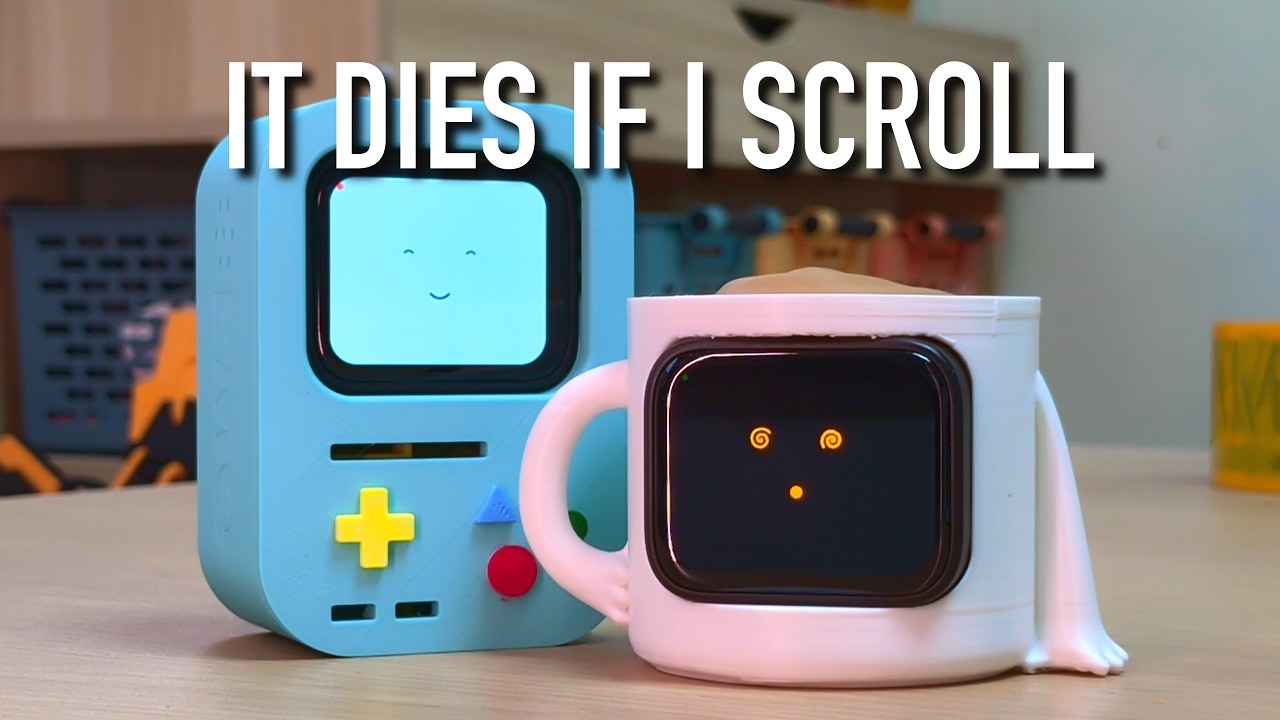
I Built a Virtual Pet that Dies when you Doomscroll — the build, and what it does. Click through to YouTube.
Everything it says is generated on your phone, on-device. There is no account and no server.
It cannot phone home, and a test proves it. The app declares no INTERNET
permission at all — these eight are the complete list:
BLUETOOTH_CONNECT  BLUETOOTH_SCAN  RECORD_AUDIO  PACKAGE_USAGE_STATS
POST_NOTIFICATIONS  RECEIVE_BOOT_COMPLETED
FOREGROUND_SERVICE  FOREGROUND_SERVICE_CONNECTED_DEVICE
PermissionCopyTest reads AndroidManifest.xml and fails the build if
INTERNET is ever added, with the manifest wired in as a declared test input so
the check cannot go stale. For a device that listens in your home and can read
your notifications, that guarantee seemed worth making mechanical.
The pet is the thing you interact with. The phone is the compute it borrows.
   ESP32-S3 board                        Android phone
  ┌────────────────┐                  ┌──────────────────────┐
  │  AMOLED face   │                  │  Whisper   (hearing) │
  │  mic + speaker │ ◄─── BLE ──────► │  llama.cpp (thinking)│
  │  touch         │      Opus audio  │  Piper     (voice)   │
  │  the simulation│      + protocol  │  screen-time sensor  │
  └────────────────┘                  └──────────────────────┘
You speak at the pet. The board streams Opus audio to the phone, which transcribes it, asks a local language model for a reply in the pet's voice, synthesises speech, and streams it back for the pet to play. The phone never joins the conversation — it has no UI for talking to the pet, only for setting it up.
The pet owns its own life. Hunger, happiness, life stage and death are simulated on the board, persisted to its own flash, and timed by its own clock. The phone contributes screen time, language and models. If you never connect a phone again, the pet goes on living — it just goes quiet.
| Board | Waveshare ESP32-S3 Touch AMOLED 1.8 |
| Display | 1.8-inch 368×448 AMOLED, capacitive touch |
| Orientation | the UI runs rotated — 448 wide, 368 tall |
| Audio | onboard mic and speaker |
| Link | BLE to an Android phone |
Both V1 and V2 board revisions are supported; the panel driver (SH8601 or CO5300) is detected at runtime.
Both are cited from the source, by section number, so a comment explaining why a thing is the way it is can point at the argument instead of restating it.
DESIGN.md — product and UX. The state model both surfaces
render, the flows, and the decisions with their reasoning: why the allowance is
per-sitting rather than per-day (a daily total never falls, so a pet made ill at
11am could not recover until midnight), why the score is called satiety rather
than hunger (so that if (hunger > 3) cannot read correctly and mean the
opposite), and the component rules the UI is built from.
CLAUDE.md — how to work on this. Written as instructions for
Claude Code, which is what it is named after,
and it doubles as the conventions file: the build commands and the traps in them,
the rule that faces and personas are generated and must not be hand-edited, and
the practice that every test here was checked by breaking the code it covers and
confirming it fails. Read it before changing anything, whatever you are using to
change it.
pet-esp32/      ESP-IDF firmware — the display, mic, speaker and the simulation
android/        the app — BLE, Whisper, llama.cpp, Piper, screen-time tracking
design-system/  design tokens, plus the pet's faces and personas (source of truth)
tools/          generators that turn faces and personas into firmware and app code
shared/         the wire protocol header shared by both sides
hardware/       printable enclosures (STL) — the shells shown in the video
licences/       full texts for the bundled fonts and for GPL-3.0
DESIGN.md       product and UX decisions, cited from the source by section
CLAUDE.md       build commands, conventions, and the traps worth knowing
The firmware and the app share a protocol (pet-esp32/main/pet_proto.h and
android/.../ble/PetProtocol.kt) and must be changed in step. Both declare a
version constant, and the pet reports its own version when it connects — but
nothing currently compares the two, so a mismatched board and app will pair and
then misbehave. Flash both from the same commit.
. ~/esp/esp-idf/export.sh
cd pet-esp32
idf.py build
idf.py -p /dev/cu.usbmodem* flash
The display can stay black after a flash until the board is power-cycled — pull the USB cable and reconnect before concluding anything is broken.
The build requires JDK 21. Kotlin 2.1 cannot parse a JDK 25 class file, and a system JDK newer than 21 will fail in a way that does not name the cause.
You also need the Android SDK located, via ANDROID_HOME or an sdk.dir line
in android/local.properties — that file is deliberately not committed, being
specific to your machine.
cd android
export ANDROID_HOME="$HOME/Library/Android/sdk"
JAVA_HOME="/Applications/Android Studio.app/Contents/jbr/Contents/Home" \
./gradlew assembleDebugThe app links llama.cpp, whisper.cpp, Piper, Opus and espeak-ng. Those are not
in this repository — about 1.3 GB of unmodified third-party source, several of
them git clones whose own .git would become a broken gitlink here. What is
kept instead is the exact commit each was built from, in NOTICE, so a
build can be reproduced rather than approximated:
tools/fetch-natives.shRead its header before running it. It fetches sources only — two prebuilt shared libraries still have to be placed by hand — and three dependencies have no recorded version, which NOTICE marks rather than hides.
Tests — 512 of them, no device required:
cd android && ./gradlew testDebugUnitTestMost are pure logic. Five read files rather than calling functions, because
they check things a compiler cannot: WCAG contrast ratios across both colour
schemes, a ban on raw .dp/.sp literals in UI code, and three that hold the
generated face sets, colour tokens and component roster in sync with
design-system/.
No models ship with the app. You supply three, and import each through the system file picker:
| Role | Format | Notes |
|---|---|---|
| Thinking | .gguf |
any small instruct model llama.cpp can load |
| Hearing | .bin |
a Whisper model |
| Voice | .onnx |
a Piper voice |
An earlier build bundled a Whisper model and cost ~75 MB in the APK and another ~75 MB unpacked, which made hearing the one faculty nobody got to choose.
design-system/faces/*.json and design-system/personas/*.json are the
sources. The firmware's face tables, the app's face sets, the notification
icons and the persona prompts are all generated from them:
tools/gen-faces.py
tools/gen-personas.py
Both refuse input that breaks a rule and say which one. A happy face must smile. A dead one has no mouth. Sad and sick must not be confusable. A spiral eye must actually turn, and must not wind tight enough to fill in. A persona may not ask you a question or read a list of apps aloud. Those rules are the design, written where they can fail a build.
PolyMO is licensed in three layers, because one dependency forces it to be.
| Licence | ||
|---|---|---|
pet-esp32/ firmware |
Apache-2.0 | Clean. Links nothing copyleft |
android/ source, design-system/, tools/ |
Apache-2.0 | Reusable under Apache terms on its own |
| A released APK | GPL-3.0 | Links espeak-ng, so the binary inherits the GPL |
The full texts are LICENSE (Apache-2.0) and licences/GPL-3.0.txt. NOTICE lists every dependency and its terms.
The app's native library links espeak-ng, which is GPL-3.0-or-later, and the app bundles espeak-ng's phoneme data. Piper uses it to turn text into phonemes; the pet cannot speak without it.
Apache-2.0 is one-way compatible with the GPL — Apache source may be combined into a GPL work, and the result is GPL-3.0. So the source in this tree stays Apache-2.0 and is reusable as such, while any binary linking espeak-ng must be distributed under GPL-3.0. The firmware is untouched by this: it never links espeak, and the audio it plays arrives over BLE already synthesised.
Note that the obligation attaches to linking, not to calling. Piper does have
a non-espeak phonemizer (PhonemeType::TextPhonemes), but selecting it changes
nothing unless espeak-ng also leaves the link — and nearly every published
Piper voice is an espeak-phoneme model, so leaving espeak behind would mean
leaving the voice ecosystem behind with it.
The APK is a GPL-3.0 conveyance of a combined work. To stay compliant:
- Tag the exact commit the APK was built from, and publish that tag
- Label the release GPL-3.0 — the repository itself stays Apache-2.0
- Include
licences/GPL-3.0.txtalongside the download - Link the source tag from the release notes, so recipients can obtain the corresponding source
- Keep that source available for as long as the download is offered
This is a description of the licences involved, not legal advice.