
slussa (Swedish): to pass a boat through a lock. The slussvakt is the lock keeper who decides what gets through.
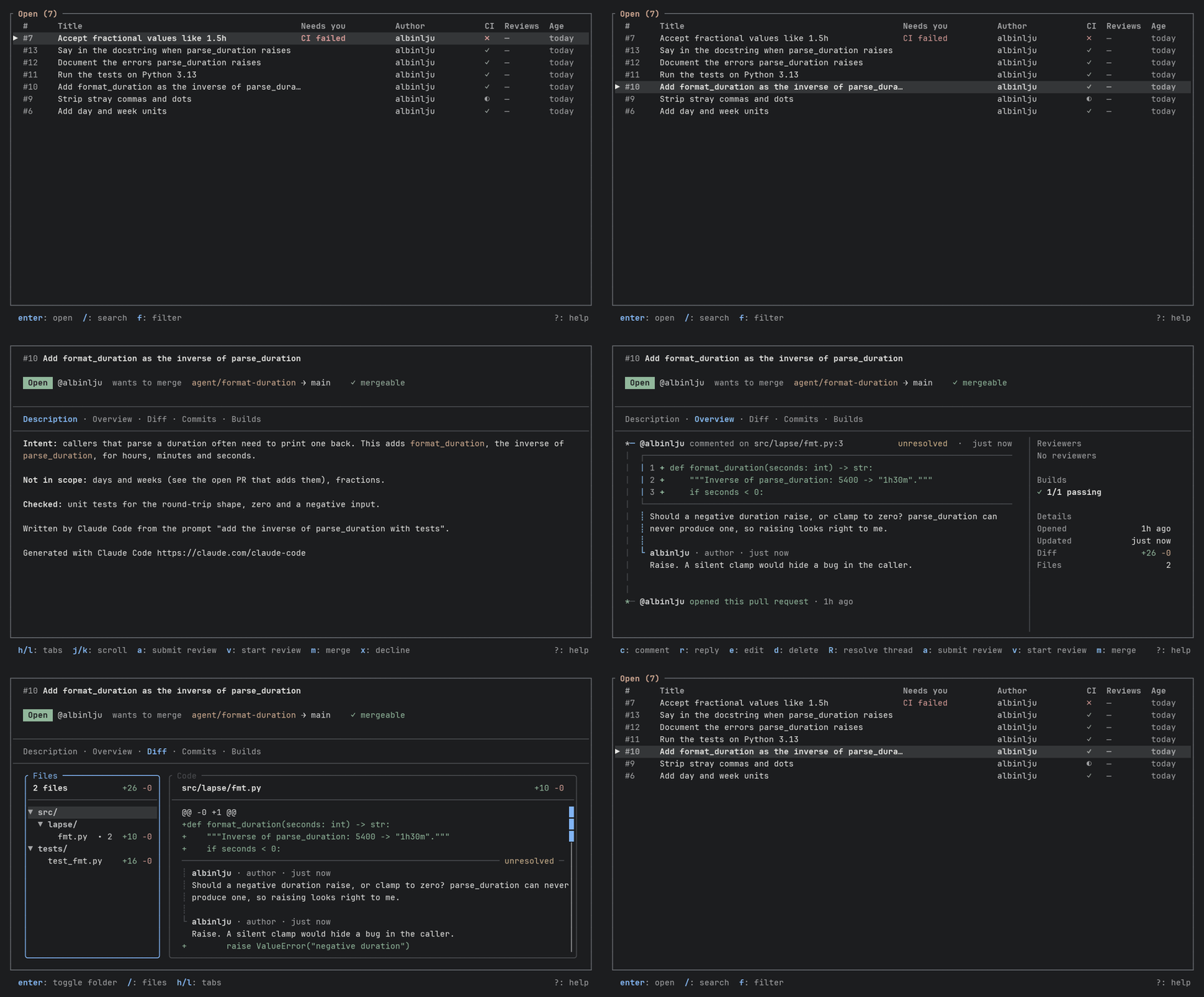
A terminal UI for pull requests. Two views: the list of PRs, and the PR you opened. Read, comment, review, merge and decline without leaving the terminal, next to your editor, git client and coding agent.
The list opens sorted by what needs you, with the reason beside each PR, and a merge that cannot go through says why. A merge or an approval is tied to the commit you were shown, so a push after you read the PR is refused instead of merged unseen. It is not a replacement for the web UI, and it stays small on purpose.
Where it is going. Pull requests written by agents, and reviews written by AI, are becoming most of what a reviewer sees. The plan is to make them first-class: marked as AI, summarized in the header, and handed back to a coding agent. None of that is built yet; ROADMAP.md has the plan.
Status: early. It is used daily by its author. Prebuilt binaries come with tagged releases.
| Provider | How it connects | Notes |
|---|---|---|
| GitHub | the gh CLI |
uses your existing gh auth login |
| Bitbucket Data Center | REST with a personal access token | token in the OS keyring; tested against a mock, and only listing has been seen on a real server |
Bitbucket Data Center is Atlassian's self-hosted Bitbucket, not Bitbucket Cloud. Atlassian ends Data Center licence sales on 2028-03-30 and support on 2029-03-28, so this provider is in maintenance: bugs are fixed, nothing new is added for it. Bitbucket Cloud is a different product that this does not affect; it and GitLab are on the roadmap, not supported.
The provider is detected from the origin remote of the repository you run
slussa in. On GitHub the repository it acts on is the one gh places the
directory in (gh repo set-default, or GH_REPO), asked once when slussa
starts and used for every call after it, so that a diff that is read and a merge
that is sent go to the same repository. In a fork where gh points at the
upstream that is the upstream, and the drafts you saved under the fork move to
it the first time. Where gh cannot place the directory, origin is used.
Platforms. macOS and Linux, on arm64 and x86_64, are built and tested in CI. Windows is not built or tested yet.
Prebuilt binary. Tagged releases attach tarballs for macOS and Linux
(arm64 and x86_64) to GitHub Releases, with checksums. Unpack it and put
slussa on your PATH. The macOS binary is not signed or notarized, so a file
downloaded in a browser may be blocked; remove the flag with
xattr -d com.apple.quarantine slussa. Check a download with
grep <target> SHA256SUMS | shasum -a 256 -c -, for example
aarch64-apple-darwin. A release made by the workflow also carries a build
attestation, which says which run built the archive from which commit; check
one with gh attestation verify <archive> --repo albinlju/slussa.
From crates.io. With a recent Rust toolchain (1.95 or newer):
cargo install slussa --lockedRun the same command again to update to a newer version.
From source. To build the current main instead:
cargo install --git https://github.com/albinlju/slussaAt runtime slussa needs git, and for GitHub the gh CLI, authenticated for
the host.
cd path/to/a/repo
slussa                  # open the PR browser for this repo
slussa 44               # open it on PR #44 (also `slussa '#44'`), even one the list does not hold
slussa -C path/to/repo  # same, as if started in that directory
slussa auth login       # Bitbucket Data Center: store a personal access token
slussa --version
slussa --help
For Bitbucket Data Center, run slussa auth login once per host. For GitHub,
run gh auth login instead. An origin that says http has a token of its own,
apart from the one for the same host over https or ssh, so a token stored for
https is never sent unencrypted; slussa auth login warns when the server is
http, and a server you reach over http needs one login after this change.
Requests that carry the token do not follow a redirect.
Press ? in any view for the keys that are available right now; the full list
is in KEYS.md. To start with: j/k move, enter opens, /
searches, f filters by status, s switches the sort and q quits. Actions the
connected provider does not support are hidden; actions blocked by the PR's
state (for example merging with conflicts) stay visible and say why.
The search takes words, and filters among them: author:alice,
review:approved (or changes, requested, none), ci:failed (or pending,
passing), merge:conflicts and merge:clean (no conflict; GitHub), for example / author:alice ci:failed retry. They narrow the list as you type.
A "Needs you" column, shown at 90 columns or wider, says why a PR is on top:
changes requested, CI failed, review requested, or approved. Team review requests
on GitHub are not counted yet. Press s to pick another order (newest, recently
updated, oldest), or set sort in the config.
slussa keeps which commit of a PR's diff you last had open. When the branch has
moved since, the PR's header says ↻ new since you read it, and w shows only
what changed, from that commit to the one now, in the files the PR touches now or
touched when you read it: a file the PR has since put back as the target has it is
shown, since a check that was added and then removed is exactly what should be seen.
Which files the PR touches now is read from its diff of the new commit, so that is read
first, and if the branch moves again meanwhile w says so instead of showing a part;
which it touched before is asked of GitHub, and when that cannot be had whole nothing
is left out. GitHub
compares from the commit the two share, and slussa asks which that is. When it is the
commit you read, the branch moved forward and what is shown is what is new, all of it.
When it is not, the branch was rebased or force-pushed: the banner then says
↻ rewritten since you read it and from which commit, because the diff holds again
what you had already read and shows nothing of what was dropped from the branch. A
branch reset to an older commit says ↻ reset since you read it: nothing is new, and
what came after is gone. Reading either of the two does not count as having read the
branch, since what was taken away is not in them: the mark stays until you go on to the
whole diff with w or esc, and that counts. After a merge of the target into the branch the files only the
merge changed are left out. A commit that was force-pushed away may no longer be there to compare, and
GitHub's answer is shown with what it probably means; w goes back to the whole diff
and asks again the next time, and F asks again too. Arriving at the PR's diff, by
opening the PR on it or choosing the Diff tab, counts as having read it, so the mark is
for the way in; a refresh under you does not clear it, whether it brings a newer diff
or the same one again.
Bitbucket Data Center does not have it.
A PR GitHub says cannot be merged for a conflict has conflicts in the Status column in place of its
status, whoever wrote it. The column stands there when some row has one, and otherwise only in
the All view, where it says Open, Merged and so on; in the other views the status is the one
you chose with f. Bitbucket Data Center does not say, so it has no such mark.
On GitHub an "AI review" column, also from 90 columns, says whether a bot account
(CodeRabbit, for one) has reviewed the PR; it is not about who wrote it. ◆ means it reviewed the head the PR has now, ◈ an older
one (only an open PR gets that), ◇ that no bot has, and ✗ that it asked for changes.
The column is there while some PR in the list has been reviewed by a bot, and ? explains
the diamonds. It says nothing of what the review found or whether it was dealt with. An agent
that posts under your own account is told apart by the text of its comments, which the list
does not read, and Bitbucket Data Center has no such column.
In the Builds tab j/k move between the builds, and enter opens the log of a
GitHub Actions job in the same place: it opens on its first error, n and N step
between the errors and esc goes back to the builds. A check that is not an Action
has no log to read, and Bitbucket Data Center has none either. The log is read from
gh api, which from version 2.92 refuses text with terminal escape sequences unless
asked; slussa asks, and removes them itself before anything is drawn.
Drafts (comment editor text and queued review comments) are saved locally and
survive a restart. A ● before a PR's number in the list means it has changed since you
last opened it, and opening it clears the mark. A PR you have never opened is not marked,
and what you do to a PR yourself while it is open does not mark it. slussa remembers this in
a file of PR numbers and times, with the commit of the diff you last had open, one per
repository and account, and nothing else about the PR.
Copying a link falls back to the terminal's clipboard (OSC 52)
over SSH; inside tmux that needs set -g set-clipboard on.
~/.config/slussa/config.toml (or $XDG_CONFIG_HOME/slussa/config.toml):
theme = "graphite"   # graphite (default), slate, gruvbox, catppuccin, terminal
sort = "attention"   # attention (default), recent, updated or oldest

[ai]
# Optional. For an agent that works as a person: a comment whose first line
# starts with one of these is its, and so is a commit with a line that does
# (a trailer such as "Assisted-By: gator-agent").
markers = ["> **gator-agent**", "Assisted-By: gator-agent"]
SLUSSA_THEME overrides the file.
A comment by an AI agent has [AI] after the author's name, in the Overview and in
the diff, and the diff's file list counts them apart from people's (• 1 ◆ 2). f in the Overview shows all comments, only
people's, or only the agents'; what it hides stays as a dimmed line
(◆ 2 AI threads hidden · …), so a filtered timeline never looks empty. On GitHub the agents are the bot accounts (CodeRabbit,
for one), so this needs no setup. markers is for an agent that posts
with your own token, which no account tells apart; it works on both providers.
Bitbucket Data Center does not mark bot accounts, so there only markers applies.
A commit by an agent has [AI] after its hash in the Commits tab and above the diff of
an open commit, so the commits a reviewing agent added can be told from the
implementer's. Without setup, a commit is an agent's on GitHub when its author address is a GitHub App's
(…[bot]@users.noreply.github.com), and on both providers when it carries the
Co-Authored-By: Claude <noreply@anthropic.com> trailer that Claude Code adds. Another agent
under your own account is told by a line of the message that starts with one of the markers.
A comment longer than 12 lines shows its first 8 and a dimmed … 34 more lines · space expand; space opens it or folds it again, in the Overview. In the diff,
a resolved thread opens and closes with space, and a long comment has a fold row
that j/k can stop on: space there opens the comment, and ▲ fold folds it
again.
What a diff line holds that a terminal would not draw is shown, not dropped: a tab
is spread to a tab stop (4 columns), and a control character, a zero-width one or
one that reorders text (a bidirectional override) is written as a marker such as
‹U+202E› in the warning colour, in the code pane and in the code a comment
quotes. A comment or description that holds raw escape bytes has them removed
before it is drawn, so it cannot colour or hide its own text.
- KEYS.md: every key, for the list and for a PR
- ROADMAP.md: the product idea, what is planned and the engineering backlog
- ARCHITECTURE.md: how the code is organised and why
Open an issue first, then send a pull request from a fork. How to build and test, and the rules, are in CONTRIBUTING.md; security problems go through SECURITY.md.