
Build and simulate your own turing-complete marble runs with ascii/unicode art
I have always had a love for mechanical computers. After reading a wonderful post on turing-complete marble runs, I decided that I wanted to design a turing-complete marble tower. From this desire was born MarbleComplete, the 2d esolang for designing (turing-complete) marble runs using AsciiDots syntax.

Unlike it's parent AsciiDots, the only logical operator in MarbleComplete is a toggler:
The Turing Tumble kickstarter has a gif of the real life equivalent.
Run python3 interpret.py --help to read about available flags.
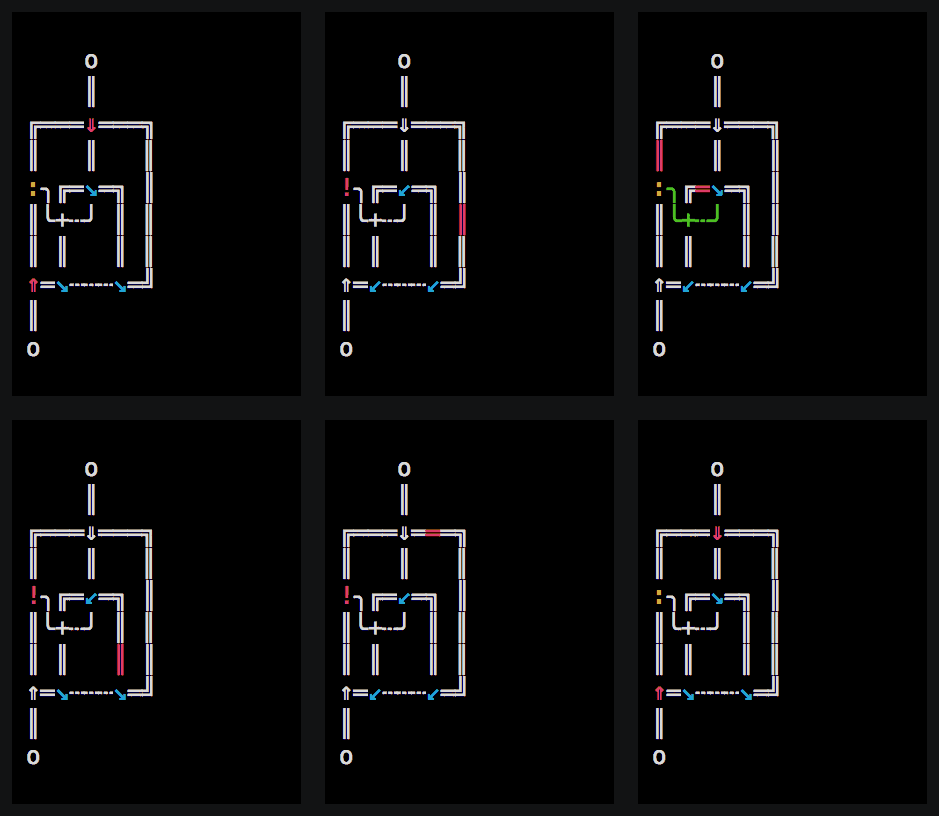
For the demo gif, I ran the interpreter in auto-stepped debug mode with a delay of 0.25 seconds. The code was prettified, too.
python3 interpret.py test.marbles -a 0.25 -d -p
A starting marble is represented with a lowercase o (o).
Program execution ends when a marble rolls over an ampersand (&).
Everything on a line after a pound symbol (#) is considered a comment and is ignored by the interpreter.
& # This text is a comment.
Marbles travel down paths (| or -):
o # This is where the program starts
| # The marble travels downwards
| # Keep on going!
& # The program ends
Think as these two paths as mirrors:
/
\
You can use them to make a path turn:
/-&         # This is where the program ends!
|
\-\ /-\
  | | |
/-/ | \-\
\---/   |
        |
        \-o # Here's where the program starts
+ is the crossing of paths (they do not interact)
> acts like a regular, 2-way, horizontal, path, except marbles can be inserted into the path from the bottom or the top. Those marbles will go to the right
< does likewise except new marbles go to the left
^ (caret) does this but upwards
v (the lowercase letter 'v') does likewise but downwards
Here's a way to "bounce" a marble backwards along its original path using these symbols:
/->-- # Input/output comes through here
| |
\-/
But there's an easier way to do that:
( reflects a marble backwards along its original path. It accepts marble coming from the left, and lets them pass through to the right
) does likewise but for the opposite direction
* duplicates a marble and distributes copies including the original marble to all attached paths except the origin of marble
Here's a fun example of using these special paths. Don't worry—we'll soon be able to do more than just start then end a program.
  /-\ /-& # End
  | | |
  \-+-v
    | | /-\
(-<-/ | | |
  |   \-<-/
  \-\
    |
    o    # Start
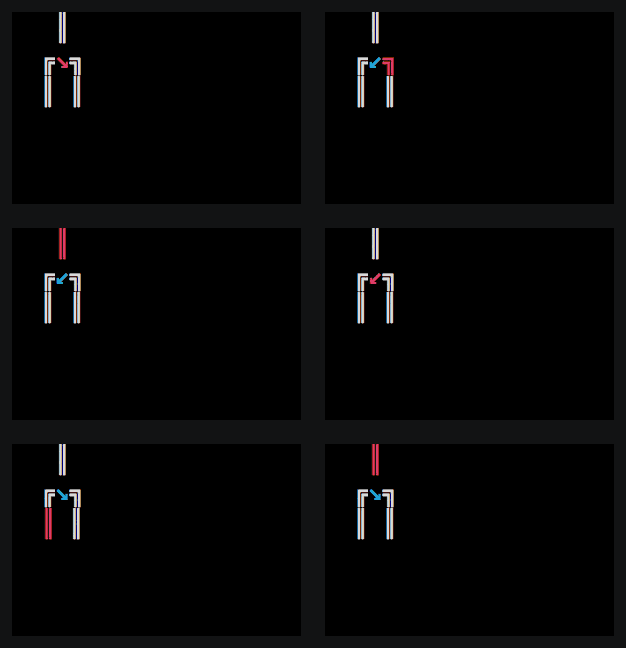
If you want to create a toggler that starts learning left (like \), use a lowercase t (t -> ↘).
If you want to create a toggler that starts learning right (like /), use an uppercase T (T -> ↙).
Here's a visualization of what a toggler does:
In order to make togglers move in unison (thereby allowing turing-completeness), connect them with wires.
In ascii, wires are represented via periods (.). These can be automatically prettified into unicode lines (e.g. ┄).
Marbles can also be controlled via gates.
An open gate is represented by a colon (:) and a closed gate is represented by an exclamation mark (!).
A gate can be opened/closed via a pulse from a toggler down a connected wire.
Gates are useful when you want to control the order in which marbles move.
Getting input from stdin is very simple. Whenever a marble rolls onto a question mark (?), it reads one character from stdin. If that character is a 0, the marble moves to the left, and if the character is a 1, the marble moves to the right. If the character read from std in is neither a 0 nor a 1, an exception is thrown.
Example:
  o
  |
/-?-\
|   |
|   \-- # the input was `1`
|
\------ # the input was `0`
If a wire activates a 1, a 1 is printed to stdout. If a wire activates a 0, a 0 is printed to stdout.
0's and 1's are conductive, meaning that can act like wires.
Programs are typically written with AsciiDots' ascii path rules:
 /---
 |
 |
/t\
|.+..
\v/ .
/t\ .
|.+./
| |
| *---
| |
| |
| |
... And then translated into Unicode box drawings via prettify.py:
 ╔═══
 ║
 ║
╔↘╗
║╰+┄╮
╚⇓╝ ┆
╔↘╗ ┆
║╰+┄╯
║ ║
║ *══
║ ║
║ ║
║ ║
Prettified code can always be re-asciified via asciify.py.
Memory Cell:
 o
 |
 v----------------- # query
 |
 |     /----------- # set to 0
 |     |   /------- # set to 1
 |     |   |
 |     |   |    /-- # toggle
 |     v\ /v    |
/t\   /t/ \t\  /t\
|.+.. |.   .|  |.|
\v/ ..+.....+..+.|
/t\ . |     |  | |
|.+.. |     |  | \-- # now 1
| |   |     |  \---- # now 0
0 1
Memory tape:
           /v----o
 o     o   \T
 |    \v\-\ .
 |     !+.+.*
/t\    || | .
|.+.. /T+-* .
\v/ ..+.| | .
 |  . | | | .
/+\ . *-+-v .
||t.. | | | .
\+----+-+-/ .
 |    \v\-\ .
 |     !+.+.*
/t\    || | .
|.+.. /T+-* .
\v/ ..+.| | .
 |  . | | | .
/+\ . *-+-v .
||t.. | | | .
\+----+-+-/ .
 |    \v\-\ .
This work is licensed under a Creative Commons Attribution-ShareAlike 4.0 International License.


