
Translates World of Warcraft terms, acronyms and slang right in your chat


 All languages in chat, in real time |
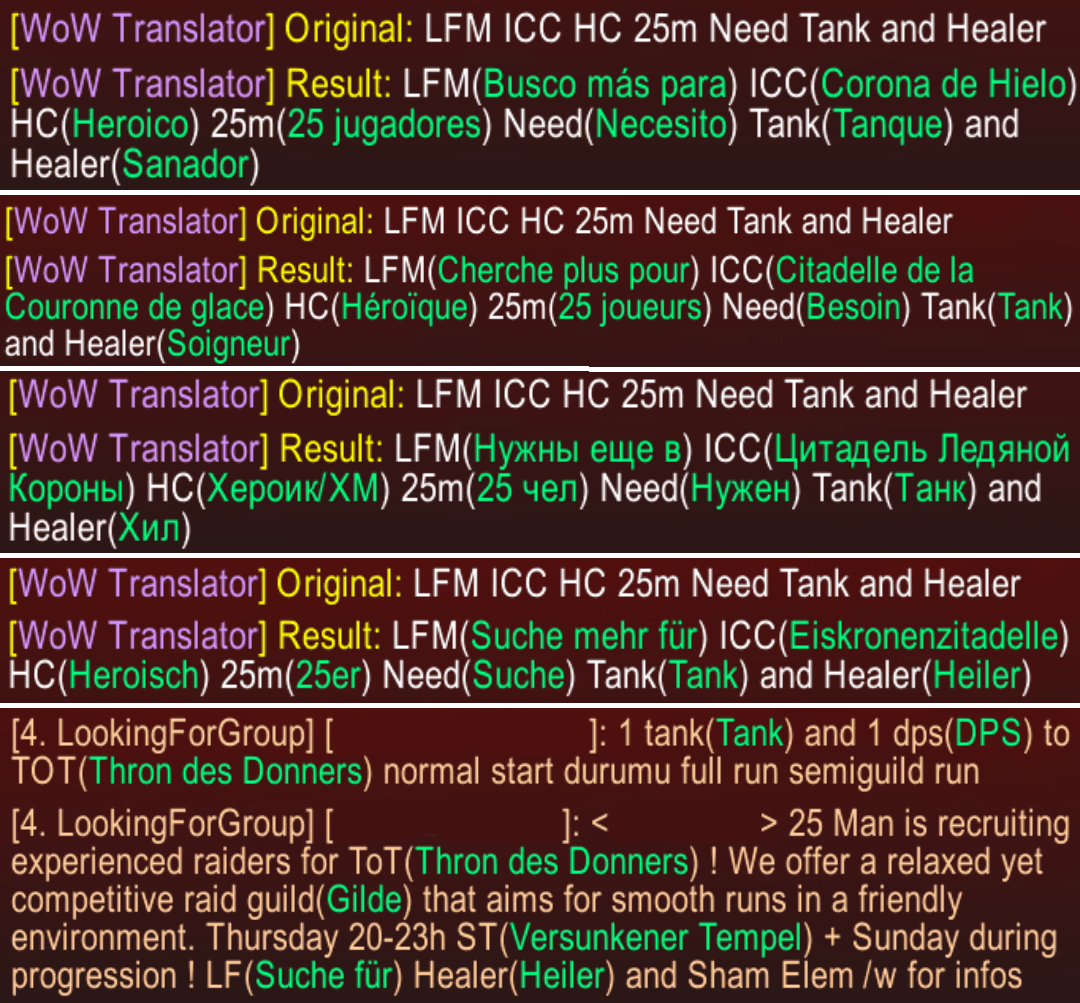
WoW Translator reads incoming chat messages and adds the meaning of WoW jargon next to each term, in the colour you choose. A message like LFM ICC HC 25m Need Tank and Healer keeps its original text, with the translation of every recognised acronym or word added in brackets. Nothing is sent for you: it only annotates what you receive.
- Translates dungeon and raid acronyms, slang, classes, roles, stats, professions, combat, trade, group, guild and status terms.
- 44 target languages; defaults to your game client's language.
- Whole sentences: typical messages (looking for group, recruiting, trade, crafters, portals, guild recruiting) also get the full sentence on a line below, in the speaker's voice, in 20 languages.
- Zone, item set and race names from LibBabble, in your client's language, each with its own colour.
- Turn each category and the instance names of each expansion (Classic to Midnight) on or off.
- Pick which chat channels are translated: say, yell, emote, global channels, whispers, Battle.net, guild, party, raid, instance, battleground and communities.
- Ignore list for words you never want translated.
/wt enturns text written in your target language back into English WoW terms and leaves it in the chat box for you to review and send.- Beta: also recognises WoW slang written in Korean and Simplified Chinese (off by default).
- Minimap button and options panel translated into 20 languages.
- Download the zip from the latest release or from CurseForge.
- Extract the
WoWTranslatorfolder into theInterface/AddOns/folder of your game version:- Retail:
World of Warcraft/_retail_/Interface/AddOns/ - Mists of Pandaria Classic:
World of Warcraft/_classic_/Interface/AddOns/ - Classic Era:
World of Warcraft/_classic_era_/Interface/AddOns/ - Anniversary:
World of Warcraft/_anniversary_/Interface/AddOns/ - WoW Forever:
World of Warcraft/_classic_beta_/Interface/AddOns/
- Retail:
- Restart WoW and enable the addon.
/wt config— open the options panel (also from the minimap button)./wt on//wt off— enable or disable translations./wt test— run a translation test in chat./wt search <word>— look up a translation directly./wt en <text>— compose a message in English./wt— list the commands.
The options panel has General (enable, colour, target language, slang in other languages, test and reset buttons), Categories, Expansions, Chat Channels, Ignored Words and Help.
- Besides current clients, it ships TOC files for older clients (2.4.3, 3.3.5, 4.3, 5.4, WoD 6.2, Legion 7.3, BfA 8.3 and Shadowlands 9.2), such as those used on private servers.
- Settings are saved account-wide in
WoWTranslatorDB.
Author: Pirson · GitHub · CurseForge · MIT License