
Abandon all your quests, or just the ones you tick, straight from the quest log


 Menu |
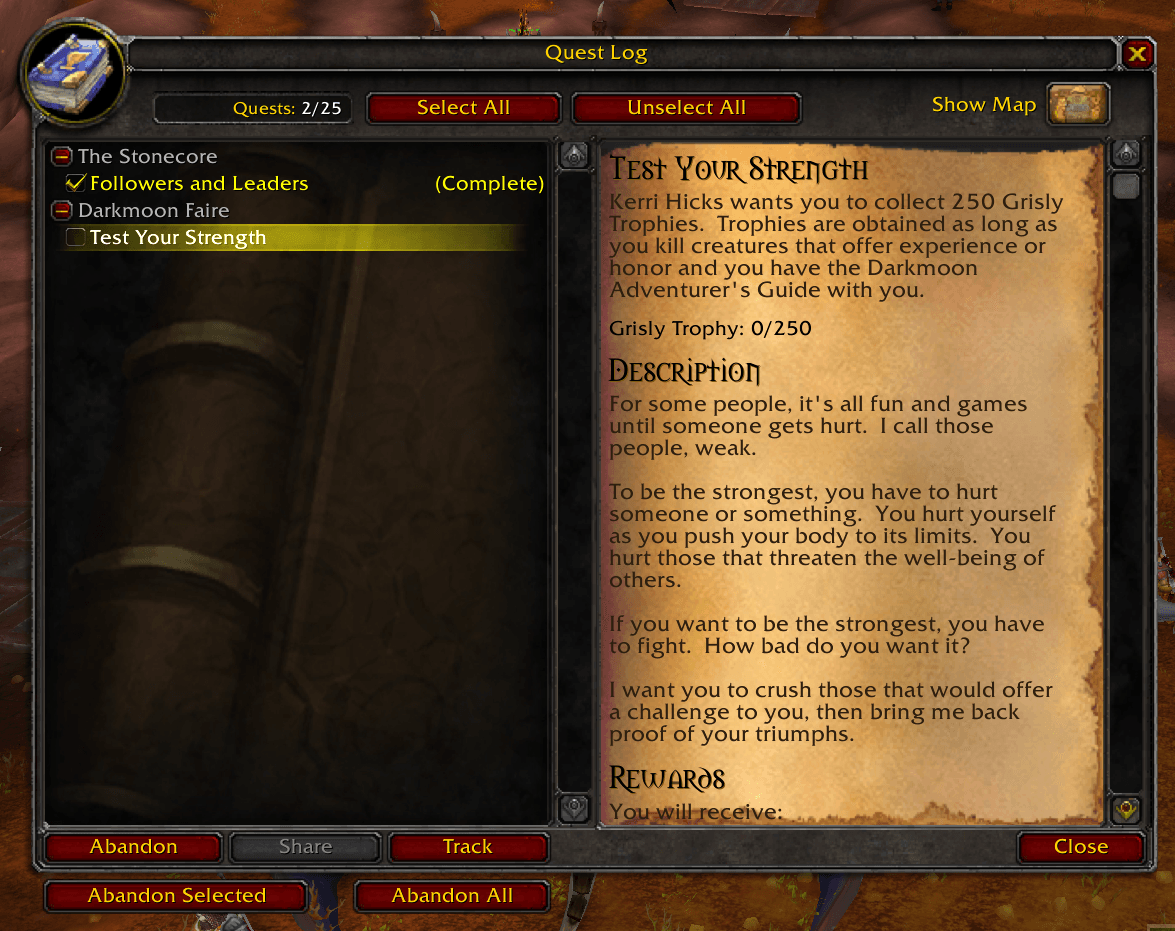
Remove Questie adds a checkbox next to every quest in your quest log and four buttons to clean it up, so you can drop a whole batch of quests at once instead of abandoning them one by one.
- A checkbox next to each quest to mark it.
- Select All / Unselect All buttons.
- Abandon Selected abandons only the ticked quests; Abandon All abandons every quest in the log.
- Each abandoned quest is listed in the chat.
- Works in the classic quest log (TBC Anniversary, Mists) and in the world map quest log (WoW Forever). Translated into 20 languages.
- Download the zip from the latest release or from CurseForge.
- Extract the
RemoveQuestiefolder into the AddOns folder of your game version:- TBC Anniversary:
World of Warcraft/_anniversary_/Interface/AddOns/ - Classic (Mists):
World of Warcraft/_classic_/Interface/AddOns/ - WoW Forever:
World of Warcraft/_classic_beta_/Interface/AddOns/
- TBC Anniversary:
- Restart WoW and enable the addon.
- Open the quest log (
L), tick the quests you want to drop and press Abandon Selected, or press Abandon All. - There are no slash commands or settings.
The buttons abandon the quests immediately, with no confirmation popup, so check your selection first. Selections are not saved between sessions. Despite the name, it does not need or touch the Questie addon.
Author: Pirson · GitHub · CurseForge · MIT License