
A customizable glowing aura that follows your mouse cursor, from static colors to a full RGB cycle



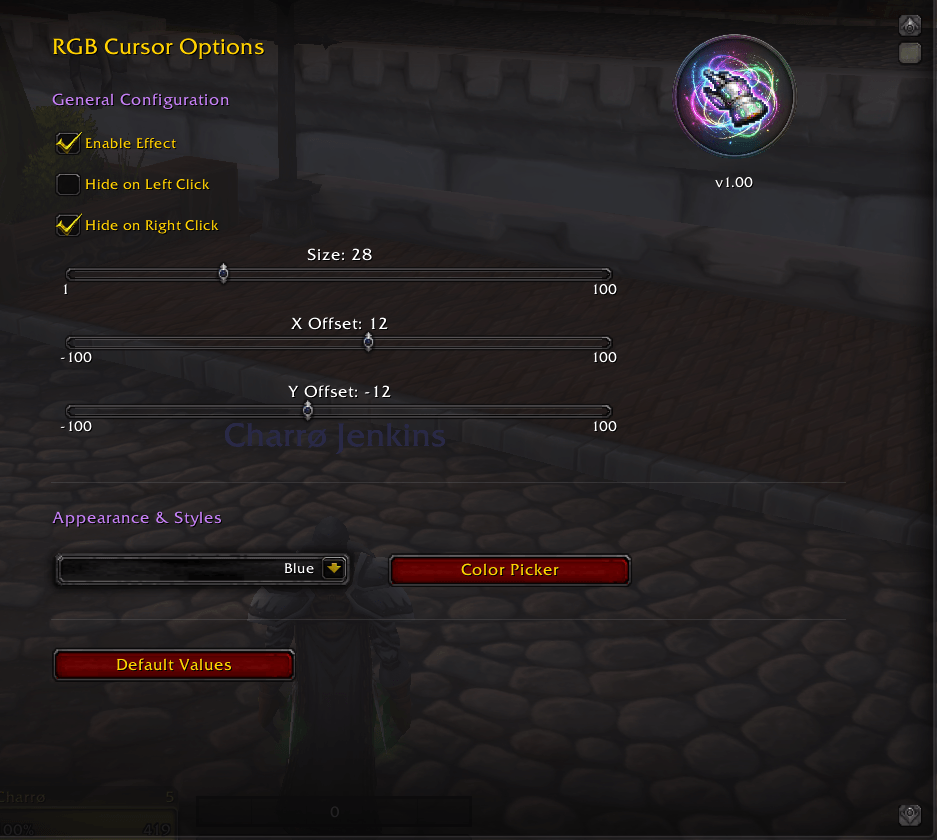 Settings panel |
 The glowing cursor |
Cursor Glow RGB (in game: RGBCursor) draws a glowing aura on top of your mouse cursor so you never lose it in a busy fight. You pick its shape, color, size and position, and it follows the cursor everywhere on screen.
- 8 cursor styles: Glow, Circle, Ring, Dot, Crosshair, Reticle, Corners and Diamond.
- 13 color styles: Blue, Cyan, Green, Lime, Yellow, Orange, Red, Pink, Purple, Magenta, White, an animated RGB cycle, and Custom (any color and opacity from the color picker).
- Size from 1 to 100 and X / Y offset from -100 to 100 relative to the cursor.
- Optionally hide the aura while the left or right mouse button is held (right click is on by default).
- Default Values button to reset everything.
- Translated into 20 languages. Settings are saved per account (
RGBCursorDB).
- Download the zip from the latest release or from CurseForge.
- Extract the
RGBCursorfolder into the AddOns folder of your game version:- Retail:
World of Warcraft/_retail_/Interface/AddOns/ - Classic (Mists):
World of Warcraft/_classic_/Interface/AddOns/ - Classic Era:
World of Warcraft/_classic_era_/Interface/AddOns/ - TBC Anniversary:
World of Warcraft/_anniversary_/Interface/AddOns/ - WoW Forever:
World of Warcraft/_classic_beta_/Interface/AddOns/
- Retail:
- Restart WoW and enable the addon.
/rgbcor/rgbcursoropens the settings.- The settings live in the game's Options → AddOns → RGB Cursor → General. The RGB Cursor page itself shows the version, links and commands.
The folder must be named RGBCursor (its TOC files are RGBCursor*.toc). It also ships TOCs for older clients (2.4.3, 3.3.5, 4.3.4, 5.4.8, WoD, Legion, BfA and Shadowlands).
Author: Pirson · GitHub · CurseForge · MIT License