






OpenTX / EdgeTX for the FlySky FS-i6X — turn a budget radio into a pro-grade transmitter.
The FlySky FS-i6X is solid, inexpensive hardware held back by basic firmware. OpenI6X replaces it with a community-driven port of OpenTX / EdgeTX — the same open-source radio operating system used by high-end transmitters — unlocking features that would normally cost you a new radio.
The goal of this project is to bring customized EdgeTX / OpenTX to the FlySky i6X and other STM32F0-based radios. It's free, it's open source — and it's reversible: you can back up your stock firmware and go back any time you like.
Join our Discord, RCGroups or Telegram to contribute, discuss or get help.
Important
Before your first flash, back up your stock firmware (the one-command backup is in step 3). Radio settings and model memory are not migrated and will be lost — and that backup is also your way back to stock firmware whenever you want it.
Good news: no soldering iron required — just a screwdriver, a USB cable and something metal to bridge two pads.
Grab a .zip from the latest release and pick your feature set:
| Build | Heli menu | INAV Lite telemetry | DFPlayer voice |
|---|---|---|---|
openi6x_<version>.zip |
— | ✓ | — |
openi6x_<version>_dfplayer.zip |
— | ✓ (English only) | ✓ |
openi6x_<version>_heli.zip |
✓ | — | — |
openi6x_<version>_heli_dfplayer.zip |
✓ | — | ✓ |
Every archive contains .bin files for all supported languages — no need to pick one upfront. DFPlayer voice requires the hardware mod.
Coming from stock firmware (first flash only):
- Power the radio off and open the case.
- Bridge the two pads labeled
R53— hold a wire or tweezers across them, no soldering needed. - Still bridging, connect USB and switch the radio on.
- Your computer will detect a new device: STM32 BOOTLOADER.
What do the pads look like? (photo)
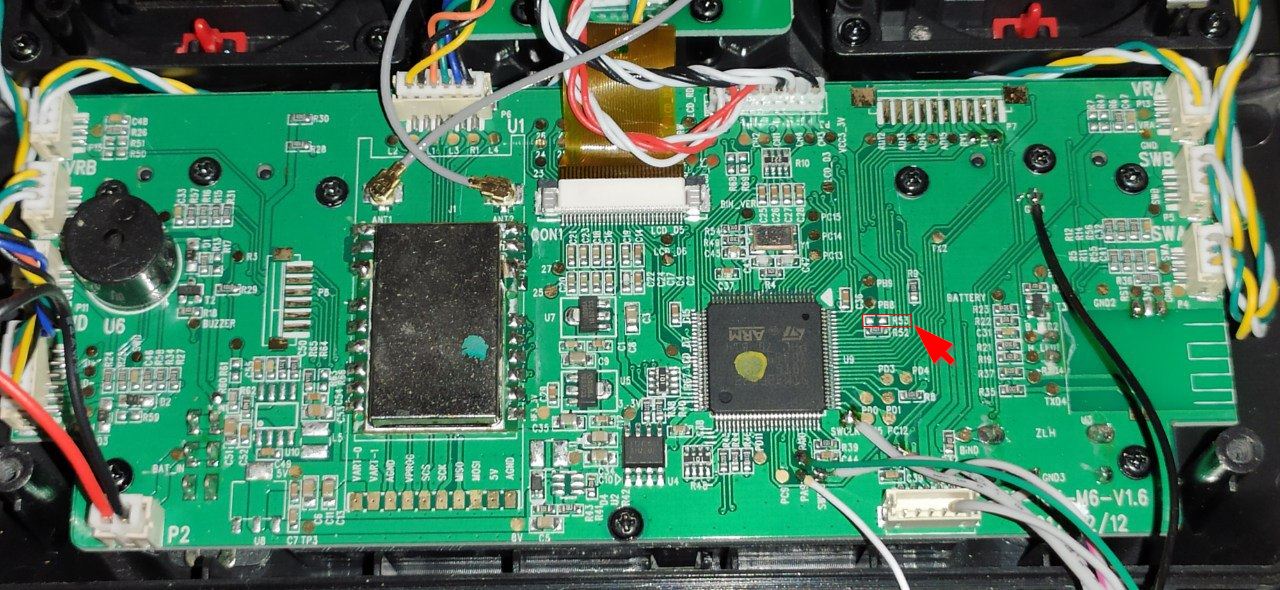
The pads marked R53 on the FS-i6X main board.
Tip
Already running OpenI6X? Upgrades are much easier — hold both inner horizontal trim switches while powering on and the radio enters DFU mode by itself. No disassembly, ever again.
If your computer doesn't see the STM32 BOOTLOADER device, you probably need drivers — the flashing guide covers the Windows fixes (STM32 drivers or Zadig).
The easiest way is EdgeTX Buddy — it flashes straight from your browser via WebUSB (use Chrome, Edge or another Chromium-based browser):
- Choose Local file and drag & drop your
.bin. - Click Flash via USB and select the STM32 BOOTLOADER device.
- Click through and wait for the process to finish. Done!
Prefer a terminal or other tools?
Back up your stock firmware (recommended before first flash):
dfu-util -s 0x08000000:leave -a 0 -U backup.bin
Flash OpenI6X:
dfu-util -s 0x08000000:leave -a 0 -D firmware.bin
Also works: STM32CubeProgrammer, Geehy DFUProgrammer (for APM32-based radios) and QMK Toolbox.
Note: the official FlySky updater cannot be used for this.
Remove the R53 bridge, power-cycle the radio, calibrate your sticks (see the manual) and set up your first model.
Tip
Using third-party firmware is done at your own risk. OpenI6X is a community project and is not affiliated with or endorsed by FlySky. Read the flashing guide before you start — and if in doubt, ask on Discord.
The fun doesn't stop at firmware — the wiki's Modifications page covers:
- DFPlayer voice announcements
- Adjustable backlight brightness
- FS-HZCZ03-ADJ hall gimbal upgrade
- External ExpressLRS module — and more
| Guide | What you'll find |
|---|---|
| Manual | The OpenI6X user interface and differences from official EdgeTX / OpenTX radios |
| EdgeTX manual | The official EdgeTX manual for B&W radios — applies to OpenI6X for the most part |
| Flashing & upgrading | Install, update or restore firmware, with troubleshooting |
| Modifications | Hardware mods: DFPlayer, backlight, gimbals, ELRS module, … |
| Development guide | Building from source and build-time options |
| Wiki | Everything else |
| Feature | Flysky i6X | OpenI6X |
|---|---|---|
| Channels | 6/10 | 16 |
| Mixers | 3 | 32 |
| Models | 20 | 20 / unlimited[1] |
| Protocols | AFHDS, AFHDS2A, PPM | 14/16Ch AFHDS2A, PPM, CRSF |
| Trainer | PPM | PPM, SBUS |
| Timers | _ | ✓ |
| Voice annoucements | _ | ✓[2] |
| Variometer | _ | ✓ |
| ExpressLRS ready | _ | ✓ Configurator built-in (no need for LUA) |
| Adjustable screen brightness | _ | ✓[3] |
| USB Modes | Joystick | Joystick, Storage, Serial (Telemetry mirror, Debug) |
| AUX Serial port | _ | ✓ SBUS Trainer, Telemetry mirror, Debug |
| Flysky FS-HZCZ03-ADJ Gimbal support | _ | ✓[4] |
| Languages | EN, CN | PL, EN, CZ, DE, ES, FI, FR, IT, NL, PT, SE |
[1] Unlimited by using USB mass storage mode eeprom backup/restore.
[2] By adding DFPlayer, see instructions in wiki.
[3] By wiring 2 pads, see instructions in wiki.
[4] See instructions in wiki.
OpenI6X is built by people like you, and new contributors are always welcome:
- Found a bug? Open an issue (please check existing ones first).
- Have an idea? Feature suggestions are welcome — especially with a pull request attached.
- Improve the documentation — the wiki and this README always need love.
- Help translate — the radio speaks 11 languages thanks to contributors.
- Want to hack on the firmware? The development guide gets you building in minutes.
If you find OpenI6X useful, consider starring the repo — it helps others discover the project.