


Beautiful, fast and highly customizable particle effects for Flutter.
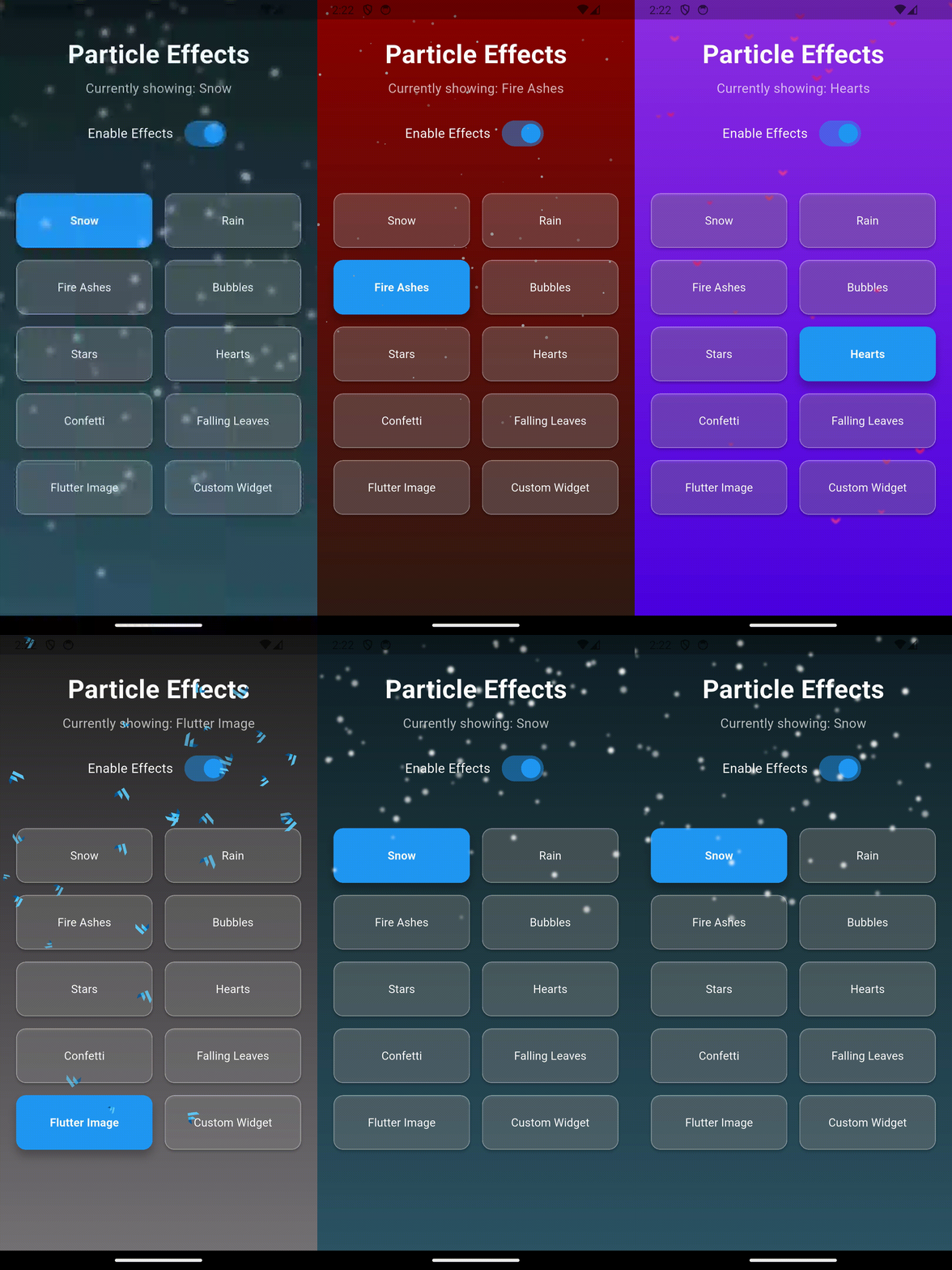
Add falling snow, rain with splashes, confetti cannons, fireworks, floating hearts, bubbles, fireflies, cherry blossoms, starfields and connected "network" backgrounds to any screen in one line. Or build your own effects with emitters, physics, touch interaction and particles made from shapes, images, SVGs or any widget.
ParticleEffects(
  config: ParticleConfig.snow,
  child: YourScreen(),
)
- Features
- Showcase: themed pages
- Installation
- Quick start
- Presets
- Particle shapes and sources
- Motion
- Guide
- Recipes
- API reference
- Performance
- Platform support
- FAQ
- Migrating from 1.x
- Contributing
Effects out of the box
- 🎁 14 ready-made presets: snow, blizzard, rain, fire ashes, bubbles, stars, hearts, confetti, falling leaves, fireflies, starfield, fireworks, sakura and network
- 🔧 Start from a preset and tweak anything with
copyWith
Any particle you like
- 🔷 13 built-in shapes: circle, square, star, heart, leaf, rain streak, snowflake, sparkle, petal, raindrop, ring, triangle, diamond
- ✏️ Your own shapes from any
Path, which is handy for SVG path data - 🖼️ Images: assets, network URLs, SVG, or any
ImageProvider, optionally tinted - 🧩 Any widget as a particle, such as icons, emoji or your own designs
- 🎨 Mix several shapes or images in one effect
Motion and physics
- 🧭 7 motion styles: falling, rising, left, right, diagonal, wandering in place, and flying outward from the center
- 🌬️ Wind, drift, rotation, twinkle and edge fading
- 🌊 Depth: small particles look farther away (slower, fainter, less parallax)
- 📜 Parallax with scrolling (built in) or device tilt
- 💧 Rain splashes where drops hit the ground
- ❄️ Colliders: particles pile up on your widgets, like snow on a card, and bursts bounce off them
Emitters, bursts and fireworks
- ⛲ Emitters: fountains, smoke, sparks from a point, a line, an area, or a moving widget
- 💥 Bursts: explosions, confetti cannons, and bursts out of any widget (e.g. a button)
- 🎆 Fireworks: shells that rise, explode into sparks and leave trails, on demand or as a continuous show
Looks
- ✨ Glow (a soft halo), blur, and additive blending for fire and light
- 🌈 Lifecycles: particles grow, shrink, fade and change color over their life
- ☄️ Trails: fading tails for comets, sparks and magic
- 🕸️ Connections: lines between nearby particles, for network and constellation backgrounds
Interaction
- 👆 Particles move away from or toward a finger or mouse
- 🫧 Tap to pop particles, with a callback, which is enough for small games
- 🖌️ Drag to paint trails of particles
- 🎯 Tap to burst anywhere
- Your UI stays fully tappable and scrollable underneath
Control
- ⏯️ Pause, resume, slow motion (
timeScale), seek and reset viaParticleController - 🔁
onAnimationCompletecallback
Built for production
- 🚀 Fast: every particle is drawn in a single GPU batch from pre-rendered sprites, with no widget rebuilds per frame
- 📉 Adaptive quality draws fewer particles when frames get slow, and
maxParticlessets a hard cap - ♿ Accessible: honours the system "reduce motion" setting
- 💾 Save and load effects as JSON, e.g. to ship seasonal effects from a server without an app update
- 🧪 Well tested, including golden image tests for every preset
- 📦 One dependency (
flutter_svg, for SVG images)
The example app includes a gallery of 18 complete, interactive pages (festivals, weather and moods, and original superhero themes), built only with this package and plain Flutter widgets. Use them as inspiration or as a starting point:
| Theme | What you'll see |
|---|---|
| 🪁 Dashain | Kites over the Himalayas that you can cut, as in a real kite fight (चेट!); a bamboo ping; marigolds; golden rice terraces; and a brass thali that bursts red tika, rice and jamara |
| 🎄 Christmas | An aurora, a flying sleigh trailing sparkles, snow in two depth layers that piles up on a greeting card, a sparkling tree, gifts that burst into confetti, and fireworks |
| 🪔 Diwali | Diyas with flickering flames, floating sky lanterns, a spinning rangoli, and a sparkler you draw with your finger |
| 🎆 New Year's Eve | A city skyline, a live countdown to midnight, champagne bubbles, and a fireworks finale |
| 🎃 Halloween | Bats across a full moon, rolling fog, ghosts you catch by tapping, and jack-o'-lanterns full of candy |
| 💘 Valentine's Day | Rising hearts, rose petals settling on a love letter, a heart constellation, and a heart explosion |
| 🎨 Holi | Gulal powder bursting in clouds, colour that stains a cotton cloth where it lands, a pichkari you squirt by dragging, and water balloons |
| 🏮 Lunar New Year | Swaying lanterns, a dragon trailing gold, falling coins and red envelopes, firecrackers and fortunes |
| 🌧️ Rainy Day | Drops sliding down a window and gathering on the frame, fog you wipe away, lightning over the city, and steaming chai |
| ⛈️ Thunderstorm | Rolling storm clouds, wind-driven rain, and lightning that strikes wherever you tap |
| 🏔️ Snowy Mountains | A blizzard with depth, snow settling on a cabin roof, chimney smoke, and footprints where you walk |
| 🏖️ Sunny Beach | Rolling waves with foam spray, bubbles, seagulls, dust in the sunlight, and sand that sprays when tapped |
| 🍂 Autumn Forest | Leaves piling up on a bench and the ground, gusts of wind, and mushrooms that puff glowing spores |
| 🌌 Cosmic Force | A warp-speed nebula, a pulsing energy core, a power blast with a shockwave and screen shake, and runes to connect |
| 🦇 Night Watch | A gothic city in the rain: a caped guardian on a ledge, a searchlight emblem you aim by dragging, lightning over the clock tower, and a bat swarm to summon |
| ⚡ Lightspeed | A runner with streak trails and electric sparks, speed lines, and a slow-motion toggle |
| 🤖 Tech Suit | A holographic HUD, a network that follows your finger, circuit particles, and repulsor blasts |
| 🔮 Arcane | Draw a spell with your finger and it erupts when you let go, with rune circles around a portal |
The example app also has a Playground that exports any configuration as ready-to-paste Dart code or JSON and imports JSON back, and tabs for presets, interaction and every particle source.
cd example
flutter rundependencies:
flutter_floating_particles: ^2.0.0import 'package:flutter_floating_particles/flutter_floating_particles.dart';Requires Flutter 3.32 or later.
1. Wrap a widget with a preset:
ParticleEffects(
  config: ParticleConfig.snow,
  child: Scaffold(body: YourContent()),
)
2. Tweak it:
ParticleEffects(
  config: ParticleConfig.snow.copyWith(particleCount: 200, wind: 0.2),
  child: YourContent(),
)
3. Celebrate something:
final controller = ParticleController();

ParticleEffects(
  controller: controller,
  config: ParticleConfig.confetti.copyWith(particleCount: 0),
  child: YourContent(),
)

// When the user completes a task
controller.confettiCannon();Every preset is a static const ParticleConfig, and ParticleEffectType.<name>.config returns the same preset by name (handy for pickers and settings screens).
| Preset | Description |
|---|---|
ParticleConfig.snow |
Softly glowing snowflakes drifting down and slowly spinning |
ParticleConfig.blizzard |
Heavy, windy snowfall of snowflakes with depth |
ParticleConfig.rain |
Fast rain streaks with a slight slant |
ParticleConfig.fireAshes |
Glowing embers rising, with additive blending |
ParticleConfig.bubbles |
Soft, translucent bubbles floating up |
ParticleConfig.stars |
Twinkling, spinning, glowing stars |
ParticleConfig.hearts |
Glowing hearts floating up |
ParticleConfig.confetti |
Colorful spinning confetti falling down |
ParticleConfig.fallingLeaves |
Autumn leaves tumbling in the wind |
ParticleConfig.fireflies |
Glowing fireflies wandering in place |
ParticleConfig.starfield |
Stars streaming out from the center, like flying through space |
ParticleConfig.fireworks |
A continuous fireworks show with glowing sparks and trails |
ParticleConfig.sakura |
Cherry blossom petals drifting in the wind |
ParticleConfig.network |
Drifting dots connected by lines, which follow the pointer |
// Pick a preset at runtime
ParticleEffects(config: ParticleEffectType.values[index].config, child: ...)Set particleType, or particleTypes to mix several (each particle picks one at random).
ParticleType |
Looks like | Great for |
|---|---|---|
circle |
● | Snow, bubbles, dust, dots |
square |
■ | Confetti, pixels |
star |
★ | Magic, celebrations |
heart |
♥ | Love, likes, Valentine's Day |
leaf |
🍂 | Autumn, nature |
streak |
╱ | Rain, speed lines (points along its motion) |
snowflake |
❄ | Winter, Christmas |
sparkle |
✦ | Twinkles, magic dust |
petal |
🌸 | Cherry blossoms, weddings, marigolds |
raindrop |
💧 | Water, splashes |
ring |
○ | Bubbles |
triangle |
▲ | Confetti, geometric designs |
diamond |
◆ | Gems, kites, confetti |
path |
anything | Your own Path in customPath |
image |
anything | image / images / imagePath |
custom |
anything | Any widget in customParticle |
Images: imagePath takes an asset path or an http(s) URL, in PNG, JPG, GIF (first frame), WebP or SVG. image and images take any ImageProvider (AssetImage, NetworkImage, MemoryImage, FileImage, …). Set particleColor or gradientColors to tint them.
ParticleDirection |
Motion |
|---|---|
topToBottom |
Falling: snow, rain, leaves |
bottomToTop |
Rising: bubbles, embers, hearts |
leftToRight / rightToLeft |
Sideways: birds, bats, wind-blown streaks |
diagonal |
Top-left to bottom-right |
none |
Wandering in place: fireflies, stars, dust |
radial |
Flying outward from the center and growing: warp speed |
Fine-tune the motion with:
- Speed and cycle:
velocityMultiplierandanimationDuration. - Drift:
wind(sideways drift, with particles wrapping around the edges) anddriftAmplitude(wobble). - Rotation:
enableRotationandrotationSpeed. - Fading:
edgeFade, plusparticleCoverage, which sets how far across the screen particles travel before fading out. - Depth:
depthEffect.
Particles are painted on top by default. With ParticleLayer.background they are painted behind the child; the child needs a transparent background for them to show.
ParticleEffects(
  layer: ParticleLayer.background,
  config: ParticleConfig.stars,
  child: YourTransparentContent(),
)Without a child, ParticleEffects fills the available space, so you can position it anywhere, for example in a Stack:
Stack(
  children: [
    const Positioned.fill(child: ParticleEffects(config: ParticleConfig.fireflies)),
    YourContent(),
  ],
)Nest or stack several ParticleEffects:
ParticleEffects(
  config: ParticleConfig.rain,
  child: ParticleEffects(
    config: ParticleConfig.fallingLeaves,
    child: YourWidget(),
  ),
)ParticleEffects(
config: const ParticleConfig(
particleType: ParticleType.star,
direction: ParticleDirection.bottomToTop,
particleCount: 60,
minSize: 4,
maxSize: 12,
gradientColors: [Colors.amber, Colors.cyan, Colors.pinkAccent],
enableGlow: true,
enableRotation: true,
velocityMultiplier: 0.8,
edgeFade: 0.2,
),
child: YourWidget(),
)const ParticleConfig(
particleType: ParticleType.image,
imagePath: 'assets/flutter_logo.png', // or 'https://example.com/heart.svg'
minSize: 10,
maxSize: 24,
enableRotation: true,
)
// Any ImageProvider, tinted from a palette
ParticleConfig(
particleType: ParticleType.image,
image: const AssetImage('assets/flutter_logo.png'),
gradientColors: const [Colors.amber, Colors.cyan],
)Show something while images load, and preload them early to avoid the wait:
ParticleEffects(
  config: config,
  loadingWidget: const CircularProgressIndicator(),
  child: YourWidget(),
)

await ParticleEffects.preloadImages(['assets/a.png', 'https://example.com/b.png']);Any coordinates work; the path is scaled to the particle size.
final bolt = Path()
  ..moveTo(14, 0)
  ..lineTo(2, 14)
  ..lineTo(10, 14)
  ..lineTo(6, 24)
  ..lineTo(18, 9)
  ..lineTo(10, 9)
  ..close();

ParticleConfig(
  particleType: ParticleType.path,
  customPath: bolt,
  particleColor: Colors.yellowAccent,
)The widget is rendered once, in a maxSize × maxSize box, and scaled for each particle. Use a const widget, or keep the same instance, so it isn't rendered again on every rebuild.
const ParticleConfig(
  particleType: ParticleType.custom,
  customParticle: Text('👻', style: TextStyle(fontSize: 40)),
  minSize: 20,
  maxSize: 40,
)
Keep the widget's drawing inside its box: a
boxShadowthat extends past it gets cut off square. Use the config'senableGlowfor a glow instead.
const ParticleConfig(
  particleTypes: [ParticleType.snowflake, ParticleType.circle],
)

ParticleConfig(
  particleType: ParticleType.image,
  images: const [AssetImage('assets/gift.png'), AssetImage('assets/bell.png')],
)ParticleController controls one or more effects. Use particleCount: 0 for an effect that only shows bursts:
final controller = ParticleController();

ParticleEffects(
  controller: controller,
  config: ParticleConfig.confetti.copyWith(particleCount: 0),
  child: YourWidget(),
)

controller.explode();                            // in every direction
controller.confettiCannon();                     // from the bottom corners
controller.fireworks(shells: 5);                 // rising shells that explode
controller.burstFromKey(buttonKey, count: 40);   // out of a widget

// Full control
controller.burst(
  alignment: Alignment.bottomLeft,
  angle: -pi / 3,   // up and to the right
  spread: pi / 6,
  minSpeed: 600,
  maxSpeed: 1100,
  gravity: 600,
);

controller.pause();
controller.resume();
controller.timeScale = 0.3;                      // slow motion
controller.seek(const Duration(seconds: 5));
controller.reset();
controller.dispose(); // when you no longer need itEmitters continuously spawn particles that move with simple physics. They can sit at an alignment or position, cover an area (extent), or follow a widget as it moves (followKey):
// Smoke rising from the bottom
ParticleConfig(
  particleCount: 0,
  enableBlur: true,
  blurSigma: 8,
  lifecycle: ParticleLifecycle.growAndFade,
  emitters: const [ParticleEmitter.smoke],
)

// Sparkles that follow a widget, e.g. an animated sleigh
ParticleConfig(
  particleCount: 0,
  particleType: ParticleType.sparkle,
  emitters: [
    ParticleEmitter(
      followKey: sleighKey,
      rate: 40,
      spread: 2 * pi,
      minSpeed: 10,
      maxSpeed: 50,
      lifespan: const Duration(milliseconds: 1500),
    ),
  ],
)
Built in: ParticleEmitter.fountain, ParticleEmitter.smoke and ParticleEmitter.fireworksShow, which is used by ParticleConfig.fireworks.
const ParticleConfig(
  // Shrink, fade and change color over each particle's life
  lifecycle: ParticleLifecycle(
    endScale: 0.2,
    endOpacity: 0,
    colors: [Colors.yellow, Colors.orange, Colors.red],
  ),
  // A fading tail behind each particle
  trail: ParticleTrail(length: 8),
)
Ready-made lifecycles: ParticleLifecycle.shrink, ParticleLifecycle.growAndFade and ParticleLifecycle.ember.
ParticleConfig.rain.copyWith(
  splash: const ParticleSplash(count: 4),
  depthEffect: 0.8, // small drops look farther away: slower and fainter
  wind: 0.2,
)final scroll = ScrollController();
late final parallax = ScrollParallax(scroll); // dispose() it later
ParticleEffects(
parallax: parallax,
config: ParticleConfig.snow.copyWith(parallaxFactor: 0.3),
child: ListView(controller: scroll, children: ...),
)For tilt, feed accelerometer readings (e.g. from sensors_plus) into a ValueNotifier<Offset> and pass it as parallax. With depthEffect, near particles shift more than far ones.
Give widgets a GlobalKey and list them as colliders. Falling particles land on top of them and melt after a while; bursts and emitted particles bounce off. Colliders follow their widgets as they move or scroll.
ParticleEffects(
  config: ParticleConfig.snow,
  colliders: [cardKey],
  collision: const ParticleCollision(settleDuration: Duration(seconds: 10)),
  child: Card(key: cardKey, child: ...),
)Particles react to the pointer while taps and scrolling still reach your widgets:
ParticleEffects(
  interaction: ParticleInteraction.repel, // .attract, .tapToBurst, .pop, .paint
  config: ParticleConfig.fireflies,
  child: YourWidget(),
)

// Or fine-tune it
ParticleEffects(
  interaction: const ParticleInteraction(
    mode: ParticleInteractionMode.attract,
    radius: 150,
    strength: 80,
    popOnTap: true,   // tap a particle to pop it
    emitOnDrag: 2,    // drag to paint particles
  ),
  onParticleTap: (details) => debugPrint('Popped at ${details.position}'),
  config: ParticleConfig.bubbles,
  child: YourWidget(),
)
An effect layer placed below a full-screen scrollable (for example, a lower child of a
Stack) never sees taps, because the scrollable takes them first. Put interactive effects above your content, or make them wrap it.
ParticleEffects(
  interaction: ParticleInteraction.attract,
  config: ParticleConfig.network.copyWith(
    connections: const ParticleConnections(maxDistance: 120, color: Colors.cyan),
  ),
)ParticleEffects(
adaptiveQuality: true, // draw fewer particles while frames are slow
config: ParticleConfig.blizzard.copyWith(maxParticles: 300),
)// Export
final json = jsonEncode(config.toJson());
// Import, e.g. from a file, a server or a user's paste
final decoded = jsonDecode(json);
if (decoded is Map<String, Object?>) {
final restored = ParticleConfig.fromJson(decoded);
}fromJson accepts hand-written and partial JSON: missing options and values of the wrong type use their defaults, and out-of-range values are clamped (for example "maxOpacity": 2 becomes 1), so any JSON object gives a valid configuration. Only jsonDecode itself can throw, with a FormatException for text that isn't JSON.
{
  "particleType": "snowflake",
  "direction": "topToBottom",
  "particleCount": 120,
  "minSize": 4,
  "maxSize": 12,
  "particleColor": 4294967295,
  "enableGlow": true,
  "wind": 0.2
}
Colors are 32-bit ARGB integers (0xFFFFFFFF is 4294967295), durations are in milliseconds (animationDurationMs), and enums use their names.
Custom widgets, paths, emitters' followKeys and image providers other than AssetImage and NetworkImage can't be serialized and are left out.
ParticleEffects(
  onAnimationComplete: () => debugPrint('cycle done'),
  respectReduceMotion: true, // default: freeze when the OS asks for reduced motion
  clipBehavior: Clip.hardEdge, // default: keep particles inside the widget
  child: YourWidget(),
)Snowy login screen
ParticleEffects(
  config: ParticleConfig.snow,
  layer: ParticleLayer.background,
  child: LoginForm(), // with a transparent background
)
"Payment successful" confetti
final controller = ParticleController();
// ...
ParticleEffects(
  controller: controller,
  config: ParticleConfig.confetti.copyWith(particleCount: 0),
  child: SuccessScreen(),
);
// in initState, or when the payment completes
controller.confettiCannon(count: 80);
Heart burst from a like button
ParticleEffects(
  controller: controller,
  config: ParticleConfig.hearts.copyWith(particleCount: 0),
  child: IconButton(
    key: likeKey,
    icon: const Icon(Icons.favorite),
    onPressed: () => controller.burstFromKey(likeKey, count: 20, gravity: 200),
  ),
)
Pop-the-bubbles mini game
ParticleEffects(
  config: ParticleConfig.bubbles,
  interaction: ParticleInteraction.pop,
  onParticleTap: (_) => setState(() => score++),
)
Landing page network background
Stack(children: [
  const Positioned.fill(
    child: ParticleEffects(
      config: ParticleConfig.network,
      interaction: ParticleInteraction.attract,
    ),
  ),
  YourHero(),
])
Weather screen with realistic rain
ParticleEffects(
  config: ParticleConfig.rain.copyWith(
    splash: const ParticleSplash(),
    depthEffect: 0.8,
  ),
  child: WeatherScreen(),
)
Seasonal effect from your backend
final config = ParticleConfig.fromJson(await api.fetchSeasonalEffect());
ParticleEffects(config: config, child: HomeScreen());| Property | Type | Description | Default |
|---|---|---|---|
child |
Widget? |
Widget to show particles over or behind. Fills the available space when null | null |
config |
ParticleConfig |
How particles look and move | ParticleConfig() |
isEnabled |
bool |
Show particles; when false nothing is painted or animated | true |
controller |
ParticleController? |
Pause, resume, bursts, fireworks | null |
layer |
ParticleLayer |
foreground or background |
foreground |
interaction |
ParticleInteraction? |
React to touch and mouse input | null |
parallax |
ValueListenable<Offset>? |
Offset particles shift by, e.g. a ScrollParallax |
null |
colliders |
List<GlobalKey> |
Widgets particles land on and bounce off | [] |
collision |
ParticleCollision |
How particles react to colliders | ParticleCollision() |
onParticleTap |
ValueChanged<ParticleTapDetails>? |
Called when a particle is tapped | null |
adaptiveQuality |
bool |
Draw fewer particles while frames are slow | false |
respectReduceMotion |
bool |
Freeze when the platform asks for reduced motion | true |
clipBehavior |
Clip |
Clip particles to the widget bounds | Clip.hardEdge |
onAnimationComplete |
VoidCallback? |
Called once per animationDuration |
null |
loadingWidget |
Widget? |
Shown while image or widget particles load | null |
Static helpers: preloadImage, preloadImages, preloadImageProvider, preloadCustomWidget, preloadCustomWidgets, clearImageCache.
| Property | Type | Description | Default |
|---|---|---|---|
particleType |
ParticleType |
Shape of the particles | circle |
particleTypes |
List<ParticleType>? |
Mix several types; overrides particleType |
null |
direction |
ParticleDirection |
How particles move | topToBottom |
particleCoverage |
ParticleCoverage |
How far across the screen particles travel before fading out | full |
particleCount |
int |
Number of continuously animated particles | 50 |
minSize / maxSize |
double |
Particle size range in logical pixels | 2.0 / 6.0 |
enableSizeVariation |
bool |
Vary sizes; when false all particles are maxSize |
true |
animationDuration |
Duration |
Time for an average particle to cross the screen | 10s |
velocityMultiplier |
double |
Speed multiplier | 1.0 |
particleColor |
Color? |
Single color (tints images) | null (white) |
gradientColors |
List<Color>? |
Palette each particle picks a random color from | null |
minOpacity / maxOpacity |
double |
Opacity range | 0.3 / 1.0 |
enableOpacityAnimation |
bool |
Twinkle between the opacities | true |
enableGlow / glowRadius |
bool / double |
Soft halo around particles | false / 4.0 |
enableBlur / blurSigma |
bool / double |
Blur the particles themselves | false / 1.0 |
enableRotation / rotationSpeed |
bool / double |
Spin particles, with a speed multiplier | false / 1.0 |
wind |
double |
Sideways drift per unit of travel; particles wrap around the edges | 0.0 |
driftAmplitude |
double? |
Side-to-side wobble in pixels; null uses a default for the direction |
null |
edgeFade |
double |
Fraction of the path (0–0.5) to fade in and out over | 0.0 |
blendMode |
BlendMode |
e.g. BlendMode.plus for glowing fire and sparks |
srcOver |
seed |
int? |
Different seeds give different particle layouts | null |
lifecycle |
ParticleLifecycle? |
Size, opacity and color over each particle's life | null |
trail |
ParticleTrail? |
Fading tail behind each particle | null |
splash |
ParticleSplash? |
Droplets where particles reach the end of their path | null |
connections |
ParticleConnections? |
Lines between nearby particles | null |
emitters |
List<ParticleEmitter>? |
Sources that spawn extra particles | null |
depthEffect |
double |
Small particles look farther away (0–1) | 0.0 |
parallaxFactor |
double |
How much particles shift with parallax |
0.5 |
maxParticles |
int? |
Upper limit on particles drawn at once | null |
imagePath |
String? |
Asset path or URL for ParticleType.image (PNG, JPG, GIF, WebP, SVG) |
null |
image / images |
ImageProvider? / List<ImageProvider>? |
Image providers for ParticleType.image |
null |
customPath |
Path? |
Shape for ParticleType.path |
null |
customParticle |
Widget? |
Widget for ParticleType.custom |
null |
Methods: copyWith(...), toJson(), ParticleConfig.fromJson(json).
| Member | Description |
|---|---|
pause() / resume() / toggle() |
Freeze and continue the animation |
isPaused |
Whether the animation is paused |
timeScale |
Speed of time: 1.0 normal, 0.5 slow motion, 2.0 double speed |
seek(Duration) |
Jump the continuous particles to a point in the animation |
reset() |
Restart the animation and remove all burst particles |
burst({...}) |
A burst from a position or alignment, with count, angle, spread, minSpeed, maxSpeed, gravity, drag and lifespan |
burstFromKey(key, {...}) |
A burst out of the widget with that GlobalKey |
explode({...}) |
A burst in every direction |
confettiCannon({count, left, right}) |
Cannons firing up from the bottom corners |
fireworks({shells, sparks}) |
Shells that rise and explode |
clearBursts() |
Remove all burst particles now |
burstParticleCount |
Number of live burst, emitted and firework particles |
isAttached |
Whether the controller drives at least one effect |
| Property | Description | Default |
|---|---|---|
alignment / position |
Where to emit (position in local coordinates wins) |
bottomCenter / null |
followKey |
Emit from a widget, following it as it moves | null |
extent |
Size of the emission area; zero height gives a line | Size.zero |
rate |
Particles (or firework shells) per second | 20 |
angle / spread |
Direction and cone width, in radians | -pi/2 / pi/6 |
minSpeed / maxSpeed |
Launch speed in pixels per second | 100 / 250 |
gravity / drag |
Downward acceleration, and speed lost per second | 0 / 0.2 |
lifespan |
How long particles live | 3s |
fireworks / sparkCount |
Emit firework shells, each exploding into sparks | false / 60 |
Presets: ParticleEmitter.fountain, .smoke, .fireworksShow.
| Property | Description | Default |
|---|---|---|
mode |
repel, attract or none |
repel |
radius / strength |
Reach and maximum push in pixels | 100 / 60 |
tapBurstCount |
Particles to burst on each tap | 0 |
popOnTap |
Tapping a particle pops it | false |
emitOnDrag |
Particles to emit per drag movement | 0 |
Presets: ParticleInteraction.repel, .attract, .tapToBurst, .pop, .paint.
| Class | Properties |
|---|---|
ParticleLifecycle |
startScale, endScale, startOpacity, endOpacity, colors; presets shrink, growAndFade, ember |
ParticleTrail |
length, spacing, endScale, endOpacity |
ParticleSplash |
count, size, minSpeed, maxSpeed, lifespan, color |
ParticleConnections |
maxDistance, color, strokeWidth, maxOpacity, connectPointer |
ParticleCollision |
settle, settleDuration, maxSettled, restitution |
ParticleTapDetails |
position, color, size, isBurstParticle |
ScrollParallax |
A ValueNotifier<Offset> that follows a ScrollController |
enum ParticleType {
  circle, square, star, heart, leaf, streak,
  snowflake, sparkle, petal, raindrop, ring, triangle, diamond,
  path, image, custom,
}

enum ParticleDirection {
  topToBottom, bottomToTop, leftToRight, rightToLeft, diagonal,
  none,   // wander in place
  radial, // fly outward from the center
}

enum ParticleCoverage { quarter, semiHalf, half, semiFull, full }

enum ParticleLayer { background, foreground }

enum ParticleInteractionMode { repel, attract, none }

enum ParticleEffectType {
  snow, rain, fireAshes, bubbles, stars, hearts, confetti, fallingLeaves,
  fireflies, starfield, fireworks, sakura, network, blizzard,
}- One draw call per effect: each shape or image is drawn once into a sprite (with glow and blur baked in), and all particles are drawn from it in a single
drawRawAtlascall. - No rebuilds: a
Tickerdrives aCustomPainterdirectly, so no widgets rebuild per frame. - Idle when not needed: the animation stops while an effect is disabled, paused, off screen in an inactive route, frozen for reduced motion, or has nothing to animate.
- Guards:
adaptiveQualitylowers the particle count while frames miss their budget, andmaxParticlessets a hard cap. - Tips:
- Reuse
ParticleConfigobjects (for example,static constconfigs) instead of creating new ones, with new widgets or paths, in everybuild. - Keep connection effects to a couple of hundred particles.
- Test large counts on your lowest-end target device before shipping.
- Reuse
The package is pure Flutter with no platform-specific code, so it runs wherever Flutter runs: Android, iOS, web, macOS, Windows and Linux.
It has been tested on Android (Impeller with OpenGL ES) and macOS (Impeller with Metal). Particle sprites are sampled without mipmaps, because some GPU backends don't create valid mipmaps for them, which used to draw square outlines around particles.
ParticlePainteris no longer exported; useParticleEffects(with or without a child).ParticleType,ParticleDirectionandParticleEffectTypehave new values, so exhaustiveswitchstatements over them need new cases.velocityMultiplier,enableSizeVariation,onAnimationCompleteandloadingWidgetnow take effect, so effects that set them look or behave differently.- Glow now adds a halo around a sharp particle instead of blurring the whole particle; use
enableBlurfor a soft look. - The
rainpreset uses the newstreakshape, andsnowuses snowflakes.
See the changelog for details.
Issues and pull requests are welcome on GitHub.
MIT. See LICENSE.
If this package makes your app a little more magical, ⭐ star it on GitHub and 👍 like it on pub.dev. It really helps others find it!
#flutter #flutterdev #dart #dartlang #fluttercommunity #flutterpackage #flutteranimation #flutterui #particles #particleeffects #animation #confetti #fireworks #snowfall #snow #rain #hearts #bubbles #uidesign #uxdesign #mobiledev #appdev #androiddev #iosdev #webdev #opensource #pubdev #dashain #diwali #holi #christmas #newyear #halloween #valentinesday #lunarnewyear #weather #superhero