







A privacy-first, beginner-friendly desktop application for running large language models fully locally on Windows, Linux, and macOS. Load any GGUF model (Mistral, LLaMA, DeepSeek, Qwen, and thousands more from Hugging Face) and chat with it — with a built-in agentic mode that can read, create, edit, and organize files in a workspace you choose. No data ever leaves your computer.
📦 Also available as a Python package — install it in seconds with
pip install ggufloaderand launch it withggufloader. View on PyPI
- Collision-proof pip package — the entire app now ships inside a single
ggufloaderpackage, sopip install ggufloaderis safe even in shared or global Python environments where other packages live (no more top-levelconfig/utils/corename clashes, no dependency mismatch: the tested dependency set is pinned). - Mature Agentic Mode — LangGraph-driven multi-step agent with 7 sandboxed tools, a live transcript panel, Allow/Deny approval cards for shell commands and git writes, and SQLite checkpointing so each workspace's conversation survives restarts and resumes where you left off.
- Find Paragraph (no-RAG search) — ask a question and locate the exact paragraph in a document or a whole folder, with a planner that decides what to read and live per-file progress.
- Full-folder summaries — "summarize this folder" now reads every readable file (Markdown, PDF, DOCX, TXT, code) before answering, with a "Reading remaining files…" status so you always know what's happening.
- One-click GPU support — an Install GPU Support button in the UI that installs the CUDA-enabled build for you and shows a green tick when GPU acceleration is ready.
- 🤖 Agentic Mode (LangGraph) — an autonomous LangGraph-driven assistant that reads, writes, edits, searches, runs commands, and uses git inside a workspace folder you grant it access to — with human approval for anything sensitive, and SQLite checkpointing so conversations resume after restarts.
- 🔎 Find Paragraph — locate a passage in a document or folder with the model itself, no RAG or vector database required.
- 🧾 Real file reading — extracts text from
.md,.pdf,.docx,.txtand source files, so the agent can summarize and answer from real content. - 🔄 Universal model support — load ANY GGUF model from anywhere; no conversion or configuration.
- ⚡ GPU acceleration — an Install GPU Support button in the sidebar installs the CUDA build with live status (green tick when ready); the app detects it and uses the GPU cleanly for fast inference.
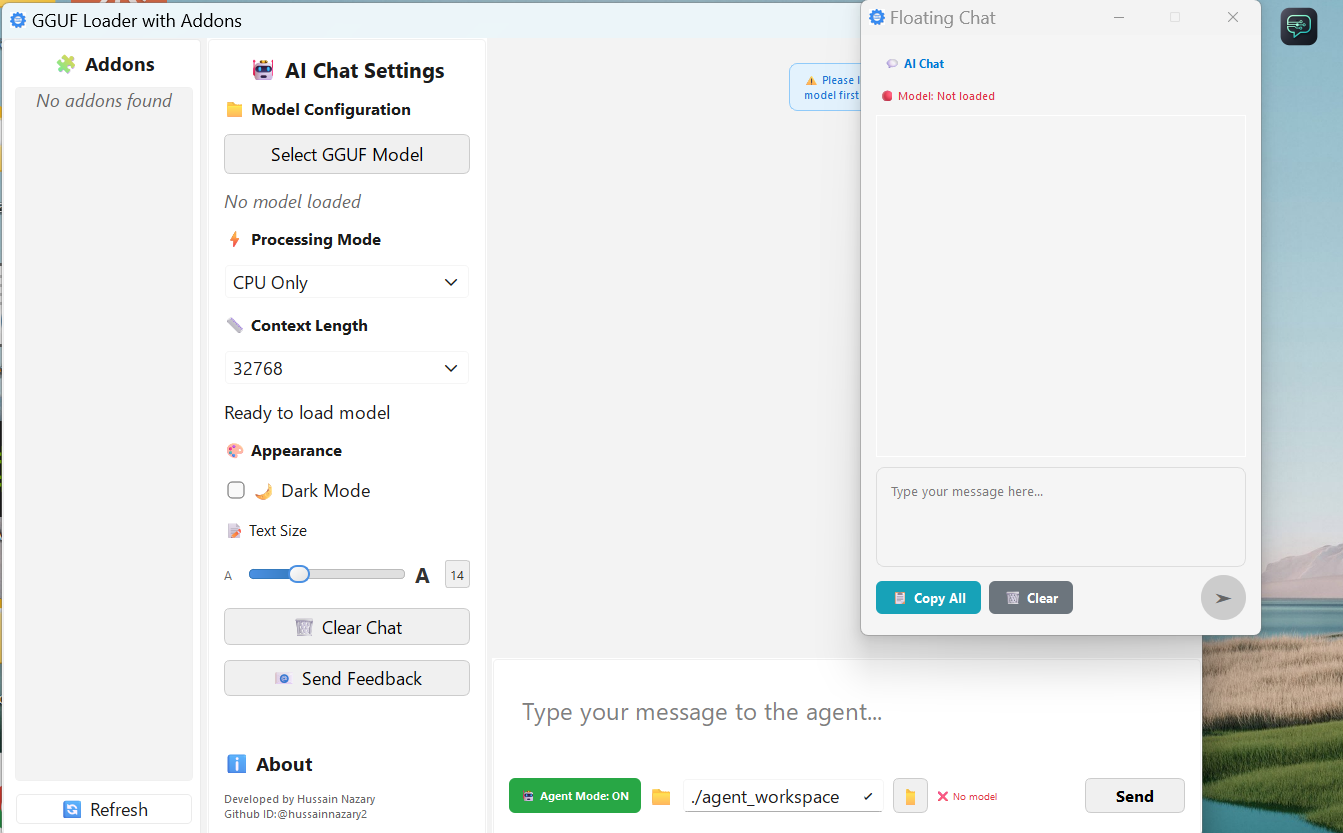
- 🌐 Floating chat — an always-on-top chat button that follows you across apps, with proper word wrapping and right-to-left support.
- 🔒 Privacy first — 100% local inference. Your prompts and files never leave your machine.
- 🎨 Modern PySide6 UI — clean, dark/light themed interface (light by default, Dark Mode toggle in the View menu).
- 💻 Cross-platform — Windows 10/11, Linux, and macOS (including Apple Silicon).
pip install ggufloader
ggufloader
That's it — the app opens. Requires Python 3.10–3.13.
The package is published on PyPI —
update it any time with pip install --upgrade ggufloader.
The wheel installs only the ggufloader name into your environment, so it
works perfectly in a global Python install alongside other packages — nothing
gets overwritten, and the dependency set is pinned to the exact combination
that is tested to install and boot together on all three platforms.
git clone https://github.com/GGUFloader/gguf-loader.git
cd gguf-loader
python -m venv .venv
.venv\Scripts\activate        # Windows (or: source .venv/bin/activate)
pip install -r requirements.txt
python main.py
Windows/Linux users can also run launch.bat / launch.sh from the extracted
ZIP (keep launch.sh executable after extraction). The scripts create a
virtualenv, check every dependency, and install anything missing — on Linux
llama-cpp-python is pulled from abetlen's prebuilt CPU wheel index, so no C
compiler is required. They need Python 3.10+ (on Debian/Ubuntu also
python3-venv or virtualenv); any missing piece is reported with a clear,
actionable message.
Standalone one-file executables are published on the GitHub Releases page:
| Artifact | Size | Notes |
|---|---|---|
GGUFLoader_v<version>_GPU.exe |
~850 MB | Windows · NVIDIA CUDA, zero setup |
GGUFLoader_v<version>_CPU.exe |
~70 MB | Windows · CPU-only, works everywhere |
GGUFLoader_v<version>_linux_x86_64_CPU |
~105 MB | Linux · CPU-only |
The GPU build bundles the full CUDA runtime; the CPU build drops it entirely, which is why it is ~10× smaller. Pick the GPU build if you have an NVIDIA card, the CPU build otherwise.
- Download a model — browse Hugging Face GGUF models.
- Click Load Model, pick your
.gguffile, wait for it to load. - Click the floating chat button and start chatting — or open the chat panel in the main window.
Agentic Mode turns the local model into a working assistant for a folder you choose (your project, a documentation set, any workspace). It plans multi-step tasks, calls tools, and streams every step live.
| Tool | What it does |
|---|---|
list_directory |
Explore folders in the workspace |
read_file |
Read any file (MD/PDF/DOCX/TXT/code — text extracted automatically) |
write_file |
Create new files |
edit_file |
Make targeted edits to existing files |
search_files |
Find files and grep for content |
run_command |
Run a shell command inside the workspace (sandboxed) |
git |
Git operations (status, diff, add, commit) |
Every tool is sandboxed to the workspace root — the agent cannot touch anything outside the folder you granted.
Shell commands and git writes are sensitive, so they pause for your approval: an Allow / Deny card appears in the agent panel and the run waits for your choice. Everything else (reading, searching, writing files) runs automatically.
The agent panel shows the run as it happens — step chips, each tool call with its result, status lines like "📖 Reading remaining files…", and approval cards. Runs are checkpointed (SQLite), so state survives restarts, and a step budget keeps runaway loops in check.
- "Summarize the Day 4 folder" → reads all 5 files (MD + PDF + DOCX) and gives a real summary
- "Create a new feature module with proper structure"
- "Refactor this codebase and organize files"
- "Find where
MAX_TOKENSis defined and explain it"
From Tools → Find Paragraph… you can locate a specific passage in a document or across a folder:
- Single file — type a question ("what does it say about control flow?") and the model finds and ranks the matching paragraphs.
- Folder search — a planner decides which files to look at and in what order (using only read-only tools), with a live per-file scan counter.
- Smart defaults — your last query, source, folder, pattern, and exhaustive-search setting are remembered between sessions.
No vector database, no embeddings — just the model reading the text and finding the answer.
The pip-installed app runs on CPU by default. To speed up inference with an NVIDIA GPU:
- Click ⬇ Install GPU Support in the sidebar.
- The app installs the CUDA-enabled
llama-cpp-pythonbuild into your current Python environment (you'll see progress, then "✅ GPU support installed — restart to apply"). - Restart the app. The button now shows a green tick ("GPU support is installed") and inference uses the GPU — no CPU+GPU mixing, just the GPU.
On macOS, GPU (Metal) support is enabled by building llama-cpp-python with
Metal, e.g. CMAKE_ARGS="-DGGML_METAL=on" pip install --force-reinstall llama-cpp-python.
For manual control you can also run the bundled scripts:
scripts/install_gpu_llama.bat (Windows) / scripts/install_gpu_llama.sh
(Linux/macOS), and verify with python scripts/verify_gpu_support.py.
| Model | Size | Notes |
|---|---|---|
| Mistral-7B Instruct | ~4.2 GB | ⭐ Best balance — excellent reasoning, great for agentic mode |
| LLaMA 3 8B Instruct | ~4.7 GB | Strong reasoning and code understanding |
| GPT-OSS 20B | ~7.3 GB | More powerful for complex refactoring |
Find thousands more on Hugging Face.
- Python: 3.10–3.13 (pip install)
- OS: Windows 10/11, Linux, macOS (Intel & Apple Silicon)
- RAM: 4 GB minimum (8 GB recommended)
- Storage: 2 GB free
- GPU: Optional — NVIDIA CUDA on Windows/Linux, Metal on macOS
The wheel declares its dependencies pinned to the exact set verified to work
together, so pip install ggufloader resolves the same tested combination
every time — no dependency mismatch, and every package has prebuilt wheels for
all three platforms:
PySide6 · llama-cpp-python (CPU by default) · langgraph ·
langgraph-checkpoint-sqlite · langchain-core · pydantic
- Wheel / sdist:
pip install build && python -m build→ artifacts indist/ - Windows executable:
scripts/build_exe.bat(orpython -m PyInstaller build_exe.spec). The script detects whether the installed llama-cpp-python is CUDA-enabled and names the outputGGUFLoader_v<version>_GPU.exeorGGUFLoader_v<version>_CPU.exeautomatically. - Linux executable:
scripts/build_linux.sh— must run on Linux (or WSL); producesGGUFLoader_v<version>_linux_x86_64_CPU. One-file binaries are not cross-platform. - Tests:
pip install pytest && python -m pytest
- Quick Reference
- Developing Addons
- AGENTS.md — codebase guide for AI coding agents
- Docs archive (v2.1.2) — historical documentation restored from git history
- Architecture
- Changelog
- Contributing
- Security Policy
Contributions are welcome! See CONTRIBUTING.md.
MIT — see LICENSE.
Report vulnerabilities to hussainnazary475@gmail.com or see SECURITY.md.
Built with ❤️ by the GGUF Loader community