


pip install nuitka_simple_guiThen just run
python -m nuitka_simple_guiornuitka_simple_guiOr use uv
uvx nuitka_simple_gui(if you have uv)
A simple GUI app for Nuitka.
Tip: On Windows, Zig is recommended as the C compiler — lightweight, no extra setup, and supports Python 3.13+ (which MinGW64 does not yet). Install with:
pip install nuitka_simple_gui[zig]
| Extra | Package | Purpose |
|---|---|---|
zig |
ziglang>=0.16.0 |
Use Zig as C compiler (--zig / CC auto-detect) |
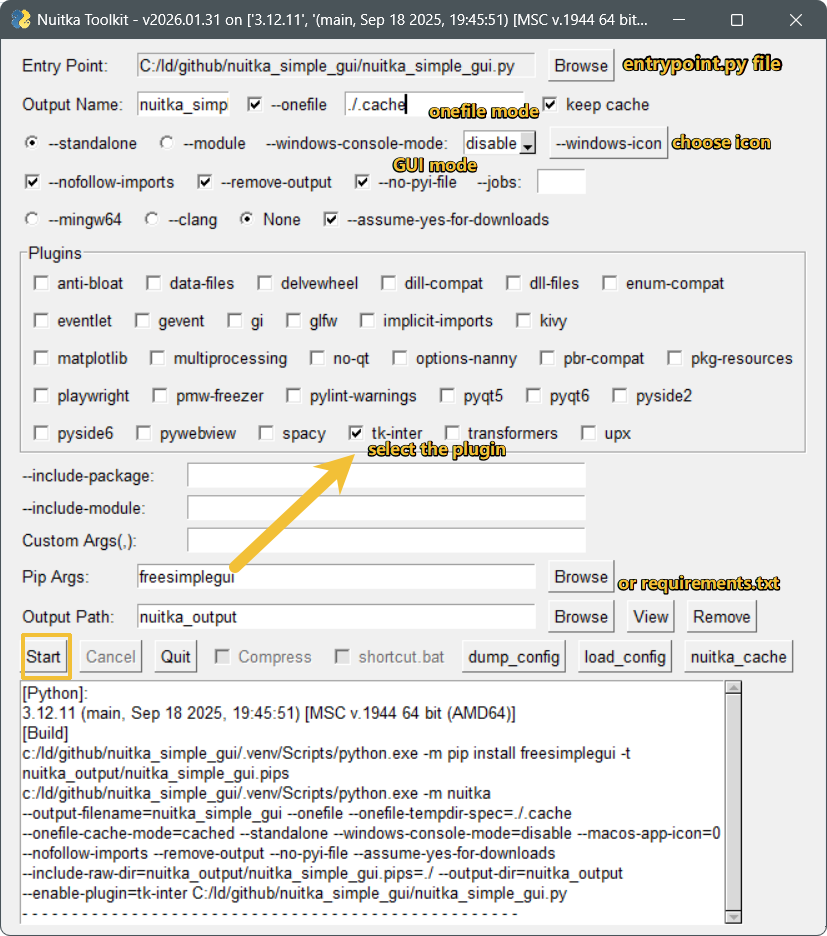
- Easily build your Python code into executable files using Nuitka
- Handy shortcut buttons for common tasks
- Compress folders into zip files
- Quickly create a symbolic link for
start.exe - Separate dependencies and source code—only build your source code
- Added
onefilemode (since 2023.07.18), withkeep cacheoption for cached extraction(since 2025.9.23) - Added a beep notification after finishing on Windows (since 2023.07.18)
- Added
dump-configandload-configfeatures (since 2023.07.27) - For more changes, check the changelog below
- Fix Linux & macOS compatibility (since 2025.11.18)
- Added
--zigbuild tool option andCCinput for custom compiler path, auto-detects ziglang (install withpip install nuitka_simple_gui[zig]) - Added
scan_pipscheckbox: scans.pyfiles in.pipsdir for stdlib imports, auto-fills--include-package/--include-moduleto preventModuleNotFoundErrorwith--nofollow-imports
No manual needed—just use the GUI!
No docs needed—just use the GUI!
I'm still thinking about it. Stay tuned!
- On Windows, Nuitka needs a C compiler. You can install MinGW64, Visual Studio, or Zig (recommended).
- If you don't have a C compiler, just run
python -m nuitka --version --assume-yes-for-downloadsand Nuitka will try to download MinGW64 for you automatically.
- If you don't have a C compiler, just run
- 2026.5.28
- Added
--zigbuild tool option andCCinput with auto-detect ziglang support - Added optional dependency
pip install nuitka_simple_gui[zig](ziglang is no longer required) - Added
requires-python >= 3.11to project metadata - Updated
--onefile-tempdir-spectooltip with correct{}token syntax and new tokens (PROGRAM_DIR,FILE_VERSION,PRODUCT_VERSION) - Added warning for Windows zig mode: onefile with relative paths and "keep cache" unchecked may fail
- Added
- 2026.1.31
- Use
--windows-console-modedropdown instead of deprecated--windows-disable-console - Use
--macos-create-app-bundleinstead of deprecated--macos-disable-console - Added
--macos-app-iconoption for macOS
- Use
- 2025.11.21
- Fixed
--include-data-dir->--include-raw-dirfor nuitka compatibility - Updated config load logic
- Fixed
- 2025.11.20
- Fixed
popup_get_filefordump_config
- Fixed
- 2025.11.18
- Fixed Linux & macOS compatibility
- 2025.9.23
- Added a "keep cache" checkbox for
--onefilemode
- Added a "keep cache" checkbox for
- 2025.1.7
- Added a
nuitka_cachebutton to showNUITKA_CACHE_DIR - Added support for
--jobs
- Added a
- 2025.1.6
- Added tooltips to plugin checkboxes
- Moved
ensure_python_pathlog to the GUI textarea, for manual GCC downloads
- 2025.01.05
- Fixed a failure when
pip_argsis empty - Made the Nuitka plugin list update dynamically
- Fixed a failure when