
Run work, personal and API-key accounts at the same time, without their configs drifting apart.
Each account is its own directory and its own terminal. Skills, hooks and settings stay linked to your main account. Claude Code, Codex, Grok Build and pi.


English | 中文
CLAUDE_CONFIG_DIR plus a shell alias already starts a second account. It does not keep skills and settings in one place, and it does not show quota for every account. Does this break a provider's terms?
| At the same time | Skills, hooks, settings | Quota and usage | Setup | |
|---|---|---|---|---|
CLAUDE_CONFIG_DIR and an alias |
Yes. Each terminal exports the variable. | Each directory is its own copy. They drift unless you symlink by hand. | That session's status line | One alias per account |
| cc-switch | Enabling a provider writes the host's live config, so open sessions share that switch. | Plugin settings are copied across providers as a separate step. | The active provider, from its quota endpoint | Install the desktop app |
| sideby | Yes. sideby run selects the directory for that process and leaves your shell alone. |
Linked to the main account. sideby doctor --fix repairs copies. Sign-in and sessions stay separate. |
Every account, from local files. Claude needs quota setup. |
npm i -g sideby, then sideby new and sign in |
cc-switch's docs describe that switch: it writes the live settings file (README). #1105 and #2908 ask for several sessions at once. #1106 is closed; the maintainer says Claude Code's "open terminal" can start one provider without changing the global config.
Requires Node 22.18+ and at least one Host CLI (Claude Code, Codex, Grok Build or pi) installed. AI agents: follow the setup steps in llms.txt ("Set up sideby for a user") instead.
npm i -g sideby
sideby new claude work        # create ~/.claude-work, sharing ~/.claude's skills and hooks
sideby login claude:work      # sign in once
sideby run work               # Claude Code on the work account
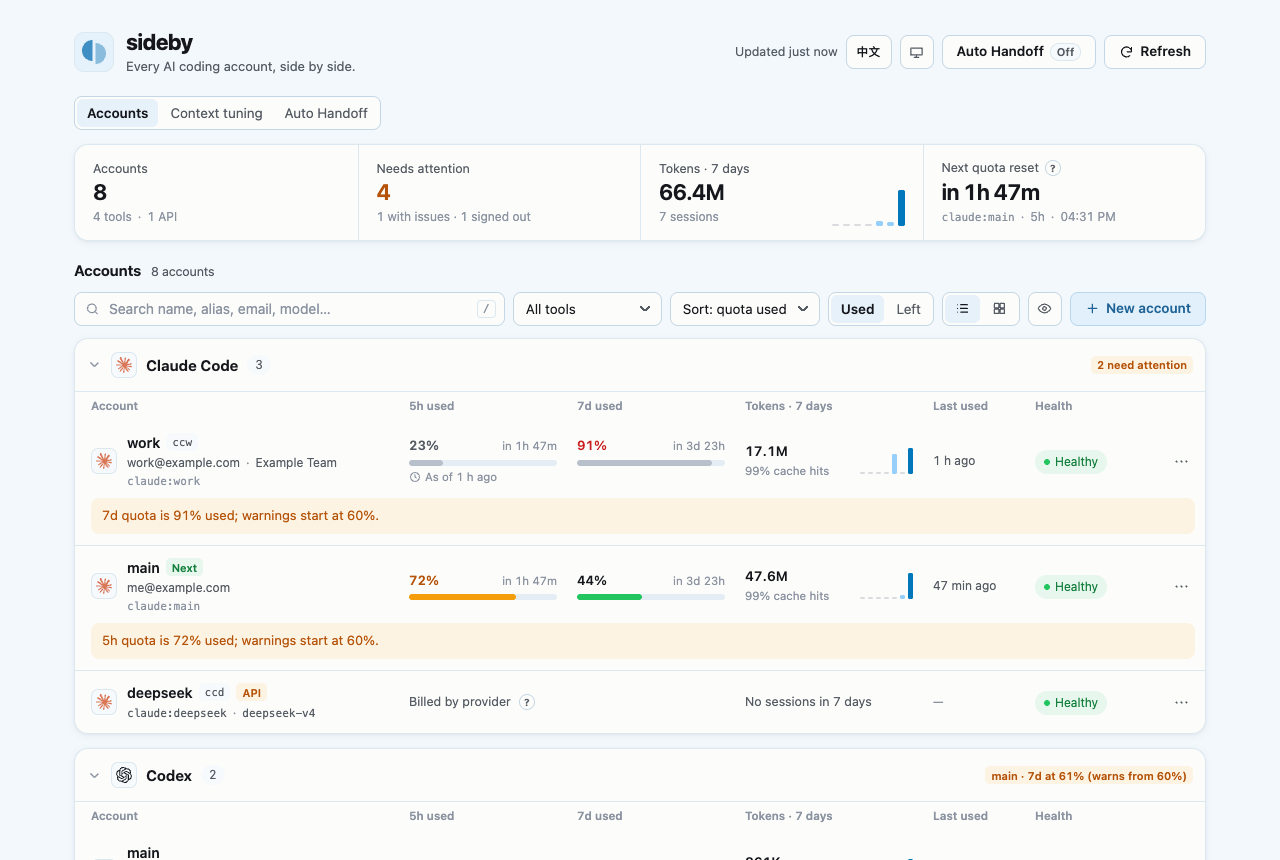
sideby ui                     # every account's quota at http://127.0.0.1:17420
sideby run claude:main keeps using ~/.claude in another terminal at the same time. Arguments after -- go to the Host: sideby run work -- --resume. To try it without installing, run npx sideby.
Paste this into Claude Code, Codex or any coding agent:
Install the sideby CLI (npm package `sideby`) and its agent skill, then set up a second Claude Code account for me.
Follow "Set up sideby for a user" in https://raw.githubusercontent.com/Adonis0123/sideby/main/llms.txt
The agent checks Node and your Host CLIs, installs sideby and the skill, creates the account, tells you what it shares with your main one and makes its short command work. You sign in once in your browser; the agent gives you that one command. Once the skill is installed, short requests work too: "add another Claude account, cc008", "what do my Codex accounts share?", "which account still has quota?".

| You want to | Run | Guide |
|---|---|---|
| Add an API key account (DeepSeek, a gateway, …) | sideby new claude deepseek --api |
API accounts |
| Find and fix config drift between accounts | sideby doctor --fix |
Doctor |
| See Claude quota (Codex needs no setup) | sideby quota setup claude --yes |
Claude quota |
| Find the cheapest auto-compact size from your own sessions, and use it in one click | sideby tune (or the panel's Context tuning tab) |
Context tuning |
| See each account's model and effort, and set them per account | sideby model <account> (or click the model in the panel) |
Model and effort |
| Stop Claude sessions from connecting to claude.ai by themselves (Remote Control), for every account at once | sideby remote-control off (or the panel's banner) |
Remote Control |
| Move on when an account hits its limit | sideby next claude |
Handoff |
| Let a running task move to the next account by itself when quota runs low (off by default; see the risk) | sideby handoff enable (or the panel) |
Auto Handoff |
Short commands such as ccw |
sideby alias add ccw claude:work |
Shell functions |
| Reopen a session from Orca and the like in the account that holds it | "resumeRouting": true in config |
Resuming from other tools |
| Open Claude Desktop or the Codex app as one account, several side by side (macOS) | sideby desktop claude:work (or the panel) |
Desktop apps |
| Open the panel from the Dock or app menu | sideby app install |
Panel app |
| Show the panel inside your own local page | createPanelHandler() |
Embed the panel |
| Add a Host or a pre-launch check | a local plugin | Plugins |
| Host | Account directories | Sign-in | Quota | Usage (7 days) |
|---|---|---|---|---|
| Claude Code | ~/.claude, ~/.claude-<name> |
claude auth login |
✓ after quota setup claude |
✓ |
| Codex CLI | ~/.codex, ~/.codex-<name> |
codex login |
✓ | ✓ |
| Grok Build | ~/.grok, ~/.grok-<name> |
grok login |
no public source | no public source |
| pi | ~/.pi/agent, ~/.pi-<name>/agent |
/login inside pi |
no public source | no public source |
sideby starts the official binary on your PATH and never patches it. Tested versions and per-Host notes are in the guide.
macOS and Linux. CI runs the suite on ubuntu-latest and macos-latest, Node 22 and 24. Windows is untested. sideby app only installs a launcher on macOS and Linux. Linked items are symlinks, sideby shell-init prints bash and zsh functions, and the Claude quota wrapper runs /bin/sh.
Gemini CLI. Gemini can point at another config directory with GEMINI_CONFIG_DIR. Older docs use GEMINI_CLI_HOME; current builds treat that name as deprecated, and exit on startup if it is set together with an exact directory override. A sideby family still needs a tested Gemini version, a login check that does not read tokens, and a list of which files to link or copy. That is more than a small patch, so it is not in this version.
- It never edits a Host's global config to switch accounts. It moves a task to another account only when you turn on Auto Handoff, and never proxies requests or pools logins.
- It never reads, prints or sends a credential value. Nothing leaves your machine: sideby calls no remote service.
doctor --fixnever replaces a real file and never changes where a link points.
Details and the terms-of-service question are in the FAQ.
Usage questions and ideas go in Discussions.
- Using sideby: accounts, API accounts, Doctor, quota, Handoff, Host notes
- Commands: every command, exit codes and
--json - Configuration:
config.json, aliases, shell functions - Panel: the panel, panel app and embedding
- Plugins: write your own Family or launch hook
- FAQ: terms of service, data locations, alternatives, uninstall
- Changelog
llms.txt: setup steps, commands, JSON contract and plugin API in one index.sideby families --jsonstates what each Host's accounts share.skills/sideby/SKILL.md: one Agent Skill for seeing, repairing and creating accounts and for moving on when one hits its limit. Install withnpx skills add Adonis0123/sideby -g;sideby doctorwarns when the installed copy is for another sideby version.AGENTS.md: rules for agents working on this repository.