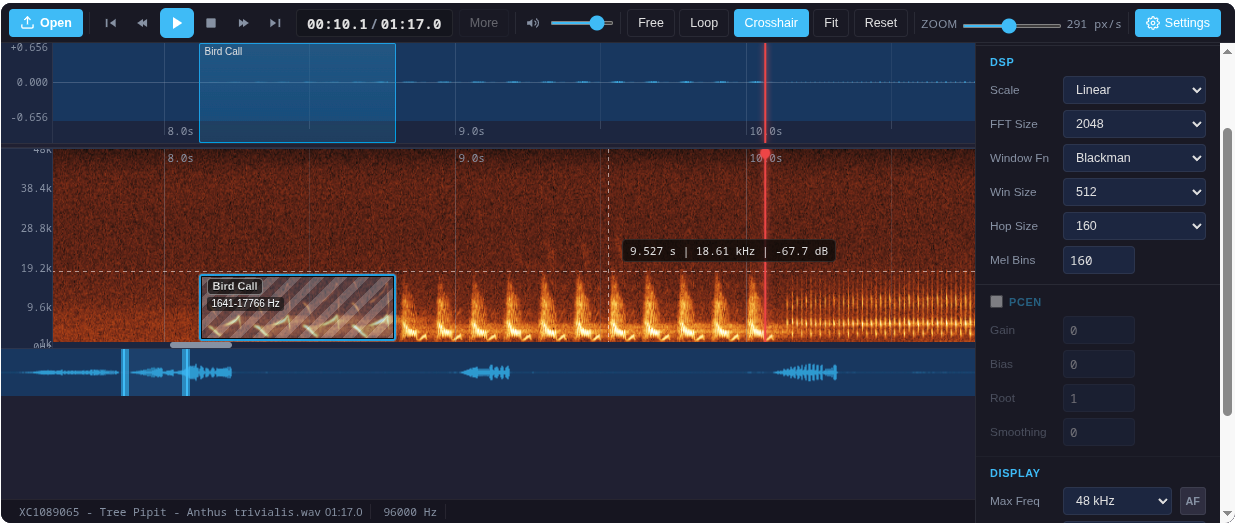


Python package to embed the SignaVis DAW player in Streamlit, Jupyter, Gradio, and any HTML-capable UI. Supports waveform & spectrogram visualization, annotation, and custom player layouts.
Live demo: https://limitlessgreen.github.io/SignaVis/
pip install signavisOptional for demos:
pip install "signavis[streamlit]"
pip install "signavis[gradio]"You can load your own audio file (WAV, MP3, etc.) and display it as a spectrogram or waveform in any supported environment. Just read the file as bytes and pass it to render_daw_player:
Jupyter Notebook:
from signavis import render_daw_player

with open("your_audio.wav", "rb") as f:
    audio_bytes = f.read()

html = render_daw_player(audio_bytes, viewMode="spectrogram")

# Display in Jupyter:
from IPython.display import HTML
HTML(html)
Streamlit:
import streamlit as st
from signavis import render_daw_player
import streamlit.components.v1 as components

uploaded = st.file_uploader("Choose an audio file", type=["wav", "mp3", "ogg", "flac"])
if uploaded is not None:
    html = render_daw_player(uploaded.read(), viewMode="spectrogram")
    components.html(html, height=620, scrolling=False)
You can use all other options as described above to customize the player.
Embed a DAW player for your own audio in Streamlit, Jupyter, or any HTML UI:
from signavis import render_daw_player
html = render_daw_player(
        audio_bytes,  # bytes (WAV/MP3)
        viewMode="spectrogram",   # 'both' | 'waveform' | 'spectrogram'
        transportStyle="hero",    # 'default' | 'hero'
        showOverview=False,        # Hide overview navigator
        showFileOpen=False,        # Hide file open button
        showStatusbar=False,       # Hide status bar
        labelTaxonomy=[{"name": "Species", "color": "#0ea5e9"}],
        # ...any other BirdNETPlayer option
)
Display in Streamlit:
import streamlit.components.v1 as components
components.html(html, height=620, scrolling=False)
Display in Jupyter:
from IPython.display import HTML
HTML(html)| Option | Example | Description |
|---|---|---|
viewMode |
'spectrogram' |
Show only the spectrogram |
transportStyle |
'hero' |
Large centered play button |
showOverview |
False |
Hide overview navigator |
showFileOpen |
False |
Hide file open button |
showStatusbar |
False |
Hide status bar |
labelTaxonomy |
[{'name': 'Species', 'color': '#0ea5e9'}] |
Custom label presets |
iframe_height |
320 |
Set iframe height (default: 620) |
For all options, see the Web API docs.
The package includes several ready-to-use presets (see demo_streamlit.py):
- Full DAW: All controls, waveform & spectrogram, annotation
- Compact: Minimal controls, no overview/statusbar
- Preview Waveform Hero: Large play button, waveform only
- Preview Spectrogram Hero: Large play button, spectrogram only
- Ultra Compact Hero: Smallest possible embed
You can combine or override any option for your use case.
You can inject your own pre-computed spectrogram data or images:
spectrogram_data: 2D numpy array (nFrames × nMels, float32)spectrogram_image: PNG/JPEG bytes, data-URL, matplotlib Figure, PIL Image, or numpy uint8 array
See the Web API for details.
Streamlit:
streamlit run demo_streamlit.pyGradio:
pip install gradio
python demo_gradio.py
Gradio Blocks (native component):
signavis.gradio.SignaVisPlayer is a real Gradio 6 component: the player,
its stylesheet and WaveSurfer are served from this package (works offline),
and the audio is streamed from disk instead of being inlined, so hour-long
recordings stay cheap. Detections are drawn as read-only labels; selecting
one scrolls to and plays it.
import gradio as gr
from signavis.gradio import SignaVisPlayer, player_value

with gr.Blocks() as demo:
    player = SignaVisPlayer()
    gr.Button("Show").click(
        lambda: player_value(
            "bird.wav",
            detections=[{"start": 3, "end": 6, "label": "Turdus merula", "confidence": 0.91}],
            select=(3, 6),  # optional: jump there and play it
        ),
        outputs=player,
    )
Google Colab:

Try the interactive notebook demo directly in your browser—no setup required!
This Python package, including the bundled player assets, is available under
your choice of the MIT License (LICENSE-MIT) or the GNU AGPL-3.0 (LICENSE).
The bundled WaveSurfer.js is BSD-3-Clause (signavis/assets/wavesurfer.LICENSE.txt).